Education
Business
Consumer

Blog

How ViewSonic Solved Ecuador’s Room-to-Room Classroom Projection Problem

SOLUTION BRIEF

How ViewSonic Solved Ecuador’s Room-to-Room Classroom Projection Problem

CHALLENGE

A government education agency in Ecuador needed classroom projection that could keep up with real teachers in real rooms. ViewSonic treated it as a design problem, not a race to the lowest bid.

The agency set out to equip classrooms with projectors across several educational zones covering hundreds of public schools. Conditions varied widely, from the capital to towns with far less infrastructure.

In many of those schools, classrooms outnumbered the available projection units, so teachers moved projectors from room to room during the day. That mobility requirement shaped the entire evaluation.

The specifications also had to guarantee enough brightness and the right resolution for reading, graphics and PDF content in a classroom filled with strong natural light, at a price and delivery schedule a large-scale public procurement could accept.

ViewSonic got involved before the tender even opened, testing equipment directly in these classrooms rather than proposing a spec on paper. The first unit under evaluation was an ultra-portable model, and extended testing showed that daily classroom use demanded more brightness and durability than that device could deliver.

Getting it right took time. The process ran close to a year and a half, partly because ViewSonic kept testing until the recommendation matched how teachers actually worked, and partly because a nationwide government purchase has to stay open to other manufacturers throughout.


SOLUTION

ViewSonic’s approach was to keep testing until the solution actually fit the classroom, not to stop once something met the minimum spec. Over the months before the tender opened, the team ran repeated demonstrations, left loaner units in place and returned to the agency every few months to refine the requirements based on what teachers and administrators saw in daily use.

That process, not a sales pitch, is what led to the ViewSonic® PA503 series over another competing portable unit first under evaluation. At under 2.5 kg the PA503W was still light enough for a teacher to carry between rooms, and it delivered the brightness and durability daily classroom use required.

Testing confirmed 4,000 lumens as the right brightness level and WXGA resolution (1280 x 800) as the best balance of image width and sharpness for reading, spreadsheets and PDF content. Those results informed the technical parameters the agency wrote into its tender.

The final tender set a minimum of 3,800 ANSI lumens. Specifying ANSI lumens matters, because it is the industry-standard measurement rather than the “white and color lumens” marketing metric some manufacturers publish. The PA503W came in above that minimum at 4,000 lumens, and the agency’s own classroom testing showed the difference on text, spreadsheets and PDF content.


“We spent a year and a half testing in real classrooms before we ever priced the deal. That’s what actually won it.”


That preparation paid off when the tender for 2,760 projectors was finally published. The PA503W cleared the technical evaluation without a single gap, a direct result of the months of hands-on classroom work that came before it.

Delivery time was the next hurdle. The agency required the full order within 90 days, and competing manufacturers quoted 120 to 150 days for an order that size.

ViewSonic drew on its global supply chain to close that gap. The team redirected units already moving toward the Americas as part of a broader regional shipment, routed them through the local distribution network in Panama and covered the entire 2,760-unit order in 60 days, well ahead of the deadline.

Price was the last piece, not the deciding one. The commercial team secured pricing approval while the supply chain team locked in the 60-day plan. ViewSonic also worked with display technology partner Texas Instruments™ through its education-sector program, so the final offer reflected the value of everything that came before it.


RESULT

This win came from refusing to shortcut the testing. ViewSonic spent a year and a half in the agency’s actual classrooms and built its recommendation around how teachers use the equipment day to day.

The global logistics network behind that recommendation then delivered on a window no competitor could match. Texas Instruments recognized the project as well and asked to document it as a success story of its own.

The agency has since launched a second purchase phase for 730 additional projectors under the same technical standard, bringing the program total to 3,490 units.


MODEL IMPLEMENTED
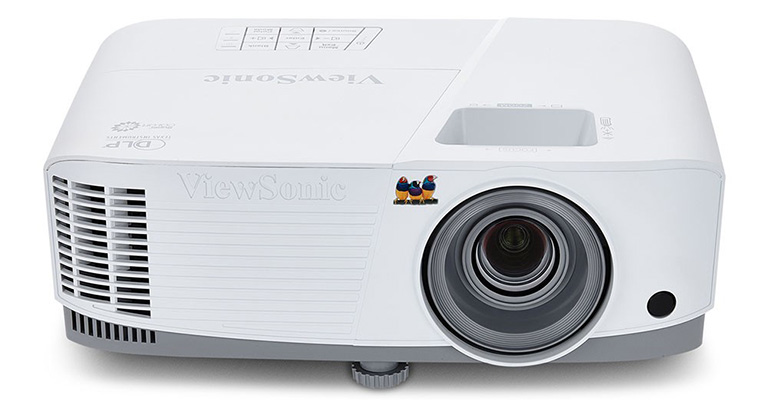
PA503W - ViewSonic 4,000 Lumens WXGA Projector with HDMI and Vertical Keystone

Frequently Asked Questions


How Can a School District Standardize Displays for Both Classrooms and Campus Communications?

A single manufacturer ecosystem can cover both needs: interactive displays for teaching and commercial displays for digital signage, managed from one software platform. This district deployed ViewBoard interactive displays in classrooms and CDE commercial displays in common spaces, managing everything with Manager Advanced software.


What ViewBoard Sizes Work for K-12 Classrooms?

The ViewBoard IFP51 series of interactive displays comes in 65” (IFP6551), 75” (IFP7551) and 86” (IFP8651) sizes, all offering 4K resolution and Android EDLA certification. This district installed 489 ViewBoard interactive displays, standardizing on the 75” IFP7551 while using 65” and 86” models for specific room sizes.


Can School Displays Connect to Emergency Alert Systems?

Yes. Manager Advanced software, ViewBoard interactive displays and the CDE series of commercial displays integrate with emergency systems so urgent safety notices hit every screen instantly.


How Does Centralized Display Management Save a District Money?

ViewSonic Manager Advanced software lets IT admins automate power off schedules when schools are empty, push remote updates and broadcast messages across campus from one console. Automated power management cuts electric bills, while remote admin tools reduce support trips and staff hours.


Ready to Modernize Your District’s Displays?

Talk to a ViewSonic representative or an authorized partner about standardizing classrooms and campus communications on ViewBoard interactive displays, CDE commercial displays and ViewSonic Manager Advanced software.


Training outcomes and participant experiences may vary depending on individual needs, district requirements, and implementation. Performance, security, compliance, and sustainability outcomes may vary depending on system configuration, usage environment, and agency requirements.

Actual performance, security, compliance, sustainability outcomes, and user experience may vary depending on system configuration, usage environment, agency requirements, and other factors. This document contains forward-looking statements that reflect the company’s expectations regarding future events and product offerings. Actual events and product offerings could differ significantly from those referenced herein. Programs, pricing, specifications, and availability are subject to change or cancellation without notice. Corporate names and trademarks mentioned are the property of their respective companies. © 2026, ViewSonic Corporation. All rights reserved. 9/26 [26PRJ-LAT1606]
What Makes a Conference Room Actually Work?

Buyer's Guide  |  Oct 14 2026

What Makes a Conference Room Actually Work?

People collaborate all day, in chat, in shared documents and in threads. Decisions get made in the meeting, and a well-equipped room gets that meeting started quickly and keeps it moving.

With hybrid schedules now standard, a room must work as well for the people dialing in as for the people sitting in it. Time lost to setup gets multiplied by everyone in the room, every time it gets booked, which makes meeting efficiency a productivity question rather than a facilities one.

What decides whether a meeting room works starts with the display on the wall. From there it comes down to how easily people can share to that screen and whether everyone can be seen and heard. The last piece is how well the room fits the systems the building already runs.

Why Do Meetings Take So Long to Start?

Because most conference room technology assumes everyone already knows the system. That worksfor the handful of people who use the room often, and it falls apart for everyone else, which on any given day is most of the people walking into it.

In practice, someone is under the table hunting for the right dongle while someone else clicks through an installer they’ve never seen, and a third person restarts the video call because the wrong input is selected. Then a guest from another company tries to present and none of it works for them at all.

Multiply that across dozens of meetings a day and it adds up to real time. There’s a second cost too, and it’s the one that lasts: people stop booking the room with the bad setup, which puts more pressure on the rooms that work.

How Do You Match the Display to the Room?

Start with how the room gets used in addition to how big it is. Screen size follows from headcount and sightlines, but whether the display needs a touch layer at all depends on what people actually do in that room, and that’s the decision that moves the budget most.

ViewBoard interactive displays suit rooms where people annotate, mark up documents and build on each other’s work directly on the screen. CDE commercial displays cover rooms that only need to present content, which describes most standard conference rooms, and they cost less because they aren’t paying for a touch layer nobody uses. Both run from 43 to 110 inches.

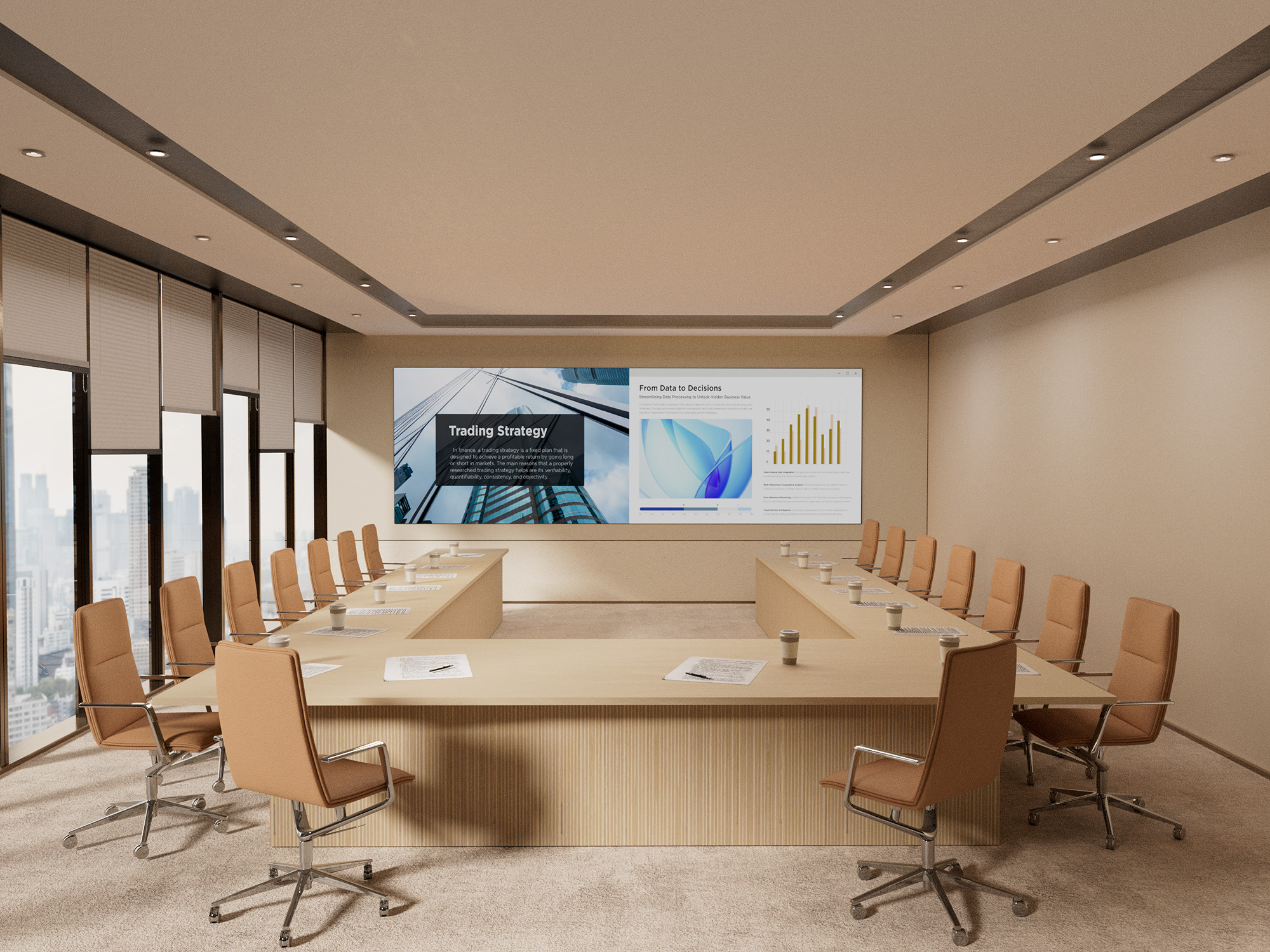
For the largest rooms, All-in-One dvLED delivers one seamless image up to 231 inches, with no bezel lines running through the middle of a slide. That’s what makes it the answer for all-hands spaces and large boardrooms instead of tiling several panels together.

  • Huddle Rooms, Two to Six People: A 55-to-65-inch display puts the screen in comfortable reading range for everyone at the table. Most huddle spaces only present content, so a CDE commercial display covers it without paying for touch.
  • Standard Conference Rooms, Six to Twelve: A 75-to-98-inch display keeps the far end of the table in range. Choose ViewBoard if people mark up documents together, CDE if the room only presents.
  • Boardrooms and Executive Rooms: A large-format display toward the top of the 110-inch range, since these rooms run longer tables and more detailed content than a standard conference room.
  • All-Hands Spaces and Large Boardrooms: All-in-One dvLED, sized to the wall rather than to a standard panel size. A display’s pixel pitch matters more than screen size in these rooms, because the fine pitch a boardroom’s front row needs is different from what a space viewed at 40 feet needs. A useful rule of thumb is that pixel pitch in millimeters times 10 gives the minimum comfortable viewing distance in feet, so a 1.5 mm pixel pitch wall reads well from about 15 feet. ViewSonic large venue solutions covers pitch selection in more detail.

That covers the screen. The rest of the room is about what connects to it.

What Should a Meeting Space Get Right?

The display is the starting point, and three more things decide whether the room works day to day. They cover how people get content onto the screen, whether the people joining remotely can follow along and whether the room cooperates with the systems the building already runs.

  • Getting Content on Screen: How quickly can anyone in the room share, including a guest who has never been in the building before?
  • Being Seen and Heard: Can remote participants see who’s talking and hear the far end of the table, so they can take part rather than just listen?
  • Fitting the Building: Does the room work with the AV control system and scheduling tools already in place?

Get all three working alongside a well-matched display and the room fades into the background, which is what a productive meeting space does. Each one is worth looking at on its own.

How Do You Get Content on Screen Without the Setup Delay?

Take out the two steps that cause most of the delay, which are installing an app and joining a network. Both assume the presenter has permissions, patience and prior experience with the room, and a guest usually has none of the three.

The ViewShare® WPD-900 Wireless Presentation System is a pocket-sized transmitter that plugs into a laptop. Presenting takes seconds, with nothing to install and no network password to track down, because the connection runs peer-to-peer with AES-128 encryption instead of routing through the corporate network.

Some wireless presentation systems still require an app or a Wi-Fi join before anyone can share. That difference shows up the moment a client, a candidate or a new hire needs to present and nobody wants to open a support ticket to make it happen.

The peer-to-peer design matters to IT for a separate reason. A presentation system that never touches the main network is one less endpoint to secure, patch and review. ViewShare also carries USB-C power delivery through the transmitter, so a presenter’s laptop charges while they present, and it supports AirPlay, Miracast and ChromeOS mirroring, which is what makes BYOD work with whatever device someone walks in with.

What Does a Meeting Room Need to Include the People Who Aren’t There?

A camera that finds whoever is speaking and a microphone that reaches the end of the table. Remote participants drop out of a conversation when they can’t tell who’s talking or can’t make out half the room. A good display keeps them watching, and good audio keeps them in the conversation.

  • 4K Conference Camera: The VB-CAM-201 is a 4K conference camera with a 120-degree wide-angle lens, motorized pan and tilt, 5x digital zoom and voice tracking that follows the current speaker. It’s Zoom Certified and includes a four-microphone beamforming array with a 20-foot pickup range.
  • Converse Speakerphone: The ViewSonic Converse (VB-AUD-201) speakerphone adds 360-degree pickup across four omnidirectional microphones with a 20-foot range. It connects over Bluetooth 5.0 or USB-C, and its 6,500mAh battery runs 24 hours of call time, which makes it the option for spaces that aren’t really rooms.
  • Expansion Microphone: The VB-MIC-201 expansion microphone extends pickup to 26 feet and pairs with the VB-CAM-201, covering the end of a long table a single mic array can’t reach.

Buy them together rather than across two budget cycles. Bought as a set they behave as one system, and bought piecemeal they behave like three separate purchases.

Does It Work With the Systems the Building Already Runs?

Usually the room’s system has to fit the building rather than the other way around. Most organizations settled on an AV control platform and a scheduling tool long before this room came up for refresh, and a display that ignores either one becomes a second system somebody has to learn.

ViewSonic displays integrate into the Q-SYS Ecosystem through a Q-SYS Library Verified plugin, and support Crestron, Extron and AMX via IP and RS-232. If the building already runs one of those, the room joins it instead of becoming a separate thing to operate.

Scheduling is the other half of fitting in. The EP1052T-A is a 10.1-inch touch panel that shows room status at the door, handles one-touch join and doubles as a communication display between meetings. A programmable multi-color LED halo shows availability from down the hallway, and the panel installs on a single cable with PoE+. It works with certified scheduling software including EMS, PLANON, Appspace and Pronestor, and supports NFC and RFID badge access for rooms that need it.

Where to Start

Start with the display. Screen size and whether the room needs a touch layer are the decisions that move the budget most, and the rest of the room follows from them.

From there, match the camera and audio to the table, so the people joining remotely can hear the room as clearly as they can see it. Then confirm the room works with the control and scheduling systems the building already runs.

Explore ViewSonic meeting space solutions to see displays, cameras, audio and scheduling panels built to work as one setup.

Frequently Asked Questions

What Is a Wireless Presentation System?

A wireless presentation system lets someone share a laptop or device screen to a conference room display without a cable, usually through a small transmitter or a network connection. ViewSonic’s is the ViewShare WPD-900, which uses a transmitter rather than a network connection.

Does the ViewShare WPD-900 Require an App or a Network Password?

No. It connects through a pocket-sized transmitter using a peer-to-peer AES-128 encrypted link, so there’s no app to install, no network password and no traffic on the corporate network.

How Far Can a Conference Room Microphone Pick Up Voices?

It depends on the device. The VB-CAM-201’s four-microphone beamforming array and the Converse speakerphone both reach about 20 feet, and the VB-MIC-201 expansion microphone extends coverage to 26 feet for longer tables. Measure from the far end of the table rather than from the middle of the room.

Do Meeting Rooms Need Interactive Displays?

Not all of them. Rooms where people annotate and collaborate on the screen together benefit from a ViewBoard interactive display, while rooms that only present content are usually better served by a CDE commercial display at a lower cost. Both ranges span 43 to 110 inches, so the decision is about how the room gets used.

What Does the EP1052T-A Room Scheduling Panel Do?

It displays room availability, supports one-touch join and shows communication content between meetings. It installs over a single PoE+ cable, uses a programmable LED halo to show status at a glance, and works with certified scheduling platforms including EMS, PLANON, Appspace and Pronestor.

Does ViewSonic Meeting Room Equipment Work With Existing AV Control Systems?

Yes. ViewSonic displays integrate into the Q-SYS Ecosystem through a Q-SYS Library Verified plugin and support Crestron, Extron and AMX via IP and RS-232.


Any references to third-party software, control systems, corporate names, or trademarks are for identification and compatibility purposes only and do not imply endorsement, affiliation, or sponsorship by their respective owners.

dvLED vs. Projection: Which Is Right for Your Space?

Buyer's Guide  |  Oct 14 2026

dvLED vs. Projection: Which Is Right for Your Space?

For decades, putting a large image in a lecture hall or an auditorium meant a projector. Direct View LED changed that. Rather than throwing light onto a screen from across the room, a dvLED display is a wall of LED modules that produce the image directly, at sizes that used to be projection’s exclusive territory.

ViewSonic builds both solutions, so this isn’t a case of one technology replacing the other. Projection still does a specific job well, and there are rooms where it remains the better buy.

What decides the answer is the room itself: how much light you can’t control, what happens when the unit needs service, and whether people will be moving around in front of it.

What’s the Real Difference Between dvLED and Projection?

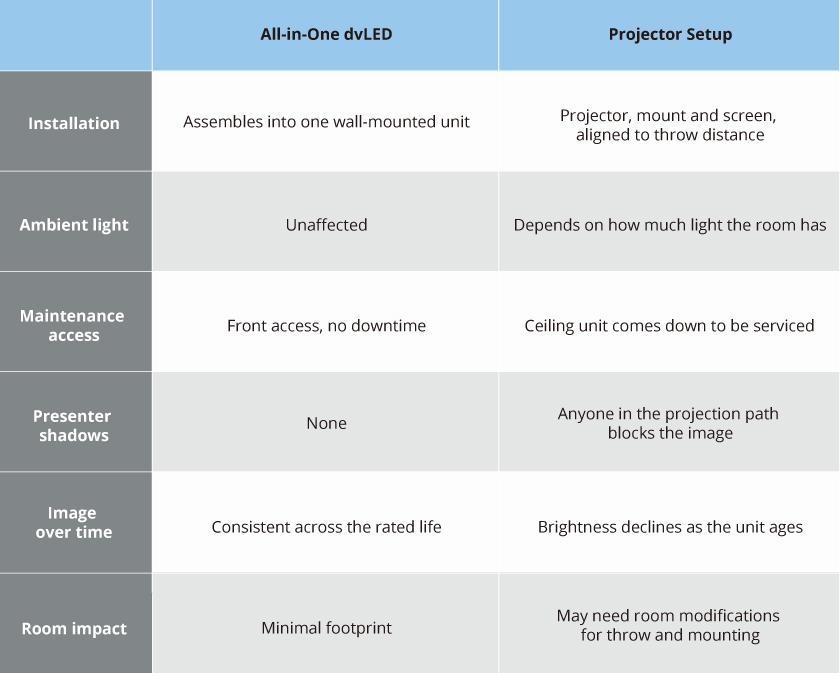
A projector setup has to be designed around the room. Throw distance decides where the unit hangs, the screen has to line up with it, and the ceiling structure has to carry the mount. A dvLED display goes on the wall like any other display, and most of the practical differences between the two follow from that.

What Changes at Install and Service Time?

This is the difference that shows up on a schedule rather than on a spec sheet.

A projector install has to fit the room requirements before it satisfies the audience. Throw distance dictates where the unit hangs, the screen has to be positioned and aligned, and ceiling structure has to support the mount. If the room can’t accommodate that geometry, the layout changes. All-in-One dvLED arrives as a single plug-and-play unit, which cuts installation time and labor cost, and the constraint becomes wall space and power rather than the shape of the room.

Service day is where the gap widens. A ceiling-mounted projector has to be brought down to be worked on, which means a lift, a scheduling window and a room that’s out of service while it happens. dvLED modules are front-serviceable and hot-swappable, so a technician replaces a module from the front of the wall in minutes without taking the room offline.

What Happens When Someone Walks in Front of the Screen?

With a projector, the image travels from the unit to the screen, and anything in that path becomes part of the picture. A presenter who steps the wrong way casts a shadow across their own slide, and so does anyone crossing to a seat.

A dvLED wall produces its image at the surface, so there’s no beam to cross. It’s also large enough that a person standing at it doesn’t obstruct too much. On a 136 or 163-inch video wall, a presenter occupies a fraction of the surface and the content stays readable around them, which means they can work at the display rather than beside it. They also aren’t squinting into a lens while facing the room.

How Much Ambient Light Can Each One Handle?

Think of it as a threshold rather than a verdict.

A high-lumen laser projector handles a room with controlled or moderate light perfectly well. ViewSonic laser installation projectors run 5,000 to 6,000 ANSI lumens and hold a clear image in a lecture hall or a training room with the lights on. If your space is enclosed and you have some control over the lighting, projection is a legitimate answer.

dvLED sits above that threshold entirely. Because it emits its own light rather than reflecting it, ambient light doesn’t factor in at all, which is what lets a dvLED wall cut through daylight in a corporate atrium or an auditorium with glass on two sides. Those are spaces where lighting normally stay at the same level without frequent adjustments.

The question isn’t which one is brighter. It’s how much light is in the room that you can’t do anything about.

When Is Projection Still the Right Choice?

Projection is the right call when the room is dark and stays dark. A dedicated auditorium with a controlled lighting rig already gets a clear image, and dvLED won’t improve on it.

It’s also the right call when you need a very large image and the budget is tight. Projection reaches large sizes for less money up front.

Also, projection is the only choice when the wall can’t take a dvLED array or when a room does not have the structure or the power for it.

If your projector works and your room is dark, keep it.

Where to Start

Start with the light. How much light does the room have that you can’t control? If the answer is a lot, dvLED stops being a preference and becomes the requirement.

Then look at how often the space gets booked and what an hour of downtime costs. The more the room is used, the more the front-service advantage compounds.

Explore ViewSonic large venue solutions to see the All-in-One dvLED range built to command attention with high-impact visuals.

Frequently Asked Questions

Does a dvLED Wall Need a Dark Room?

No. dvLED emits its own light rather than reflecting it off a surface, so ambient light doesn’t wash out the image. That’s the main reason it suits lobbies, atriums and multi-use halls where ambient light is hard to control.

Can a Projector Be Serviced Without Taking the Room Offline?

Usually not. A ceiling-mounted projector has to be unmounted for service, which means a lift, a scheduling window and a room that’s unavailable while the work happens. dvLED modules are front-serviceable and hot-swappable, so a technician works from the front of the wall without the room becoming unavailable.

What’s Included in an All-in-One dvLED Display?

Cabinets, power, processing and mounting arrive pre-integrated as one system, rather than being specified and assembled from separate components on site.

How Long Does a dvLED Display Last?

ViewSonic dvLED is rated for roughly 100,000 hours of LED life, which means far fewer replacements. The warranty covers three years standard, and is extendable to five years.

All-in-One vs. Component-Based dvLED: What’s the Difference?

Buyer's Guide  |  Oct 14 2026

All-in-One vs. Component-Based dvLED: What’s the Difference?

A Direct View LED (dvLED) display is built from LED modules that tile together into one large image. There are two ways to get one, and what separates them is cost, time and risk.

The traditional approach is component-based. The display cabinets, the processing unit, the power distribution and the control system are separate products that have to be designed, purchased and integrated together. It works well for large-scale custom installations.

The modern approach is All-in-One, where all the separate components are built into a single unit. You specify the display, you receive a complete system, and you install it. For most enterprise buyers and AV integrators, that’s the right starting point.

What Goes Into a Component-Based dvLED Build?

The cabinets, the processor, the power distribution and the control system are separate purchases, each sourced and integrated by whoever is building the system.

The cabinets come from one place and the video processor from another. Power distribution has to be designed for the array. Then the modules have to be stitched into a single image, which means stitching software licensed, configured and color-calibrated on site.

Integrators do this well, and for a genuinely custom installation it’s the right approach. Compared to All-in-One dvLED, what adds to each traditional project is cost, time and risk. Every one of those decisions belongs to somebody, and each additional vendor is a delivery date you don’t control.

What Does All-in-One Change?

Processing, power and mounting are built in, so there’s no separate media player or control box to source. Image stitching is software-free and factory-calibrated, which means tiles of the wall arrive already matched instead of needing to be color-tuned in the room.

A pre-configured All-in-One display is a single part number. Even a made-to-order configurable one runs two to three, against the dozens of separate components a component-based build requires. That difference is how the project is quoted, how long it takes the project to finalize, and how many delivery dates need to be scheduled.

Control system compatibility comes with the display too. Every ViewSonic dvLED series supports Q-SYS Library Verified plugins plus Crestron, Extron and AMX over IP and RS-232. On a component-based build that’s a separate question, because the control system has to talk to whichever processor was specified, and confirming it is somebody’s job before the room goes live.

Which Factors Decide Between Component-Based and All-in-One?

Both approaches can put a working wall on the site. The differences show up after the sale, in who owns the design, who services the wall and how many suppliers have to deliver on time.

  • Design Ownership: If the finished wall does not fit the space or the content, who is ultimately responsible for the result? A component-based build involves multiple vendors, so the answer depends on which part of the system is at fault, and sorting that out takes time. With an All-in-One display, one manufacturer owns the design and the outcome.
  • Stitching and Calibration: Is the image matched at the factory or configured on site? A component-based build is stitched and color-matched in the room after installation, and that work has to be repeated whenever modules are replaced. ViewSonic All-in-One dvLED arrives factory-calibrated, so a replacement tile matches the wall without a recalibration pass.
  • Service Without the Integrator: When a module fails in year three, can your facilities team handle it, or does the original integrator have to come back? On a component build, service routes back through whoever specified and calibrated the system. ViewSonic tiles are front-serviceable and hot-swappable, and every system ships with calibrated spare tiles equal to 5% of the tile count, so an in-house team can make the swap.
  • Vendors in the Quote: How many companies have to deliver on schedule for the wall to open on time? A component-based build coordinates cabinets, processing, power distribution and control across separate suppliers, and each one is a delivery date you do not control. A pre-configured All-in-One display is a single part number from a single manufacturer.

Where to Start

For most rooms, All-in-One is the answer. It reduces project complexity, shortens the timeline and makes the system easier to quote, approve and deploy at scale.

Component-based still has a place in large-scale custom installations when no All-in-One display, pre-configured or configurable, meets the requirement. Outside of that, it adds cost, time and risk without adding benefits.

Once you’ve decided on All-in-One, the next question is which ViewSonic series fits, which comes down to whether a standard size serves your space. Our guide to pre-configured versus configurable dvLED walks through that decision.

Explore ViewSonic large venue solutions to see the All-in-One dvLED range built to command attention with high-impact visuals.

Frequently Asked Questions

What Does All-in-One dvLED Mean?

All-in-One dvLED means the processing, power and mounting are integrated into a single unit, rather than being specified, purchased and assembled from separate components on site. There’s no separate media player or control box to source.

What Is Image Stitching, and Why Does Factory Calibration Matter?

Stitching combines multiple LED modules into one continuous image. On a component-based build it’s configured and color-matched on site, which takes time and has to be redone when modules are replaced. ViewSonic All-in-One dvLED uses software-free stitching that’s calibrated at the factory.

Does All-in-One dvLED Still Need a System Integrator?

Not for the system design, since the display arrives as a complete unit. You’ll still want a qualified installer for the physical mount and the electrical work, and ViewSonic’s U.S.-based Solutions Engineers provide pre-sales site assessment at no additional cost. AV integrators can also earn a ViewSonic dvLED Installation Certification through a two-day training program at the Brea, California headquarters.

When Does a Component-Based Build Still Make Sense?

A component-based build makes sense for large-scale custom installations when no All-in-One display, pre-configured or configurable, meets the requirement. For nearly every other project it adds cost, time and risk without adding capability, which is why All-in-One is the starting point for most enterprise deployments.


Proper wall suitability, reinforcement, and professional installation are the sole responsibility of the customer, installer, or system integrator. ViewSonic assumes no liability for any equipment damage, property damage, or personal injury resulting from incorrect installation. Any references to third-party software, control systems, corporate names, or trademarks are for identification and compatibility purposes only and do not imply endorsement, affiliation, or sponsorship by their respective owners.

How Do You Build a Connected Campus Display System?

Buyer's Guide  |  Oct 14 2026

How Do You Build a Connected Campus Display System?

Getting one message onto every screen across a campus should take minutes. On most campuses it takes several logins, more than one vendor and a chunk of somebody’s week.

The screens themselves are usually fine. What’s missing is one place to manage them from, and that gap costs more time than any hardware decision on the campus.

What Kinds of Displays Does a Campus Use?

Before comparing management platforms, it helps to know what you’re managing. Most corporate campuses run four kinds of display, and they don’t all have the same job.

  • Commercial Signage Displays: These cover hallways, break areas and departmental communication. They’re the highest-volume category on most campuses, and they run the longest hours.
  • LED Video Walls: These go in lobbies and atriums, where you want to show impressive images, and there’s too much daylight for a standard display to compete.
  • Interactive Kiosks: These sit at entrances and busy hubs, so visitors and new hires can look up a directory instead of asking at the front desk.
  • Interactive Flat Panels: These belong in meeting rooms and training spaces, where people collaborate on the screen rather than just read it.

Most campuses have all four. Whether they can be run from one platform is what decides how much day-to-day work they create.

Why Do Campus Displays End Up Fragmented?

Because nobody buys them all at once.

A lobby video wall goes in during a renovation. Wayfinding kiosks show up the next year, usually from a different vendor with different software. A building changes tenants and directory screens appear. Three years on, IT has four logins and a spreadsheet tracking which screen belongs to which platform.

Each of those purchases made sense on its own. None of them accounted for the others, and the cost of that doesn’t surface until someone needs to push an emergency alert to every screen at once, or update wayfinding across six buildings before a new tenant moves in Monday. By then what it costs is staff hours, not equipment.

What Should IT Look for in Campus Display Management Software?

Most campuses choose displays based on size, brightness and resolution. The management software matters just as much. Without it, updating a display or putting a message on it means sending someone to that building.

Here’s what to ask about the software:

  • Coverage: Can one login manage every display type, or only one category? Ask for that answer model by model rather than brand by brand, since management support often varies by generation within the same product line. Signage, lobby displays and interactive kiosks on separate platforms leaves you with the same fragmentation, just spread across more logins.
  • Automation: Does the platform handle scheduled tasks across multiple buildings, or does every change need a person?
  • Emergency Broadcast: Can the platform receive alerts from the notification system the campus already runs, and is that integration included? Most campuses already hold a contract for a CAP service. What to watch for is a display vendor that charges again on its own side, or one that expects you to run a separate alerting platform just for the screens.
  • Control System Fit: Does the platform work with the AV control systems already installed, or does it expect to become the new control layer?

Ask them in that order, because the first one rules out the most vendors.

Can Campus Displays Handle Emergency Alerts?

Yes, and facilities and security teams increasingly expect it as a baseline.

Urgent Alert Broadcast is included in both ViewSonic Manager and Manager Advanced, so emergency messaging isn’t gated behind the subscription. It works through ViewSonic and third-party CAP messaging integrations, which means alerts can come from the emergency notification system a campus already runs.

That last part matters most in practice, because during an actual incident nobody should be logging into a second system to send a message.

Does Campus Signage Work With Existing AV Control Systems?

Most campuses have an AV control system in place long before they add displays, so the display has to fit the infrastructure rather than the other way around.

ViewSonic displays integrate into the Q-SYS Ecosystem through a Q-SYS Library Verified plugin, and support Crestron, Extron and AMX control via IP and RS-232. An OpenAPI is shared across the ViewSonic dvLED, commercial display and interactive flat panel lines, so a control system built for one product family doesn’t need rework when another gets added.

The upshot is that new displays connect to what IT already runs, with no parallel control layer and nothing to rip out.

Which ViewSonic Displays Belong in Which Campus Spaces?

Building one connected campus means matching display types to what each space actually needs.

  • Lobbies and Atriums: These spaces need a large-format ViewSonic commercial display or an All-in-One dvLED wall, because ambient light is hard to control here and dvLED holds its image where a standard display washes out.
  • Hallways and Shared Areas: Put ViewSonic CDE series signage displays here, rated for 24/7 operation at 500 nits with anti-glare. Hallway screens run more hours than anything else on campus, so continuous-duty rating matters more than image size.
  • Entrances and Busy Hubs: ViewSonic interactive ePoster kiosks let visitors and new hires search a directory themselves, which takes load off the reception desk.
  • Meeting Rooms and Training Spaces: ViewSonic ViewBoard interactive flat panels from 43 to 110 inches fit these rooms, since collaboration matters more here than broadcast, and touch response and wireless presentation matter more than brightness. ViewSonic meeting space solutions covers sizing and room setup in detail.
  • Auditoriums and All-Hands Spaces: ViewSonic All-in-One dvLED comes in pre-configured sizes from 108 to 231 inches for these rooms, where image size is the priority rather than interactivity. See ViewSonic large venue solutions for sizing guidance.

Mixing display types across a campus is normal, since every space has different requirements. Mixing management platforms is what creates avoidable work, and that’s the part worth sorting out before the next purchase order.

What This Means for Your Next Purchase

Campuses will always add screens at different times, in different renovations, for different reasons. That’s normal and it isn’t going to change.

What makes it manageable is deciding up front how everything gets managed. For some organizations that layer is ViewSonic Manager. For others it’s the Crestron, Extron, Q-SYS or AMX control system already running the buildings, and ViewSonic displays work with those too.

Either way, buying displays from one vendor pays off the same way. One portfolio covers lobbies, hallways, entrances, meeting rooms and auditoriums, which means one support relationship, one firmware path and one integration effort instead of four. Standardizing a management layer is a lot easier when the hardware underneath already speaks the same language.

Explore ViewSonic campus solutions to see how lobby displays, signage and wayfinding kiosks run as one system.

Frequently Asked Questions

What Is Campus Display Management Software?

Campus display management software is a platform that lets IT control every screen across a campus, including lobby displays, digital signage and wayfinding kiosks, from one central dashboard instead of managing each system separately.

Which ViewSonic Displays Enroll in ViewSonic Manager?

CDE series commercial displays, ViewBoard interactive flat panel, and interactive ePoster kiosks enroll in Manager, as do the LDS, LDM, LDP and LDC dvLED series. Three exceptions are worth catching during specification: the CDEG3 series and the IFPG1 series are OS-free by design, and the LDE dvLED series runs a simplified operating system without Manager support.

Is ViewSonic Manager Free?

Yes. ViewSonic Manager is a free browser-based console with no software to install and no server to stand up. It covers device monitoring, batch enrollment, firmware updates and Urgent Alert Broadcast.

What’s the Difference Between ViewSonic Manager and Manager Advanced?

Manager Advanced is a paid tier that adds automation. It includes Task Scheduling for one-off or recurring device actions like screen on and off, power off and media broadcast, plus zoned multimedia broadcast for sending different content to different groups of screens, and remote desktop support for fixing a display without visiting it.

Can Emergency Alerts Be Sent From a System We Already Use?

Yes. Urgent Alert Broadcast works with ViewSonic and third-party CAP messaging integrations, so alerts can come from the emergency notification platform a campus already runs. Staff don’t need to log into a separate display console during an incident.

What AV Control Systems Does ViewSonic Integrate With?

ViewSonic displays integrate into the Q-SYS Ecosystem through a Q-SYS Library Verified plugin and support Crestron, Extron and AMX via IP and RS-232, with a shared OpenAPI across the dvLED, commercial display and interactive flat panel lines.


Performance, security, compliance, and emergency notification outcomes may vary depending on system configuration, usage environment, and agency requirements. Proper wall suitability, reinforcement, and professional installation are the sole responsibility of the customer, installer, or system integrator. ViewSonic assumes no liability for any equipment damage, property damage, or personal injury resulting from incorrect installation. Any references to third-party software, control systems, corporate names, or trademarks are for identification and compatibility purposes only and do not imply endorsement, affiliation, or sponsorship by their respective owners.

How Do You Spec a dvLED Display for a Large Venue?

Buyer's Guide  |  Oct 14 2026

How Do You Spec a dvLED Display for a Large Venue?

How Do You Spec a dvLED Display for a Large Venue?

Auditoriums, lobbies, atriums and event halls are where Direct View LED (dvLED) displays do their best work, and they’re also where a specification mistake gets expensive.

Specifying one starts with the room rather than the product. Measure from the display wall to your closest viewer and divide that distance by 10, and you have the pixel pitch the room calls for. Measure the wall and the sightlines, and you have the screen size it will carry. Take both figures to facilities and confirm the structure, the electrical supply and the freight access can support them.

That order matters, because the price of a dvLED display for a large venue often comes down to size and pixel pitch. Screen size is usually dictated by room size. With pixel pitch, overspend and you may be paying for detail nobody can see from their seat. Underspend and the front row may see individual LEDs.

None of it requires a vendor. A tape measure and a conversation with facilities gets you to a specification accurate enough to quote against, and the sections below show how each figure is derived.

Use the 10x rule. Pixel pitch in millimeters times 10 gives the approximate optimized viewing distance in feet, so a 1.5 mm display looks right from about 15 feet and a 1.8 mm from about 18 feet.

Run the rule in reverse to spec a display for a specific room. Measure from the display wall to your closest viewer and divide by 10, and that gives you the largest pixel pitch that will still look sharp from that distance. In a large venue the closest viewer usually isn’t the person you designed for, since someone will always walk right up to a lobby wall.

The 10x rule gives you a starting point rather than a final specification. What the room shows, how bright it is and how long the display has to stay current all move the starting point, and not always in the same direction:

  • Diminishing Returns: Tighter pitch costs more, but past a certain distance the extra detail is too fine for anyone to see. If your closest viewer is 20 feet from the display, the 10x rule puts a 2.0 mm pixel pitch right at that distance, which means it already delivers sufficient detail for that room. A 1.2 mm display at the same size costs substantially more and looks no different from 20 feet.
  • Content Type: High-resolution video and detailed data visualization reward tighter pitch. General presentations and digital signage can perform well at looser pitch.
  • Ambient Light: In bright rooms, ambient light reduces perceived resolution and brightness matters more than pixel pitch. Every ViewSonic dvLED model delivers 600 nits at a 6,500:1 contrast ratio, or 10,000:1 on the Chip-on-Board LDP Series.
  • Margin for Change: Rated at approximately 100,000 hours, a dvLED wall stays in service well over a decade, long after the room around it changes. Seating plans get rearranged, queue lines form in front of lobby walls, and content that starts as brand video often becomes dashboards and wayfinding. When the budget allows it, specifying one step tighter than your current minimum keeps the display usable if the closest viewer ends up nearer than you planned.

Does the Room Need 4K, or Is 1080p Enough?

On a dvLED wall, pitch and resolution are linked by size. Divide the width of the wall by the pixel pitch and you get the pixel count across it, so a tighter pitch on the same wall produces a higher resolution. What separates them is the question each one answers. Pitch determines how close a viewer can stand before the individual LEDs become visible. Resolution determines how much content the display can show legibly at one time.

The ViewSonic LDS, LDE and LDM Series are 1080p. The LDP Series is 4K. For presentations, video and digital signage, 1080p across a large format is sufficient. For spreadsheets, CAD, GIS, dashboards or any content where small text and fine lines have to stay readable, specify 4K. A boardroom reviewing financial models needs a different display than a lobby playing brand video, even at the same size.

Check source count while you’re there. Most ViewSonic dvLED series provide four video inputs with picture-by-picture and picture-in-picture support. The LDE Series provides two inputs without either, which matters if the room needs to show two sources side by side.

What Should You Confirm About the Room Before You Buy?

These are the room details that keep a large venue project on schedule, and every one of them can be confirmed before you issue an RFQ.

  • Wall Structural Load: Confirm the wall can carry the system weight.
  • Power Availability: Confirm circuit amperage and how close the supply sits to the install location.
  • Mounting Depth and Clearance: ViewSonic All-in-One dvLED mounts at approximately 2.7 inchesdeep. Confirm clearance against any protrusion limits that apply in circulation paths.
  • Conduit and Cable Routing: Map the paths before install day rather than during it.
  • Ceiling Height and Access: Installation equipment needs room to work.
  • HVAC and Ambient Heat: Confirm heat management near the display.

One thing worth checking early for an upper-floor install: a 100-inch-plus LCD display often won’t fit a standard elevator, which rules it out above the ground floor. dvLED arrives in crates and assembles in the room, so its display size is not limited by the logistics of the building.

Who Handles the Installation?

A qualified installer or AV integrator does the physical work, and ViewSonic supports the project on both ends of it. dvLED installation is more involved than mounting a flat panel, so confirm what your vendor includes while you’re still building the budget. A clear scope up front keeps the numbers accurate and the schedule realistic.

ViewSonic’s U.S.-based Solutions Engineers provide pre-sales site assessment at no additional cost and can validate wall structure, power and layout before you commit to a purchase. On-site installation supervision is also included at no additional cost, covering pre-installation site validation, supervision during the install itself and post-installation commissioning support.

How much site work the job takes depends on how the display mounts. ViewSonic dvLED supports wall, floor-standing and ceiling-mount configurations depending on the series and the environment. The Mobile LDS Series requires no fixed mounting, no conduit and no structural work at all, which removes most of the installation question for rooms that need to move the display.

AV integrators who want the expertise in-house can earn a ViewSonic dvLED Installation Certification through a two-day hands-on training program at the Brea, California headquarters and in select U.S. cities. Certification carries CTS renewal units and prepares installers to deploy ViewSonic systems with first-install efficiency.

Where to Start

Measure from the display wall to your closest viewer before you shop for sizes, because that distance determines the pixel pitch, and pixel pitch drives the budget. Then check with facilities to confirm the wall can carry the display.

Explore ViewSonic large venue solutions to see the All-in-One dvLED range built to command attention with high-impact visuals.

Frequently Asked Questions

What Is Pixel Pitch?

Pixel pitch is the distance in millimeters between the centers of two adjacent LED pixels. It determines how close a viewer can stand before individual LEDs become visible, which makes it a major factor in both image quality and cost.

How Do You Calculate the Right Pixel Pitch for a Room?

Use the 10x rule. Pixel pitch in millimeters times 10 gives the approximate optimized viewing distance in feet. Run it in reverse to spec a display: measure to your closest viewer and divide by 10 for the coarsest pitch that will work.

Does a Large Venue dvLED Display Need to Be 4K?

It depends on the content rather than the size. Presentations, video and digital signage read well at 1080p across a large format. Spreadsheets, CAD, GIS and dashboards need 4K, which on ViewSonic dvLED means the LDP Series.

What Should You Check Before Installing a dvLED Display?

Confirm the wall’s structural load capacity, the amperage of the power circuit and how close the supply runs to the install location. Then check mounting depth against any protrusion limits that apply in circulation paths, map the conduit and cable routing, confirm the ceiling height where installation equipment has to work and confirm heat management around the display. Having these answers before you issue an RFQ keeps the project on schedule and removes the most common reasons a dvLED install gets redesigned. ViewSonic Solutions Engineers validate the full list during a pre-sales site assessment at no additional cost.

Does ViewSonic Provide Installation Support?

Yes. ViewSonic’s U.S.-based Solutions Engineers handle pre-sales site assessment at no additional cost, and installation supervision is also included. AV integrators can earn a ViewSonic dvLED Installation.


Proper wall suitability, reinforcement, and professional installation are the sole responsibility of the customer, installer, or system integrator. ViewSonic assumes no liability for any equipment damage, property damage, or personal injury resulting from incorrect installation. Any references to third-party software, control systems, corporate names, or trademarks are for identification and compatibility purposes only and do not imply endorsement, affiliation, or sponsorship by their respective owners.

Higher Education Hybrid Classroom Gets Transformative Upgrade with ViewSonic® dvLED Displays and More

CASE STUDY

Higher Education Hybrid Classroom Gets Transformative Upgrade with ViewSonic® dvLED Displays and More

CUSTOMER

Founded in 1887, NC State University is a public land grant university in Raleigh, NC. The largest university in the Carolinas, NC State has a total enrollment of over 36,000 students and is known for its leading programs in science, technology, engineering and math. Also a leader in agriculture, education, textiles, business and natural resources, NC State is at the forefront of teaching and research in design, the humanities and the social sciences.

CHALLENGE

Sample Image
  • Replace a dual-projector hybrid classroom with a video wall that serves in-person and remote students equally, and that IT can monitor and maintain without disruption.

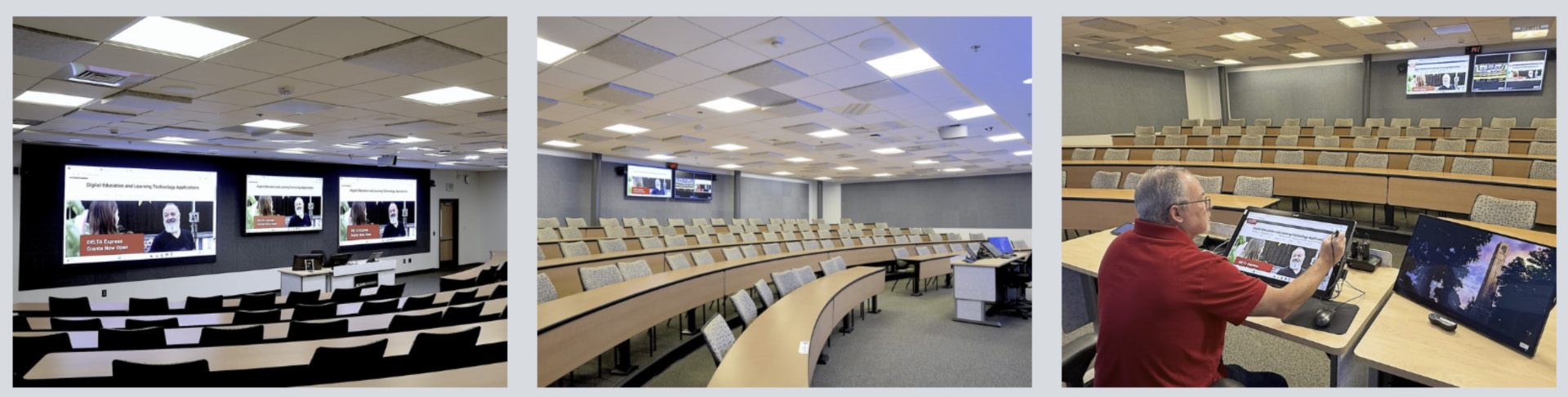
A recognized leader in STEM higher education, NC State is likewise dedicated to being at the forefront of classroom technology. To facilitate efficient use of technology resources, the university offers instructors a variety of classroom configurations to meet their edtech needs. At the pinnacle of these options are the university’s DELTA (Digital Education & Learning Technology Applications) classrooms. Equipped to simultaneously deliver seamless instruction to inperson and remote students, these rooms are live-monitored by DELTA staff to prevent tech-related disruption.

One such classroom in NC State’s Park Shops building was due for a major technology update. The existing setup relied on two ceiling-mounted projectors, which cast content onto dual wall screens. It was time to upgrade to technology that would support the range of modern learning options and instructional modalities: a state-of-the-art video wall that would deliver bright, consistently sharp visuals for every student. Importantly, the solution needed to seamlessly deliver content to in-person and distance learners, while creating an environment that connected those audiences and provided intuitive control for the instructor.


“It’s truly been an amazing transformation and we’re extremely happy with the ViewSonic displays.”

— Tim Hinds, A/V and Network Infrastructure Manager, NC State University DELTA


“A majority of DELTA-supported classes incorporate a Zoom call for students who aren’t able to make it to class or choose the distance learning option,” said Tim Hinds, A/V and Network Infrastructure Manager for Digital Media Support Services Engineering (DMSSE) and DELTA.

“Additionally, most classes also offer asynchronous learning, so in our classrooms everything we do is redundant because it’s critical that lectures are recorded and uploaded – all while providing a smooth live experience for distance and in-room learners.”

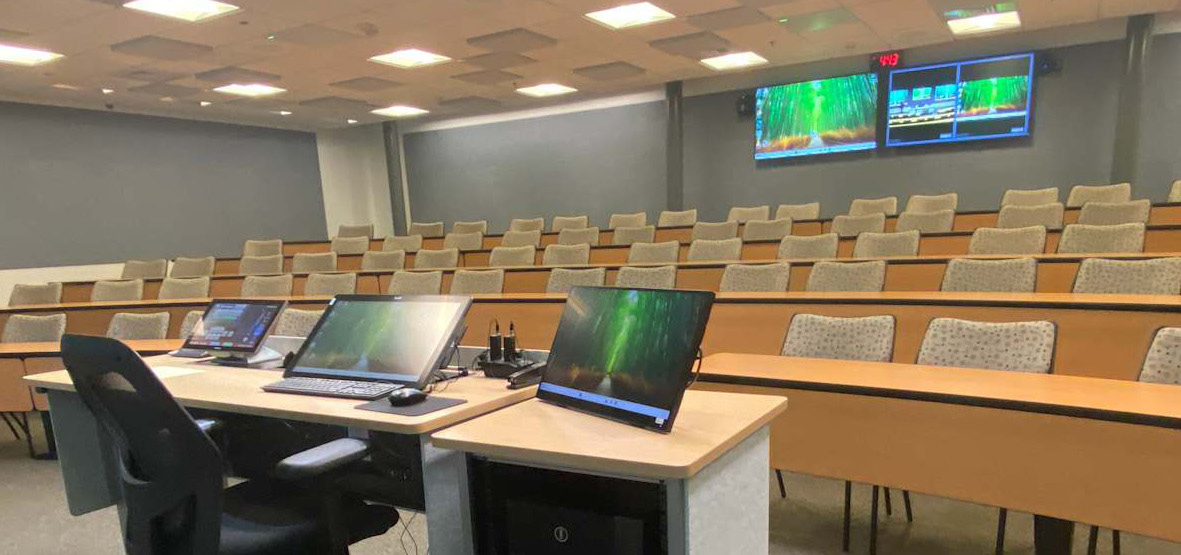
Several types of displays would be needed to support these goals: large, vibrant front-of-room displays for on-site learners; displays to bring Zoom participants into the room; confidence displays for the instructor at the back of the room; and a desktop smart display at the instructor podium. All of which would be maintained and monitored in real time by DELTA team members.

SOLUTION

Sample Image
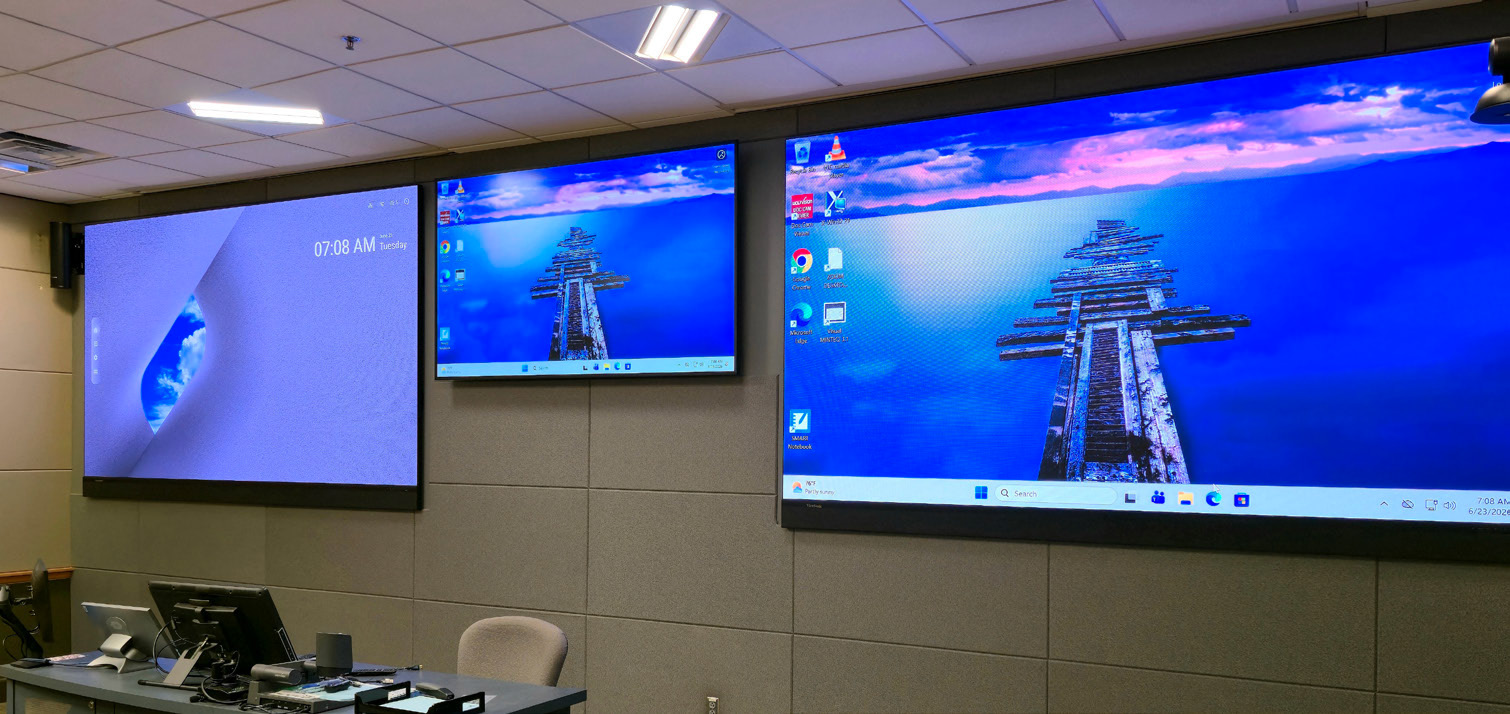
  • 136” All-in-One Direct View LED Video Walls (LDM136-151)
  • 98” Commercial 4K Display (CDE9830)
  • 65” Commercial Displays, rear-wall confidence monitors (CDE6530)
  • 24” Touch Display at the instructor podium (myPodium™ ID2456-4K)

To accomplish these goals, Hinds worked with longtime reseller partner ClarkPowell, which recommended ViewSonic for the display component of the installation.

“I looked into the ViewSonic products they suggested and was happy with those recommendations,” said Hinds. “I particularly liked that the ViewSonic dvLED had the Glue-on-Board surface, which adds durability. The boards in the front of the classroom are low enough that they could easily be bumped by backpacks or elbows, so this durability was very appealing.” Additionally, Hinds mentioned that the specs overall added up to a great product, and that he appreciated that the ability to replace individual panels would streamline maintenance.

The final front-of-room solution included two 136-inch ViewSonic All-in-One Direct View LED (dvLED) Video Walls (Model LDM136-151), which would present class content, complemented by a ViewSonic 98-inch Commercial Grade 4K Display (Model CDE9830-2) to integrate Zoom participants. Two ViewSonic 65-inch Commercial Displays (Model CDE6530) would be mounted to the back wall for instructor visibility: one to mirror the instructional content; one to display Zoom participants. Finally, the instructor podium would be equipped with a ViewSonic 24-inch Touch Monitor (Model ID2456-4K) that would enable faculty to intuitively deliver content and connect with students using integrated ViewSonic software. To ensure seamless operation, the ClarkPowell team would integrate the ViewSonic displays into the DELTA classroom’s existing Crestron matrix switcher.

RESULTS

Sample Image
  • Removed projector glare from the instructor sightline

  • Unified in-person and Zoom instruction on one front-of-room system
  • Reduced maintenance to individual panel swaps
  • Improved recorded image quality for asynchronous learners
  • Established a repeatable model for future classroom refreshes

The DELTA team was more than satisfied with the service and support from the ClarkPowell team, which was professional and detailed from start to finish. Today, NC State’s Park Shops DELTA classroom is a cutting-edge digital learning environment, with integrated technology that seamlessly blends in-person and remote experiences.

“It’s truly been an amazing transformation and we’re extremely happy with the ViewSonic displays,” said Hinds. “It’s such a big improvement over the projector system. The professors don’t have to worry about lights shining in their eyes and the in-person and Zoom learners are visually well-integrated.”

What’s more, added Hinds, the brightness of the dvLED displays has provided outstanding images for the class recordings – a critical component of serving the needs of distance learners.

“These video walls deliver bright, clear images, and they’re highly visible in all lighting conditions,” said Hinds. “When we record content for distance education, we can’t dim the lights, or the students wouldn’t be able to see the professor. With the ViewSonic dvLED walls that’s not a problem at all. Not only is it better for students, our team doesn’t have to worry about issues related to lighting and visibility.”

The NC State DELTA team has received positive feedback from a variety of stakeholders, along with visitors from other universities.

“We’ve received many comments about how great the new displays look,” said Hinds. “And we’ve also had IT people from other universities come look at them. Everyone who has seen the setup has loved it and given us positive feedback.”

In fact, Hinds reflected, a visiting IT specialist mentioned that one of their university’s classrooms had a dvLED board that lacked the glue-on LED surface treatment.

“They were unhappy with the product because it created issues and added maintenance, because students do bump into it,” said Hinds. “This was great reinforcement for my initial impression of the ViewSonic dvLED durability.”

Likewise, faculty and other instructors have been overwhelmingly pleased with the upgrade.

“The confidence monitors in the back of the room allow presenters to easily confirm that their content is looking as it should on the front screens and provides an interface with the students joining on Zoom,” said Hinds. “

These displays alert the instructor if there’s a problem with either feed and they offer great reassurance when they can see our team in the central control room quickly resolve issues.”

As noted on the university’s DELTA website, the ultimate goal of DELTA classrooms is to empower faculty to deliver modern, high-impact instruction to a range of students, using a variety of modalities, without the burden of technical barriers. In these spaces, the range of edtech allows faculty to focus on teaching, not troubleshooting. The Park Shops classroom upgrade has achieved just that, with bright and durable ViewSonic dvLED walls, Commercial Displays, and Touch Display shining as the foundational visual technology.

“We’re extremely happy with our ViewSonic display set up,” concluded Hinds. “I’m planning to use those same ViewSonic products in another room we are working on.”

Institutional requirements, compatibility, and user experience may vary depending on system configuration and environment. Third-party corporate names, logos, and trademarks stated herein belong to their respective owners and do not imply endorsement or affiliation. 10/26 [26ALL-EDU1603a]

ViewSonic Mobile and Foldable 138-Inch All-in-One dvLED Transforms Graduation and Beyond at Rural School District

CASE STUDY

ViewSonic Mobile and Foldable 138-Inch All-in-One dvLED Transforms Graduation and Beyond at Rural School District

SCHOOL

Frankston Independent School District is a rural public school district in East Texas with 3 schools serving 811 students. The district has a student-teacher ratio of 1:13, an above average attendance rate for the state of Texas, and a 97.7% graduation rate. The district fosters a community of life-long learners by providing an environment that builds self-worth, integrity, and respect for diversity while striving for academic and social excellence.


“We got rave reviews about [the LDS138-151] at graduation. It’s been a game-changer for presenting at our big events and trainings. We love it, and everyone who sees it loves it – including the administrative team and the school board.”

— Chad Griffin, Director of Technology, Frankston ISD


CHALLENGE

Sample Image
  • Graduation ceremonies ran for years on a bulky rear-screen projection system
  • The screen surface was sticky and unpleasant to handle, earning it the nickname “the gummy bear screen”
  • Setup took four people and a great deal of patience
  • Room configuration left the projected image covering only part of the screen
  • The district wanted large-format size, strong image quality, easy mobility, compact storage and enough versatility to use the display year-round

For far too many years, the high school graduation ceremony at the Frankston Independent School District relied on a bulky rear-screen projection system. Its disadvantages went beyond being cumbersome.

“I called it the ‘gummy bear’ screen because everything that touched it would stick,” said Rachel Menjivar, the district’s technology applications PEIMS coordinator. “It was quite disgusting. Plus, it literally took four people with an enormous amount of patience to set it up. And then, because of the room configuration, the image only covered part of the screen.”

As she prepared to attend the state’s annual edtech conference, the Texas Computer Education Association (TCEA), Menjivar was determined to find a replacement. She didn’t know what that solution would be, but she knew she wanted something fabulous.

“We may be a small district, but my motto is that being small is no excuse to be behind on technology,” she said. “For example, we’ve purchased a robot patient for our medical CTE track, we have virtual welders, and we’re always striving to bring cutting edge tech to the district.”

Along with substantial size and superior image quality, her check list included easy mobility, compact storage, and the versatility to use the display for a wide range of applications. Along with Technology Instruction Specialist Courtnie Mewbourn, Menjivar’s first stop at TCEA was the booth of their long-time AV partner Visual Techniques, Inc. (VTI).

“As soon as they told me what they were looking for, I knew what they needed,” said VTI Sales Consultant Michael Chism, who has worked with ViewSonic for over a decade. “ViewSonic is unique among vendors because of the large range of products they offer, not to mention their WiFi casting and display management solutions, which are terrific. With their broad product catalog I know I can always meet my K12 customers’ display needs.”

Chism walked Menjivar and Mewbourn over to the ViewSonic booth. As soon as they saw the 138-inch foldable, mobile dvLED, he said, they knew it was ideal for their needs.

In fact, said Menjivar, her first sighting of the massive display was from behind, and she was already awe-struck.

“We saw the back of it, and it was bent – you can literally live-bend the panels, and it keeps working! We were so impressed,” she said. “Then when we saw the front, and the incredible image quality, we asked for a quote right away.”

SOLUTION

Sample Image
  • ViewSonic LDS138-151 foldable 138-inch All-in-One dvLED display
  • Specified with long-time AV partner Visual Techniques, Inc. after a demo at TCEA
  • Foldable, live-bendable panel design that ships and stores in a single rolling case
  • Two people handle setup: open it, plug it in, press one button to raise the screen
  • Adjustable height, integrated speakers and a hideaway shelf that holds a laptop or clicker
  • Transit case built for forklift pickup, so maintenance staff move it between buildings
  • Funded through a payment plan arranged by VTI and ViewSonic, approved by the school board

Beyond the favorable first impression, the ViewSonic LDS138-151 mobile and foldable 138” All-in-One LED Display met the IT team’s requirements for supporting the graduation ceremony – and so much more. What made the decision even clearer was the team’s familiarity with the quality provided by ViewSonic products.

“We have ViewSonic projectors and monitors in use across the district,” said Director of Technology Chad Griffin. “And we use ViewSonic interactive displays in our classrooms to provide teachers and students with outstanding image quality and touchscreen response.”

With this foundation of trust in the brand, Menjivar and the IT team were ready to invest in the impressive display. VTI rep Chism worked with ViewSonic to arrange a payment plan, while Menjivar appealed to finance director Randi Westbrook, who in turn pitched the solution to the school board.

“I have to credit Randi and our board for making this happen,” said Menjivar. “They are amazing about approving technology investments when they see clear value for students and the community. They recognize that not only are we good stewards of technology, we are also good at bringing in products that expand students’ tech horizons.”

RESULTS

Sample Image
  • Arrived in time for the 2026 graduation ceremony and drew rave reviews from students, families, the administrative team and the school board

  • Two staff members unboxed and set up the display themselves, against an expectation of six helpers
  • Delivered full-screen visual support for the graduation slide show for the first time in the technology director’s tenure
  • Now moves across campus for teacher training sessions and any large-group presentation
  • Integrated speakers cover cafeteria presentations of up to 200 attendees with no audio issues, and connect to the gymnasium sound system when needed
  • Forklift-ready transit case lets maintenance staff relocate the display between buildings without specialized handling
  • Hideaway shelf holds a laptop or clicker, removing the need for a separate accessory table

Arriving just in time for the 2026 graduation, the initial unboxing of the display was both dramatic and uneventful. Menjivar had six strong helpers on hand to assist, just in case.

“We knew it was created to be easy to use, but it seemed so huge and heavy we weren’t sure how we were going to handle it,” she said. “And then it gets here and Courtnie and I were able to do everything. It literally just took two not very strong people.”

The setup, she said, couldn’t have been simpler.

“We were expecting a lot more complexity around setting it up and using it,” Menjivar said. “To be able to just open it up, plug it in and push the button to lift the screen was incredible. Plus, it’s so easy to adjust the height – actually, everything about using it is just so easy.”

On hand to support the unboxing, VTI’s Michael Chism was likewise amazed.

“I’d never seen one set up from scratch, and I was very impressed,” he said. “I was thinking to myself that it felt like a fifth gen product, meaning it felt like they worked out all the kinks before releasing it – from the way the box snaps together to the additional set of wheels for the box itself.”

The massive new screen added energy and excitement for the students and audience alike at the graduation ceremony.

“We got rave reviews about it at graduation,” said Griffin, adding kudos to his team Rachel and Courtnie for bringing it to the district. “It’s been a game-changer for presenting at our big events and trainings. We love it, and everyone who sees it loves it – including the administrative team and the school board.”

For the first time since he’s been with the district, Griffin added, his team had the ability to provide robust visual support for the graduation slide show, with outstanding image quality that filled the entire screen.

Since then, the district has made use of the product’s easy portability, relocating it to various spaces on campus for teacher training sessions and more.

“Any time we have a large group of people that we are presenting to, we use it,” said Griffin. “It impresses every time.”

Even moving the display across the campus is quite manageable, noted Menjivar, considering how much it weighs.

“The case has a place for a forklift to slide right into it, so it’s really easy for our maintenance people to transport,” said Menjivar. “When it arrives at the new building, it’s easy to roll the case to the final location, and so easy to unbox and get it working quickly.”

Griffin and Menjivar are both big fans of the simple but clever hideaway shelf on the back of the display.

“It’s an undersold feature,” said Griffin. “We discovered it while looking for an HDMI port. It flips down and can accommodate a laptop or a clicker. It’s such a small thing but it eliminates the need to have a table available for accessories.”

Along with the outstanding image quality, the team discovered that the integrated speakers deliver equally exceptional sound quality.

“We host a lot of presentations in the cafeteria, with up to 200 attendees, and we’ve had no issues with everyone being able to hear,” said Menjivar. “We haven’t yet come across a situation where the sound suffered.”

When needed, she added, connecting the display’s audio to their gymnasium sound system was a snap.

Plans for the foldable display include using the giant screen to enhance the high school esports and gaming activities, perhaps even hosting tournaments. Griffin jokes that he’s lost count of how many people have asked what it would cost to rent the display for a big game watch party.

“It really gets sports fans excited,” he said. “But in all seriousness, it’s a hefty purchase and not to be taken lightly, and for us it was definitely worth every penny.”


Performance, security, compliance, and sustainability outcomes may vary depending on system configuration, usage environment, and agency requirements. Training outcomes and participant experiences may vary depending on individual needs, district requirements, and implementation. Performance, security, compliance, and sustainability outcomes may vary depending on system configuration, usage environment, and agency requirements. Drywall alone is not a structural mounting surface and must never be used as the sole means of support. Proper wall suitability, reinforcement, and the use of appropriate commercial-grade mounting hardware are the sole responsibility of the customer, installer, or system integrator. ViewSonic does not design, evaluate, inspect, or certify wall structures or installation methods. Corporate names and trademarks stated herein are the property of their respective companies. Copyright © 2026, ViewSonic Corporation. All rights reserved.10/26 [26DVL-EDU1710]

ViewSonic Laser Projectors Upgrade Sales at Brazilian Multinational Beauty and Cosmetics Company

SOLUTION BRIEF

ViewSonic Laser Projectors Upgrade Sales at Brazilian Multinational Beauty and Cosmetics Company

line drawing of a circular mazeline drawing of a circular maze
  • Replace low-resolution lamp projectors with laser technology, and expand projection beyond 100 inches at headquarters and 10 regional sites.


“The shift to laser technology brought better image quality and less maintenance to our training rooms across Brazil.”


CHALLENGE

A Brazilian multinational in beauty and cosmetics needed to upgrade the sales training rooms at its headquarters and 10 regional sites. The existing lamp-based projectors delivered low resolution and drew a lot of electricity, and every unit needed lamp replacements on a recurring schedule.

The company also wanted to expand how many rooms could project beyond 100 inches, so a full room of trainees could read the content from any seat.


SOLUTION

The company traded up its entire lamp-based fleet for ViewSonic LS740HD laser projectors, installing 55 units across the headquarters’ training rooms and the 10 regional sites.

The LS740HD delivers 5,500 ANSI lumens at 1080p, which is what lets a 100-inch-plus image hold up in a lit training room instead of requiring the lights down. The laser light source removes both recurring costs the old fleet carried, since there are no lamps to replace and no mercury to dispose of.

Trading up the whole fleet at once, rather than swapping units as they failed, also put every site on the same model. That means one spare, one support path and one set of instructions across 11 locations.


RESULT

All 55 projectors are installed and in service. Sales teams at every site now train against images larger than 100 inches, at higher resolution than the equipment they replaced.

Maintenance dropped along with the lamps. A laser light source has no consumable to schedule, which removes both the part cost and the service visit from 55 rooms across 11 locations.

Electricity consumption fell as well, which the company counted toward its own sustainability commitments.

MODELS DEPLOYED

65” IFP6551 ViewBoard interactive display

75” IFP7551 ViewBoard interactive display

86” IFP8651 ViewBoard interactive display

55” CDE5531 commercial display

65” CDE6531 commercial display

75” CDE7531 commercial display

ViewSonic Manager software

LS740HD laser projector

Frequently Asked Questions


How Can a School District Standardize Displays for Both Classrooms and Campus Communications?

A single manufacturer ecosystem can cover both needs: interactive displays for teaching and commercial displays for digital signage, managed from one software platform. This district deployed ViewBoard interactive displays in classrooms and CDE commercial displays in common spaces, managing everything with Manager Advanced software.


What ViewBoard Sizes Work for K-12 Classrooms?

The ViewBoard IFP51 series of interactive displays comes in 65” (IFP6551), 75” (IFP7551) and 86” (IFP8651) sizes, all offering 4K resolution and Android EDLA certification. This district installed 489 ViewBoard interactive displays, standardizing on the 75” IFP7551 while using 65” and 86” models for specific room sizes.


Can School Displays Connect to Emergency Alert Systems?

Yes. Manager Advanced software, ViewBoard interactive displays and the CDE series of commercial displays integrate with emergency systems so urgent safety notices hit every screen instantly.


How Does Centralized Display Management Save a District Money?

ViewSonic Manager Advanced software lets IT admins automate power off schedules when schools are empty, push remote updates and broadcast messages across campus from one console. Automated power management cuts electric bills, while remote admin tools reduce support trips and staff hours.


Ready to Modernize Your District’s Displays?

Talk to a ViewSonic representative or an authorized partner about standardizing classrooms and campus communications on ViewBoard interactive displays, CDE commercial displays and ViewSonic Manager Advanced software.


Training outcomes and participant experiences may vary depending on individual needs, district requirements, and implementation. Performance, security, compliance, and sustainability outcomes may vary depending on system configuration, usage environment, and agency requirements.

Foldable dvLED Displays: What to Know Before You Buy

Foldable dvLED Displays: What to Know Before You Buy

A foldable dvLED display unfolds and powers on without an install crew. Here is how mobile dvLED works, how it compares and what to check first.

Foldable dvLED Displays:
What Buyers Should Know

A foldable dvLED display should roll into a room, unfold and power on without a truck, a lift or an integration team. That's the whole premise of mobile dvLED. It's also what separates this tier from the fixed-install LED walls most people picture.

Say you need a large-format display for a boardroom, lobby or event space. Start with two questions: how many rooms do you need to cover, and does the room's job change? If one space needs a permanent centerpiece, a fixed-install dvLED is the best choice. If you want to host an all-hands in one room this month and a customer briefing in another next month, mobile dvLED covers both with one display. And if the room rules out a permanent install altogether, historic walls you cannot touch or glass with nothing to mount to, mobile is the only display that works there.

What is a foldable, all-in-one dvLED display?

A foldable dvLED display is a Direct View LED (dvLED) video wall built to travel. Cabinets, power, processing and mounting are integrated into one folding unit, so there's nothing to source or configure. Think of it like a giant monitor: unfold it, connect power and an input source, and you're presenting.

The ViewSonic LDS136-152 is a 136-inch foldable dvLED display with a 1.52 mm pixel pitch. It folds for transport and ships ready to present. There's no system design phase and no control unit to wire in. It rolls on silent wheels, fits a passenger elevator and plugs into a 20-amp outlet.

LDS136-152 specifications at a glance

SpecLDS136-152
Screen size136"
Resolution1920 x 1080
Pixel pitch1.52 mm
Brightness600 nits
Lift travel range2.95 ft
Max height, top of screen9.34 ft
HDMI inputs4 (HDMI 2.0, HDCP 2.2)
Protective designGOB, IP65, IK06
LED lifespan100,000 hours
Power20-amp outlet
Control integrationQ-SYS Library Verified, Crestron, Extron, AMX
Warranty3-year limited, parts and labor, on-site service

How do foldable dvLED displays compare?

Foldable dvLED exists for two reasons: easy assembly and easy transportation. Plenty of vendors now ship an all-in-one dvLED. Fewer belong in the foldable category, and far fewer deliver on both halves of that premise.

The differences show up on install day. Some foldable displays still need an assembly step before they're ready to present. Some ship pre-installed in a transport case that limits how you position the screen. Others leave you mounting and wiring a control box separately, which defeats the point of buying an all-in-one.

Then there is the fold itself, where direction matters more than it sounds. The LDS136-152 folds inward, so the LED surface faces in and stays protected every time the display moves. Some competitors fold outward, leaving the LEDs exposed in transit, which is exactly when a doorframe or a wall corner is most likely to find them. On a display you plan to move often, that difference adds up.

Lift height is the spec buyers most often skip. A 136-inch screen sitting low in the room still blocks sightlines for anyone past the third row. The LDS136-152 lift raises the top of the screen to 9.34 feet across a 2.95-foot travel range, higher than any display in its class. Four HDMI inputs mean you're not choosing which source gets a port.

Is mobile dvLED the same as Samsung The Wall or LG dvLED?

No. Mobile foldable dvLED and premium fixed-install dvLED solve different problems. Samsung's The Wall and LG's large-venue dvLED lines are built to be installed for good. They're usually custom-configured for one space by an integration team. ViewSonic builds fixed-install dvLED too, in preconfigured and custom-sized ranges.

The LDS136-152 is built for the opposite job. Think temporary setups, multi-room deployments, events and any space where a permanent build-out isn't the goal. Comparing the two on specs alone misses the point. The better question is which one matches how and where you deploy.

Why does a fourth-generation product matter?

Most foldable dvLED options on the market today are first-generation products from brands new to the category. That means the setup friction, stability issues and deployment gaps are yours to find. On site. For the first time.

ViewSonic has the longest track record in mobile All-in-One dvLED: four generations of refinement for an innovative, foldable all-in-one design. The upgrades in this fourth generation came from asking corporate IT and AV teams what they actually needed.

  • Increased height range: The motorized lift now raises the top of the screen to 9.34 feet, meaning no more blocked sightlines for the back row.
  • Easy connectivity, built to expand: The I/O moved to the rear, so connecting devices is fast, with no flipping open panels or fumbling with the control bar. An integrated OPS slot lets you add computing power later without swapping out the display.
  • The right size for corporate spaces: At 136 inches with 600 nits of brightness, this dvLED holds up in bright rooms like lobbies, atriums and large conference rooms.

Those preferable upgrades sit on top of what earlier generations already got right. It rolls on silent wheels, folds to fit a passenger elevator and sets up in minutes.

The LDS136-152 is the current version of a product that has already been through three generations of real deployments. It won Best All-in-One LED Display at the rAVe Best of InfoComm 2026 awards.

What should you check before choosing a foldable dvLED display?

A few questions cut through most of the noise.

  • Does it fold and power on without assembly, or does something still need mounting and wiring on site?
  • How high does the lift actually reach, measured at the top of the screen?
  • How many HDMI inputs do you get, and does it work with your control system?
  • Who do you call when you need help, and do they know this specific display?
  • Is this a first-generation product, or has the design been refined across several rounds of real deployments?

Frequently Asked Questions

What is a foldable dvLED display used for?

Foldable all-in-one dvLED displays are built for temporary and multi-room use. Think events, boardrooms, conference rooms and any space where a big display needs to go up fast and move later. They also solve for rooms where a permanent install is not an option: historic buildings where you cannot touch the walls, glass and curtain wall surfaces with nothing to mount to, and leased space where structural changes are off the table. They fold for transport and unfold ready to present, with no separate install phase.

Is mobile dvLED as reliable as a permanent installation?

Mobile dvLED is a different product built for a different job, not a lesser version of a permanent install. The GOB protective design and IP65 and IK06 ratings on the LDS136-152 are built for repeated setup, transport and use. A fixed install is never asked to handle that. Modules are hot-swappable and five calibrated spares ship in the box.

How does the LDS136-152 compare to other 136-inch foldable dvLED displays?

Its lift reaches 9.34 feet at the top of the screen, higher than any display in its class. It also folds and powers on without an assembly step, and it ships with four HDMI inputs plus Q-SYS, Crestron, Extron and AMX control integration.

What installation is required for the LDS136-152?

None. That is the point. The LDS136-152 ships ready to present. Unfold it, roll it into place and plug it into a standard 20-amp outlet. No crew, no lift, no system design phase and no install date on the calendar. Our U.S.-based Field Solutions Engineers are there for customers building a fixed-install dvLED, where design support and installation guidance actually earn their keep.

Why does it matter that this is ViewSonic's fourth generation of mobile dvLED?

Because the design shows it. First-generation foldable dvLED still asks something of you on site: an assembly step, a screen that stands inside the case it shipped in, LEDs facing outward during transport. Four generations of customer feedback is how those get engineered out. The LDS136-152 unfolds, lifts and presents on its own.

See how the LDS136-152 fits your space


*Comparative claims are based on specific features and publicly available manufacturer specifications as of the date of publication, and are not intended to represent a comprehensive evaluation of all product attributes. Any references to competitors' products or trademarks, including Samsung, 'The Wall,' LG, Q-SYS, Crestron, Extron, and AMX, are for identification purposes only and do not imply endorsement, affiliation, or sponsorship by their respective owners.

Community Webinar Recap: Best Practices in the Secondary Classroom

Community Webinar Recap: Best Practices in the Secondary Classroom

How do you get secondary students up at the ViewBoard® without losing control of the room?

The answer is simple: give students a specific, low-stakes task, and use tools built for more than one student at a time. That’s the approach ViewSonic® trainer Tawnie Black walked through in a recent ViewSonic Community webinar for teachers, tech coaches, and instructional technology specialists.

She covered practical ways to build board interactivity into secondary classrooms using curated interactive websites and a wide range of myViewBoard® software tools.

Read our recap below or watch the full webinar now:

Key Takeaways

  • Bringing secondary students up to the ViewBoard works best when the task is focused, low-stakes, and allows more than one person to contribute at once.
  • Touch-driven websites like PhET, BioDigital, and Desmos feature fun, ready-made board activities that minimize prep work.
  • myViewBoard whiteboarding software offers free classroom engagement tools, such as Sticky Notes, Backgrounds, Magic Box, Participate Mode, and Quiz Tools.

What Interactive Websites Work Best for Secondary Classrooms?

Start with websites, not custom lesson-building. Teachers don’t have to create anything, and students only face one learning curve (the board) instead of two (the board plus a brand-new lesson format).

ViewSonic’s team keeps a running list of interactive, touch-friendly sites organized by subject, from Desmos to PhET’s science simulations and the Poetry Foundation. Some highlights from the training:

  • PhET Colorado’s natural selection simulation features a growing bunny population. Students can touch the screen to add mates, mutations, and environmental factors and watch the results play out live.
  • BioDigital gives students the opportunity to explore and manipulate 3D body systems by touch, popular with biology teachers.
  • Google Earth works well for showing real locations tied to literature or history.
  • Blob Opera, built on Google Arts and Culture, lets students drag their finger to build harmonies with colorful blobs, a favorite with music teachers.

Tawnie’s pro tip: pick a single site to start, get comfortable, then add more.

Bring Multiple Students to the Board With myViewBoard

myViewBoard is ViewSonic’s free whiteboarding software, available on ViewBoard interactive displays and downloadable to Windows, Android, macOS, and iPadOS devices. Unlike platforms that force users to share a single cursor, several of myViewBoard’s tools are designed to let multiple students work on the board at the same time. For example:

  • Sticky Notes allow small groups to brainstorm and write or type directly on the board, then resize and move their notes into place. Notes can all be saved rather than lost when class ends.
  • Backgrounds turn the board into a ready-made graphic organizer. Secondary teachers can drop in a KWL chart, an X-Y axis, a periodic table, or a compare-and-contrast layout instead of building one from scratch.
  • Magic Box houses tools like timers, calculators, and customizable dice, which teachers can pair with a background to build a full station activity in four steps: add a background, add directions, add a timer or other tool, then duplicate the page for each group.

Two newer myViewBoard features are also particularly useful for teachers trying to engage groups of students at once: Participate Mode and Quiz Tools.

Give Everyone a Turn With myViewBoard's Participation Mode

Participate Mode allows up to six students to write on the board at the same time by splitting it into smaller individual sections. Unlike other whiteboard tools, Participate Mode is designed specifically for multiple users. Each student gets their own space on the board, chooses their own pen color, and writes or erases without affecting anyone else’s work. When a group finishes, the teacher swaps in the next set of students, and any background or setup carries over automatically, so there’s no rebuilding between rotations.

Another important difference is that Participate Mode lets teachers drop in any ViewSonic Originals saved image, turning the whiteboard into a structured activity like vocabulary building, labeling, or station work instead of just a blank writing space.

Transform Quick Assessments with myViewBoard’s Quiz Tools

The Quiz Tools in myViewBoard help build entry and exit tickets right into the lesson. They make traditional pop quizzes more interactive by bringing students’ attention to the board for both questions and answers.

The teacher first writes or types a question on the board. Students then scan a QR code or visit a link on their own device, type their name, and respond. No student login is required.

The teacher can reveal answers one at a time or all together, and responses can even be kept anonymous. It’s a fast way to check understanding at the start or end of class without pulling every student into a separate app.

Ready to Level Up Your Classroom?

Involving the whole class in an interactive task is one of the best ways to keep secondary students focused and help the day’s concepts stick. Just a single online experience, well-timed activity, or quick assessment can make a real difference.

Teachers can try the tools covered in this webinar right now with little to no setup. myViewBoard comes pre-installed on ViewSonic interactive displays and is free to download on Windows, Android, macOS, and iPadOS devices. Districts should confirm they’re on the latest myViewBoard version (3.4.6.1088 at the time of this training) to access Participate Mode, Quiz Tools, and other features.

Discover more webinars and resources for educators at the ViewSonic Community.

Frequently Asked Questions

Do students need an account to use myViewBoard’s Quiz Tools?

No. Students join by scanning a QR code or visiting a link and then typing their name. No account, email address, or login is required. Teachers can reveal responses to the class but choose whether to keep answers anonymous, making it a low-friction way to check understanding.

How many students can write on the board at once in Participate Mode?

myViewBoard’s Participate Mode allows 1, 2, 3, 4, or 6 students to write on the board simultaneously. Each student gets their own dedicated space and pen color, and can erase their own work without affecting anyone else’s. When a group finishes, the teacher swaps in the next set and any background or activity setup carries over automatically, so there’s no need to rebuild between rotations.

Can teachers save student work from myViewBoard sessions?

Yes. Sticky Notes, Participate Mode sessions, and Quiz Tools responses can all be saved to Google Drive or OneDrive. Work isn’t lost when class ends, and teachers can refer back to responses for grading or future planning.

Does a school district need to buy separate software to use these tools?

No. myViewBoard is included with ViewSonic interactive boards and is also free to download on other devices such as laptops and tablets.

What if a teacher’s version of myViewBoard doesn’t include these tools?

Older versions of myViewBoard, identifiable by a tan toolbar, don’t include Participate Mode or Quiz Tools. Updating to the latest version, which has a white-bordered toolbar, unlocks both features. Learn how to update myViewBoard for free here.

Tech in Cube Creates a Future-Ready Workspace with End-To-End Digital Collaboration Solutions

CASE STUDY

Tech in Cube Creates a Future-Ready Workspace with End-To-End Digital Collaboration Solutions

Summary

Tech in Cube set out to build a future-ready display and collaboration infrastructure for the 3,500 m² next-generation coworking space within Dijitalpark Technopark Inc. In the project, carried out in partnership with ViewSonic and Etkin Proje, the needs of a total of 12 areas were analyzed, and display, video conferencing, and wireless presentation solutions suited to each usage scenario were brought together in a single integrated technology infrastructure. With the ViewSonic IFP6534, IFP7550, IFP8652-1B, and IFP105UW interactive displays, the LDM163-182 All-in-One LED display, CDE4330 and CDE5530 commercial displays, VB-CAM-201-2 conferencing camera, TRS10 room scheduling panel, UMB202 mount, and WPD-900 wireless presentation system, meeting, training, and collaboration needs across all 12 areas were addressed under a single technology infrastructure.


Challenge

Tech in Cube hosted a range of different usage scenarios, including meetings, training sessions, seminars, coworking sessions, and corporate events. For this reason, rather than a standard setup, display, video conferencing, and collaboration solutions had to be planned individually according to the capacity, purpose, and user profile of each area — the eight meeting rooms first and foremost. The goal was an efficient and seamless user experience for both in-person and remote-participation meetings.

Another priority of the project was to build an easily manageable, standardized, and sustainable technology infrastructure that supports future growth needs. The installed system was intended not only to meet current requirements but also to adapt to new areas and technologies added later. With this in mind, all processes — spanning consulting, installation, and after-sales support — were managed under a single integrated structure.


Solution

The project began with a needs analysis and solution architecture study. The usage purpose, user profile, capacity, and future needs of each area were assessed to create an area-based structure suited to display size, interactive use, video conferencing, and wireless presentation requirements. The customer then experienced different display, camera, and meeting solutions in the ViewSonic showroom through real-world usage scenarios, identifying the most suitable configurations. This process ensured products were evaluated not just by their technical specifications but by real usage needs.

Accordingly, ViewSonic ViewBoard IFP6534, IFP7550, IFP8652, and IFP105UW interactive displays, the LDM163-182 All-in-One LED display, CDE4330 and CDE5530 commercial displays, VB-CAM-201 video conferencing cameras, TRS10 room scheduling panels, UMB202 mounts, and WPD-900 wireless presentation systems were integrated for the meeting rooms, training areas, amphitheater, lounge, and foyer. Hardware and connectivity infrastructure suited to each area's usage scenario was planned to create a consistent user experience. The entire process — covering needs analysis, product selection, system design, installation, and after-sales support — was managed with a single end-to-end project approach, delivering a centrally manageable and scalable technology infrastructure.

Result

As a result of the project, a professional display and meeting infrastructure for Tech in Cube's 3,500 m² next-generation coworking space was delivered with a holistic approach. Solutions developed for the meeting rooms, amphitheater and seminar area, training room, lounge, and foyer were customized to each area's usage purpose and capacity. The scenario-based planning carried out for all 12 areas ensured that solutions were created to suit the needs of different user groups.

The standardized and sustainable technology approach enabled the display, video conferencing, and wireless presentation solutions to work in harmony with one another, simplifying daily use and management processes. While the scalable system design supports future expansion needs, end-to-end project management helped run the entire process from a single center. As a result, Tech in Cube gained a future-ready digital work environment that meets meeting, training, seminar, coworking, and corporate communication needs under one roof, with the user experience at its center.


Products: ViewSonic IFP6534 · ViewSonic IFP7550 · ViewSonic IFP8652 · ViewSonic IFP105UW · ViewSonic LDM163‑182 · ViewSonic CDE4330 · ViewSonic CDE5530 · ViewSonic VB‑CAM-201 · ViewSonic TRS10 · ViewSonic UMB202 · ViewSonic WPD‑900

Actual performance, compatibility, and user experience may vary depending on system configuration, network conditions, usage environment, and other factors. Drywall alone is not a structural mounting surface and must never be used as the sole means of support. Proper wall suitability, reinforcement, and the use of appropriate commercial-grade mounting hardware are the sole responsibility of the customer, installer, or system integrator. ViewSonic does not design, evaluate, inspect, or certify wall structures or installation methods. Founded in California, ViewSonic is a leading global technology provider in visual solutions, operating in more than 100 countries worldwide. With its innovative and visionary approach, ViewSonic offers comprehensive hardware and software solutions spanning monitors, projectors, pen displays, commercial displays, All-in-One LED displays, ViewBoard interactive displays, and the myViewBoard software ecosystem. With 40 years of expertise in visual display technologies, ViewSonic delivers innovative and reliable solutions for the education, corporate, consumer, and professional markets, helping customers experience “See the Difference.” To learn more about ViewSonic, visit our website at www.viewsonic.com. 9/26 [26ALL-MLT1628e]

Open-Office Meeting Experience Powered by Technology at X Teknoloji̇

CASE STUDY

Open-Office Meeting Experience Powered by Technology at X Teknoloji̇

Summary

X Teknoloji strengthened its workspace with a corporate technology infrastructure to support its open-office culture with more efficient meeting processes. In the project, thanks to the 86-inch ViewSonic IFP8651 interactive display integrated into the meeting room, teams gained an integrated collaboration environment where — beyond simply presenting — they could work together on content, visualize their ideas, and manage decision processes through the same digital platform.


Challenge

While the open-office layout speeds up communication between teams, there was a need for a more controlled meeting area for focused discussions, content evaluations, and decision processes. X Teknoloji aimed to create a modern meeting experience that preserves the dynamic nature of the open office while enabling teams to work together on the same content and supporting the exchange of ideas.

Accordingly, a solution was prioritized that would let participants review presentations together, interact directly with content, and adapt easily to different work scenarios. At the same time, the goal was for the meeting room to support the technology-focused corporate identity, fit the open-office design with its aesthetic appearance, and deliver a fast, practical experience in daily use.


Solution

Positioned at the center of the meeting room, the 86-inch ViewSonic ViewBoard® IFP8651 interactive display brought presentation and collaboration needs together on a single platform. Thanks to the large screen surface, meeting content could be easily followed by all participants in the room, while the touch capability allowed users to interact directly with documents, presentations, and visual materials. Throughout meetings, teams became able to work together on the same content, evaluate key points in real time, and share their ideas on a common digital surface, running a more efficient collaboration process.

By bringing the presentation display and collaboration area together in a single solution, the IFP8651 significantly reduced the need to switch between different devices and separate work tools. This structure contributed to smoother-flowing meetings while also strengthening content sharing and intra-team communication. The shared visual focal point created by the 86-inch display helped participants at different points around the table follow the same information simultaneously. With its modern design complementing the open office's technology-focused corporate identity, the solution turned the meeting room from a space used only for presentations into a functional and integrated collaboration environment that supports the daily workflow.

Result

With the completion of the project, X Teknoloji's meeting room turned into a modern, interactive collaboration area supporting open-office culture. As the meeting room's central display and collaboration platform, the ViewSonic ViewBoard® IFP8651 interactive display let teams evaluate presentations, documents, and visual content together on the same large screen. The ability to interact directly with content helped turn meetings into more participatory and efficient work processes.

The large screen made it easier for participants to follow the same content simultaneously, creating a shared visual focal point in the meeting room. As a result, information sharing, planning, and decision-making processes gained a more orderly and integrated structure. Designed in harmony with the open office's modern way of working, this solution made technology not just a meeting tool but an important part of a corporate work culture that supports team collaboration.


Products: ViewSonic ViewBoard® IFP8651

Drywall alone is not a structural mounting surface and must never be used as the sole means of support. Proper wall suitability, reinforcement, and the use of appropriate commercial-grade mounting hardware are the sole responsibility of the customer, installer, or system integrator. ViewSonic does not design, evaluate, inspect, or certify wall structures or installation methods. ViewSonic does not design, evaluate, inspect, or certify wall structures or installation methods. Founded in California, ViewSonic is a leading global technology provider in visual solutions, operating in more than 100 countries worldwide. With its innovative and visionary approach, ViewSonic offers comprehensive hardware and software solutions spanning monitors, projectors, pen displays, commercial displays, All-in-One LED displays, ViewBoard interactive displays, and the myViewBoard software ecosystem. With 40 years of expertise in visual display technologies, ViewSonic delivers innovative and reliable solutions for the education, corporate, consumer, and professional markets, helping customers experience “See the Difference.” To learn more about ViewSonic, visit our website at www.viewsonic.com.

Corporate Meeting Room Digital Transformation at Türasaş

CASE STUDY

Corporate Meeting Room Digital Transformation at Türasaş

Summary

TÜRASAŞ carried out a digital transformation project in partnership with ViewSonic and X Teknoloji to turn its corporate meeting room into a more modern and efficient work environment. In the project, a 136-inch ViewSonic LDM136-151 All-in-One Direct View LED display was used to present technical presentations and corporate content on a single, seamless display area. Integration with ViewSonic Manager enabled the display to be managed centrally and remotely, increasing operational efficiency.


Challenge

TÜRASAŞ's meeting room hosted a range of different usage scenarios, such as corporate meetings, technical evaluations, project presentations, and decision-making processes. In these processes, it was highly important that tables, technical drawings, reports, and visual content could be followed by all participants clearly, seamlessly, and at the same time. The existing display infrastructure, however, could not deliver adequate performance given the size of the meeting room and its usage needs.

For this reason, the project aimed not just at a bigger display but at an integrated display solution that fit the corporate environment. Presenting different content types effectively on a single, seamless surface was prioritized. In addition, the ability to manage the display centrally and remotely stood out as an important requirement that would ease the technical team's maintenance and management processes and help keep the meeting room always ready for use.


Solution

A 136-inch ViewSonic LDM136-151 All-in-One Direct View LED display was positioned as the meeting room's main display solution. Thanks to the seamless LED display structure, presentations, reports, tables, and technical content could be shared on a single large display area while being clearly followed from different points in the room. The large screen surface supported participants working simultaneously on the same content, making meeting, evaluation, and decision-making processes more efficient. The All-in-One design offered a professional and orderly appearance that fit the corporate character of the meeting room.

Supported by ViewSonic Manager, the solution enabled the display to be managed centrally and remotely. The technical team became able to perform basic display management tasks through a single platform without the need for physical intervention. This made it easy to monitor the display's status while carrying out necessary management tasks more quickly and efficiently. The centralized management structure made it easier to keep the display ready for use ahead of meetings, while also contributing to more controlled management of operational processes.

Result

As a result of the project, TÜRASAŞ's corporate meeting room gained a large-format, seamless display infrastructure with the 136-inch ViewSonic LDM136-151. Presentations, technical reports, tables, and other visual content became shareable effectively on a single display, while participants at different points in the room could easily follow the content. Information sharing in meetings thus became smoother and more efficient. This structure delivered a more efficient meeting experience supporting joint evaluation and decision-making processes.

The professional design of the All-in-One LED display strengthened the corporate look of the meeting room, while the remote management provided by ViewSonic Manager simplified the display's technical administration. The technical team became able to carry out basic management tasks more controllably through a central platform. In this way, TÜRASAŞ combined large-format display technology with centralized device management to create a modern, efficient, and future-ready meeting environment.


Products: ViewSonic LDM136-151

Founded in California, ViewSonic is a leading global technology provider in visual solutions, operating in more than 100 countries worldwide. With its innovative and visionary approach, ViewSonic offers comprehensive hardware and software solutions spanning monitors, projectors, pen displays, commercial displays, All-in-One LED displays, ViewBoard interactive displays, and the myViewBoard software ecosystem. With 40 years of expertise in visual display technologies, ViewSonic delivers innovative and reliable solutions for the education, corporate, consumer, and professional markets, helping customers experience “See the Difference.” To learn more about ViewSonic, visit our website at www.viewsonic.com.
Performance, security, compliance, and sustainability outcomes may vary depending on system configuration, usage environment, agency or institutional requirements, and other factors. Drywall alone is not a structural mounting surface and must never be used as the sole means of support. Proper wall suitability, reinforcement, and the use of appropriate commercial-grade mounting hardware are the sole responsibility of the customer, installer, or system integrator. ViewSonic does not design, evaluate, inspect, or certify wall structures or installation methods. 10/26 [26ALL-MLT1628f]

A Technology Upgrade Preparing Learning Spaces for The Future at Yaşar University

CASE STUDY

A Technology Upgrade Preparing Learning Spaces for The Future at Yaşar University

Summary

Yaşar University renewed the display infrastructure of its learning and presentation spaces in partnership with ViewSonic and Info Cube, deploying 75-, 86-, and 98-inch ViewSonic ViewBoard® IFP51 Series interactive displays along with myViewBoard and ViewSonic Manager solutions. This technology upgrade enabled academics to use digital content more efficiently while creating a more interactive learning experience for students and a sustainable, centrally manageable education infrastructure for the university.


Challenge

Yaşar University needed a scalable display infrastructure suited to every environment for its learning and presentation spaces, which vary in size and usage scenario. Ensuring that academics have a consistent and easy usage experience across all areas, and can readily integrate digital content into lesson processes, was also among the project's core requirements.

In addition, the goal was to enable the displays at different locations to be managed centrally and remotely, and to reduce the IT team's operational burden. The university aimed to unite hardware, education software, and device management under a single ecosystem, building a sustainable structure that both meets current needs and adapts to future technology investments. The goal was thus to make education and technical management processes more efficient, flexible, and easy to manage.


Solution

A scalable solution made up of 75-, 86-, and 98-inch ViewSonic ViewBoard® IFP51 Series interactive displays, suited to the needs of different learning spaces, was planned for Yaşar University. Display sizes were determined according to the physical structure of the areas, user capacity, and display needs, while the myViewBoard ecosystem created a structure in which academics can more easily produce and present digital content and develop interactive lesson experiences. In this way, each learning space was supported by a display solution suited to its usage scenario, providing a more efficient educational environment.

Supported by ViewSonic Manager, the solution enabled all displays to be managed centrally and remotely, reducing the IT team's operational burden. The different display sizes offered under the same series created a consistent user experience across the university while supporting standardization in management processes. As a result, hardware, education software, and device management were brought together under a single integrated ecosystem, creating an efficient, sustainable, and future-ready education infrastructure across the university.

Result

With the technology upgrade, Yaşar University equipped its various learning and presentation spaces with 75-, 86-, and 98-inch ViewSonic ViewBoard® IFP51 Series interactive displays, gaining a more modern and scalable display infrastructure. The myViewBoard ecosystem supported academics' processes for creating and presenting digital content and running interactive lessons, while providing a more participatory learning experience for students. Different usage scenarios were thus met with a consistent user experience under a single product family.

A structure was created in which all displays can be managed centrally and remotely with ViewSonic Manager, easing the IT team's operational processes. Thanks to the shared software ecosystem, education and technical management processes became executable in a more integrated way. Bringing hardware, education software, and device management together in a single ecosystem, this solution gave the university a more efficient and sustainable education-technology infrastructure while also establishing a flexible foundation for future growth and technology investments.


Founded in California, ViewSonic is a leading global technology provider in visual solutions, operating in more than 100 countries worldwide. With its innovative and visionary approach, ViewSonic offers comprehensive hardware and software solutions spanning monitors, projectors, pen displays, commercial displays, All-in-One LED displays, ViewBoard interactive displays, and the myViewBoard software ecosystem. With 40 years of expertise in visual display technologies, ViewSonic delivers innovative and reliable solutions for the education, corporate, consumer, and professional markets, helping customers experience “See the Difference.” To learn more about ViewSonic, visit our website at www.viewsonic.com.
Actual performance, educational outcomes, security, compliance, and user experience may vary depending on system configuration, network conditions, usage environment, institutional requirements, and other factors. Drywall alone is not a structural mounting surface and must never be used as the sole means of support. Proper wall suitability, reinforcement, and the use of appropriate commercial-grade mounting hardware are the sole responsibility of the customer, installer, or system integrator. ViewSonic does not design, evaluate, inspect, or certify wall structures or installation methods.

Stadtwerke Krefeld’s Plug-and-Play Meeting Rooms

SOLUTION BRIEF

From the Analog Chalk Age to the “No-Remote-Control Strategy” – The Digital Transformation of Stadtwerke Krefeld

Executive Summary

Stadtwerke Krefeld (SWK) faced the challenge of fundamentally modernizing its analog meeting culture and efficiently connecting home-office and office employees. Together with ViewSonic and the IT system house eitech, a company-wide media-technology infrastructure was implemented. Through the use of ViewSonic ViewBoard interactive displays, the CDE series commercial displays, and All-in-One Direct View LED display walls, a seamless collaboration environment was created that impresses above all through its uncompromising simplicity in everyday work.


The Challenge: Complexity Blocks Collaboration

Before the modernization, everyday work at Stadtwerke Krefeld was shaped by analog tools such as classic flip charts and whiteboards. With the shift toward hybrid working models, the pressure on the IT infrastructure grew. Three central hurdles had to be overcome:

  • The hybrid divide: Office workers and colleagues in the home office had to be brought together seamlessly in shared Microsoft Teams sessions.
  • The “cable and tech frustration”: Before meetings, employees lost valuable time searching for the right video, webcam, or power cables.
  • High IT support effort: The manual switching of different signal sources overwhelmed many users. The media-technology team regularly had to be dispatched to fix simple usage errors on site.


The Solution: A Holistic Ecosystem Instead of Isolated Solutions

Since the start of the partnership in 2018, SWK and the system house eitech have pursued a gradual, perfectly coordinated evolution of the spaces:

  • Interactive collaboration: The start was made with interactive ViewSonic touchboards for creative, digital teamwork.
  • Standardized presentation: For classic meeting rooms, the ViewSonic commercial displays series (non-touch displays) was defined as the new standard.
  • Large-format infotainment & event surfaces: In representative areas – such as the grandstand, the entrance area, and the large congress hall – impressive ViewSonic All-in-One dvLED walls were installed to enable large-scale events and hybrid events in grand style.

The Result: Plug-and-Play in Real Everyday Work

The success of the new equipment is measured by its acceptance. Thanks to ViewSonic's All-in-One solutions, technology worries are a thing of the past. Today, Stadtwerke Krefeld benefits from a consistent “no-remote-control strategy”:

  • Real time savings: Employees enter the room, connect their device, and get started immediately – all signals, audio, and webcam connections run automatically via plug and play.
  • Maximum flexibility: Larger meetings can flexibly take place live on site, while remote participants are seamlessly connected via Microsoft Teams on the large dvLED walls.
  • Relief for IT: Thanks to intuitive operation and standardized interfaces, operating errors and support calls have dropped drastically.

Founded in California, ViewSonic is a leading global provider of visual solutions. This document is an English translation of the original German ViewSonic solution brief prepared for Stadtwerke Krefeld.
Performance, security, compliance, and sustainability outcomes may vary depending on system configuration, usage environment, and agency requirements.

How ViewSonic Projection Powers the Cité des Sciences

CASE STUDY

IMMERSIVE TECHNOLOGIES When the Museum Becomes an Experience

Immersive projection, virtual reality, video mapping, interactive screens, intelligent lighting, cybersecurity: technology is reinventing museum spaces and cultural mediation tools. Between audiovisual innovation, immersive experience, and heritage promotion, the museum is becoming an interactive environment serving new uses and new audiences.


Introduction — The Museum in the Age of Immersion

Long associated with conservation and contemplation, the museum is now evolving toward more immersive and interactive forms of mediation. Video projection, dynamic screens, spatialized sound, motion capture, virtual reality, and scenographic lighting now hold a growing place in cultural experiences. These technologies do not replace the works or the scientific content, but enrich the modes of narration and transform the visit experience. This evolution accompanies the public's new expectations. Accustomed to digital uses and sophisticated audiovisual environments, visitors seek sensory, collective, and engaging experiences. Cultural institutions must therefore reconcile scientific rigor, accessibility, and appeal. Contemporary museography thus becomes a meeting ground between scenography, audiovisual, IT, and networks.

Immersion as a Mediation Tool

Immersive technologies open new possibilities for transmission. At the Cité des Sciences et de l'Industrie, video projectors, motion sensors, and interactive devices transform the visitor's body into a tool for expression and interaction. In the collective VR experiences developed by Excurio, participants explore historical or scientific environments reconstructed with a high level of accuracy. The projected image, screens integrated into the scenography, video mapping, and sound spatialization thus become genuine tools of cultural mediation. The quality of lighting is also an essential concern. New-generation LED solutions seek to reconcile faithful color rendering, visual comfort, and the preservation of works sensitive to light. Behind these experiences lies an increasingly essential technical infrastructure: IP networks, media servers, real-time processing, storage, and cybersecurity. Because cultural heritage is now also digital. Images, videos, scenographic content, and archives must be protected against the risks of loss or cyberattack.

Through this dossier, Smart Intégrations Mag offers a panorama of this rapidly evolving technological museography, where audiovisual, screens, IT, and immersion combine to transform cultural venues into interactive and connected spaces.


Cité des Sciences et de l'Industrie

Projection as a Mediation Tool

La Villette, a major player in scientific and technical mediation in Europe, has the mission of making all knowledge accessible to every audience, particularly the youngest. The immersive scenography of the “Danser” (Dance) exhibition puts this “powerful vector of communication and expression” into action by drawing on interactive video.

The deployment of video projectors across the various animation points rests on close collaboration between the internal multimedia design teams and the audiovisual provider Videlio, responsible for installation and maintenance. An in-house technical control room additionally ensures operational continuity in the event of an incident. The hardware choices respond to multiple constraints: diversity of spaces, high ambient brightness due to large glazed surfaces, and configurations that are sometimes atypical in terms of projection distance. In this context, ViewSonic projectors are used across a wide variety of models and configurations: front projection, rear projection, short and ultra-short throw. This flexibility makes it possible to place the image as close as possible to the interactive devices, while optimizing the footprint and discretion of the equipment. The out-of-nominal-range constraints — notably the unconventional distances between projector and projection surface — amount to a genuine stress test for the equipment, highlighting its robustness and adaptability.

Dance draws children and adults alike into a collective, joyful, creative, and spontaneous experience. A powerful vector of communication and expression, dance helps people discover their bodies, create social bonds, and explore space.

Motion Capture

The “Danser” exhibition perfectly illustrates a use case based on the integration of immersive technologies, combining projection and real-time interaction. The “Matière à danser” installation lets visitors manipulate animated letters on screen through the movement of their bodies. This system relies on the Azure Kinect motion sensor developed by Microsoft, now marketed by Orbbec. Initially aimed at the video game market, this technology has found a second wind thanks to the significant improvement in its tracking capabilities. Real-time processing of movements runs on Unity and Max MSP software (developed by Xavier Vielemans and Jean-Michel Couturier), executed on an i7 Z790 PC (16 GB DDR5, RTX 4070 Ti V2 graphics card) prepared by Inovio. The system translates visitors' movements into dynamic visual interactions, rendered as images by ultra-short-throw projectors such as the ViewSonic LS831WU, allowing display at very short distance with no cast shadow. With a brightness of 4,500 lumens and WUXGA resolution, this model guarantees optimal legibility. Its successor, the LS832WU, pushes performance to 5,000 lumens and a light-source lifespan reaching 30,000 hours. This projector is also deployed in other spaces of the Cité des Sciences. The sound environment is provided by Mackie MR824 monitoring speakers, ensuring faithful and immersive reproduction, essential to reinforcing the overall sensory experience.


Jean-François Lemercier — Multimedia and Audiovisual Engineering, Universcience

“At Universcience, I have three distinct missions on exhibitions: audiovisual and multimedia engineering, IT development, and technical coordination. For each exhibition whose technical design I handle, I work within several constraints: budget, quality, maintainability, robustness, routing, and accessibility. For “Danser,” I wanted to guarantee high audio quality by prioritizing the bandwidth and neutrality of the playback system, on a reasonable budget. A real challenge, given the venue's shortcomings in sound and acoustic isolation. On “Bal,” in addition to precise speaker positioning, sound engineer Thierry Bertomeu (Novapista) carried out an on-site mix to guarantee the best possible fidelity of the soundtrack composed by Florian Seraul.”


Cercles de danse

“In “Cercles de danse,” I compensated for the lack of acoustic treatment using The Tracks DSP 4x4 Mini Amp 4-way amplifiers, tuned with REW software and a Dayton Audio EMM-6 measurement microphone. The exhibition's visual and immersive dimension rests mainly on ViewSonic video projectors, when the focal lengths and brightness matched the needs. It's a brand I appreciate a great deal, because for tight budgets it offers many references with very decent projection quality. The ultra-short-throw LS832WU, for example, delivers a fine projection surface in confined spaces, with 5,000 lumens — sufficient in a controlled lighting environment — on a quality ShowTex projection screen (supplied and installed by the Edmond Petit company after comparative testing).”


Le Bal

“The cylindrical projection surfaces of “Bal” and “Cylindres de danse” are handled by Vioso 6 software, which — thanks to a GigE camera with a 185° wide-angle lens — automatically calibrates the mapping, overlaps, colorimetry, and uniformity of the blacks. Video playback in HAP format runs on Vioso's Exaplay 2, driven via OSC by the in-house-developed Patchway software. To direct visitors toward “Bal” every 30 minutes, this element is synchronized with “Grand Saut” and “Cercles de danse” via an IP network over UDP (User Datagram Protocol).”


Mapping and Spatialization

Another application of ViewSonic projectors in the “Danser” exhibition concerns video mapping. In the circular “Bal” space, nine LS711HD projectors are deployed to create a continuous visual environment through edge-blending and warping (image deformation) techniques. This configuration makes it possible to turn the perimeter of the space receiving visitors into an immersive projection surface. The mapping is driven via MadMapper software, recognized for its flexibility in creative environments, while rendering is managed by a media server developed by Vioso, Anystation 12-output, guaranteeing precise synchronization and alignment of the images. A Shuttle PC synchronizes the audiovisual streams under Visio 6 with a calibration kit and Exaplay 2 player. Audio playback uses 9 Mackie MR824 units with Presonus Temblor T10 subwoofers emulated via a Behringer UMC 1820 sound card on a NUC Core i3 PC. Show control is orchestrated by Patchbay software (SIP Conseil), developed for the exhibition by Jean-François Lemercier. Lighting is driven by a Phidget 1012 controller and a Sunlite-EC digital multiplexer. All of this equipment is integrated into discreet concealed racks that remain accessible for maintenance. This approach illustrates the importance of audiovisual engineering in the success of immersive systems: beyond simple projection, the goal is to design a coherent, robust, and engaging experience.

Thus, the integration of ViewSonic solutions at the Cité des Sciences et de l'Industrie demonstrates how projection technologies can become full-fledged narrative tools, serving scientific mediation and interactivity.


Some Equipment Deployed at the Cité des Sciences et de l'Industrie

ViewSonic

The LS711HD model is a short-throw installation video projector using a 3rd-generation laser and displaying 1080p resolution for a brightness of 4,200 ANSI lumens and high contrast, achieved thanks to a 0.65-inch DLP (TI) imager from Texas Instruments. The 0.49 short throw allows perfect blending of the edges of two images, with horizontal and vertical keystone correction, enabling 360° projection and portrait-mode display.

The LS832WU video projector is an ultra-short-throw installation model displaying WUXGA format, thanks to a 2nd-generation laser phosphor light source, ensuring 30,000 hours of operation and producing 5,000 lumens. The image can cover an ultra-wide screen up to 170 inches, with horizontal and vertical keystone adjustment offering, here too, greater installation flexibility. The device connects to the local network to ensure synchronized management between units.


Digital Projection

The E-Vision 5100 is a compact and powerful mono-DLP laser projector whose MultiAxis installation capability allows orientation in nearly any position. The unit features a fixed ultra-short-throw optic and a multitude of connectivity options.


Vioso

The Anystation Media is a high-performance server running on Exaplay or other third-party solutions, designed for demanding applications, offering unmatched output power and flexibility to suit complex configurations. The unit can drive an immersive installation totaling up to 16 synchronized WUXGA outputs, for real-time applications and even 8K dome projections. The Anystation HD version offers up to 8 4K outputs for video walls and immersive installations.


MadMapper

Born from a collaboration between the French installation studio 1024 Architecture and the Swiss developers GarageCube, MadMapper is software that handles high-resolution video up to 16K, drawn from multiple outputs displaying distinct parts of the composition. MadMapper includes advanced features such as 3D calibration, spatial scanning, LED scanning, live shader editing, and more.


Azure Kinect DK

Microsoft + Orbbec Azure Kinect DK is a development kit and an AI-sensor peripheral for computer vision and voice models. It includes a 12-megapixel RGB camera, another sensor for depth at 1 megapixel, an array of seven microphones at 360 degrees, and an orientation sensor.


Mackie

The MR824 model is an active nearfield speaker featuring an 8-inch woofer and a 1-inch tweeter, both amplified in Class A/B and developing a total power of 85 watts. Its frequency response ranges from 35 Hz to 20 kHz. Filters for low and high frequencies are adjustable.


IK Multimedia

The t.racks DSP 4x4 Mini Amp is used to amplify, mix, and play back signals from audio devices, musical instruments, and microphones. It has 4 inputs and 4 outputs, and its digital signal processor (DSP) performs equalizer, filtering, delay, limiter, and gain-management functions.


Daheng Imaging

The compact industrial digital camera in the Mercury 2 Pro series is equipped with a Sony IMX304 CMOS imager for monochrome or color vision.

Written by Antoine Pélaprat for Smart Integration Magazine

Performance, security, compliance, and sustainability outcomes may vary depending on system configuration, usage environment, and agency requirements.

dvLED Displays Modernizing Sports Facilities

SOLUTION BRIEF

dvLED Displays
Modernizing Sports Facilities

Challenge

Digitalizing municipal gyms and sports complexes is essential to raising the profile of local clubs, improving communication for local authorities, and energizing the spectator experience.

However, integrators and municipalities face heavy technical and structural constraints:

  • High risk of impact: Traditional displays and LCD panels cannot withstand the impact of heavy balls (handball, basketball, futsal), leading to shattered glass or repeated pixel failures.
  • Light pollution and glare: The large glazed surfaces of gyms create significant variations in natural light, making conventional displays unreadable due to reflections.
  • Installation and maintenance complexity: Mounting a heavy display at height often requires reinforcing the building structure, and the smallest fault can put the equipment out of service if rear access is impossible.


Solution

The ViewSonic dvLED (Direct View LED) solution combines durable technology with custom-built structures designed to adapt perfectly to the demands of sports environments. It delivers a turnkey solution that removes integration complexity:

  • Built-in sports-grade durability The LED modules feature a reinforced surface treatment (GOB technology or equivalent) that absorbs the energy of ball impacts with no damage to the components.
  • Adjustable full-daylight visibility With brightness above 600 cd/m² and a native anti-glare treatment, the image stays sharp and high-contrast even when light hits the screen directly.
  • 100% front-access maintenance The LED panels are magnetically mounted on an ultra-light aluminum chassis. For maintenance, a technician can replace a module from the front in under 2 minutes using a magnetic extraction tool, without dismantling the display.

Discover our full range of all-in-one dvLED displays

LDS Series — Mobile
LDE Series — Pre-configured
LDP Series — Pre-configured Premium
LDC Series — Customizable


This General Wall Mounting Guideline is provided for convenience of reference only. Please consult local codes for further guidance. ViewSonic assumes no liability for any errors or omissions in the information displayed. ViewSonic shall not be liable for any equipment damage, property damage, or personal injury—including death—caused as a result of incorrect installation, operation, human factors, acts of God, or failure to comply with local codes and these instructions. Drywall alone is not a structural mounting surface and must never be used as the sole means of support. Proper wall suitability, reinforcement, and the use of appropriate commercial-grade mounting hardware are the sole responsibility of the customer, installer, or system integrator. ViewSonic does not design, evaluate, inspect, or certify wall structures or installation methods. If there is any uncertainty regarding wall construction, load-bearing capacity, or installation methods, you must consult a licensed contractor, structural engineer, or qualified professional prior to installation.