 Teacher's Community
  Support
How a Southeastern University Replaced Aging Classroom Projectors with Direct View LED Displays in 50+ Classrooms
- Jul 28, 2026
SOLUTION BRIEF
How a Southeastern University Replaced Aging Classroom Projectors with Direct View LED Displays in 50+ Classrooms
What Challenge Was This University Trying to Solve?
This major state university in the Southeast set out to upgrade its classroom experience and boost student engagement across its campus. For nearly 10 years, each classroom had relied on a single projector paired with a 120” screen.
Those projectors were beginning to fail, and both students and professors had started to complain about the aging setup. The university knew it was time for more than a like-for-like replacement. It wanted a display solution that would genuinely change how lessons landed in the room.
Why Did the University Move from Projectors to dvLED Displays?
A single centered screen meant students at the edges and the back of the room never got a clear view, and failing projectors made that view dimmer every semester. Rather than buy another round of lamps and replacement units, the university chose to move to Direct View LED technology to truly upgrade its classrooms.
dvLED displays deliver bright, uniform images that hold up with the lights on, with no lamps or filters to replace. ViewSonic's All-in-One Direct View LED LDE136G-152 pairs that with a 100,000-hour rated LED lifespan and 600-nit brightness, a meaningful step up from a decade-old projector.
What ViewSonic Solution Did They Deploy?
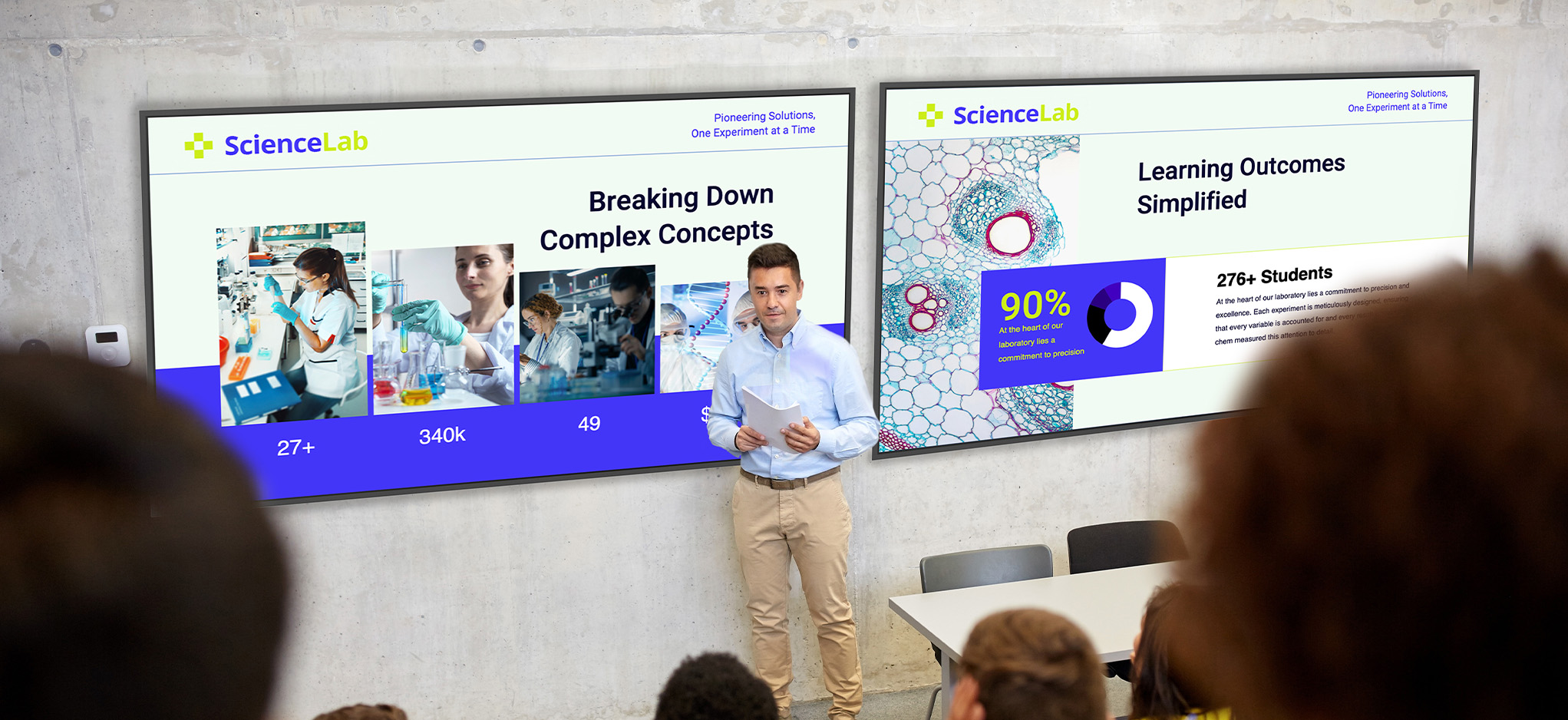
Working with a leading AV integrator, the university standardized on a three-display front wall for the 50+ classroom upgrade:
(2) ViewSonic® 136” LDE136G-152 All-in-One Direct View LED displays, one on each side of the front of the room
(1) ViewSonic 98” CDE9831 4K commercial display, mounted in the center between the two dvLED displays
The LDE136G-152 All-in-One Direct View LED display puts power, controls and image stitching directly inside the cabinets. It ships as a single SKU, which simplifies setup in the classroom. Glue-on-Board technology with IP54 and IK06 front protection helps the screen stand up to daily use in high-traffic classrooms, while hot-swappable front modules and included spare tiles streamline ongoing maintenance.
The CDE9831 commercial screen anchors the room with 4K resolution, 500-nit brightness and anti-glare glass. It’s rated for 24/7 operation to ensure constant reliability. Both products integrate with Crestron, Extron, AMX and Q-SYS control systems, letting campus AV teams manage every room from one central dashboard.
Why Did the University Choose ViewSonic?
The university and their integrator partner chose ViewSonic over alternatives for three reasons: the range of display products ViewSonic offers, pricing versus the competition and ViewSonic's responsiveness to both the reseller and the end user.
Because ViewSonic's portfolio spans dvLED and commercial displays, the university sourced the entire front-of-room solution from one manufacturer and one trusted partner.
| Spec | LDS138-151 |
|---|---|
| Screen size / resolution | 138", Full HD 1920x1080 |
| Mobility | Foldable design on a motorized, height-adjustable stand with 360-degree wheels; packed in a custom flight case |
| Setup time | Minutes, no system integration required |
| Durability | GOB (Glue-on-Board) protection, IP54 and IK06 rated, built for high-traffic public spaces |
| Serviceability | Hot-swappable front LED modules for minimal downtime |
| Casting/Connectivity | AirSync wireless screen casting (AirPlay, Google Cast); Q-SYS, Crestron, Extron and AMX compatible |
| Warranty | 3-year limited warranty on parts and labor, with on-site service |
| Recognition | Best New Mobile dvLED Product, rAVe Publications' Best of InfoComm, June 2025 |
What Results Has The University Seen?
The result is a completely new and engaging classroom experience that everyone can see no matter where they’re sitting.
Students responded positively, not only seeing better but feeling that lessons were much more engaging.
Professors said the move from projectors to dvLED was even more of an upgrade than they had expected.
With 50+ classrooms complete, the three-display configuration now serves as the university's standard for future classroom refreshes.
Frequently Asked Questions
Why Replace Classroom Projectors with dvLED Displays?
Projectors dim over time, need lamp and filter replacements and struggle in bright rooms. dvLED displays like ViewSonic's LDE136G-152 deliver 600-nit brightness with a 100,000-hour rated LED lifespan, so content stays bright and readable with the lights on and there's no lamp to replace.
What Display Setup Works for Large University Classrooms?
One proven approach is a three-display front wall with two 136” dvLED displays flanking a 98” 4K commercial display. A major state university in the Southeast deployed this ViewSonic configuration across 50+ classrooms so every student has a clear view regardless of their seat.
What Makes an All-in-One dvLED Display Practical for a Multi-Classroom Rollout?
All-in-One dvLED displays like the ViewSonic LDE136G-152 build power, controls and image stitching directly into the cabinets. They also ship as a single SKU with an included wall mount. Hot-swappable front modules and included spare tiles keep maintenance simple across a large fleet of rooms.
Can Universities Manage dvLED and Commercial Displays Through Existing AV Control Systems?
Yes. ViewSonic's LDE136G-152 dvLED display and CDE9831 commercial display both work with Crestron, Extron and AMX and integrate with the Q-SYS ecosystem, so campus AV teams can control power, volume and inputs across every classroom from one central location.
Ready to Upgrade Your Classrooms?
Talk to a ViewSonic representative about designing a dvLED classroom solution for your campus.
Related Products
- 136” LDE136G-152 All-in-One Direct View LED Display: viewsonic.com/us/lde136g-152.html
- 98” CDE9831 Smart Commercial Display: viewsonic.com/us/cde9831.html
Comparative claims are based on specific features and publicly available manufacturer specifications as of the date of publication, and are not intended to represent a comprehensive evaluation of all product attributes. Delivery schedules, network performance, training outcomes, and user results may vary depending on individual needs, district or agency requirements, implementation, environmental conditions, and other factors. Any references to third-party products, competitors, software platforms, hardware architectures, certification seals, control systems, or corporate trademarks are for identification, compatibility, and comparative reference purposes only and do not imply endorsement, affiliation, or sponsorship by their respective owners. Corporate names and trademarks stated herein are the property of their respective companies. Environmental protection ratings (including GOB, IP54, and IK06 ratings) are based on standard operating conditions; proper wall mounting, structural reinforcement, mobile assembly, freight handling, and professional installation are the sole responsibility of the customer or installer. ViewSonic assumes no liability for property damage or personal injury resulting from improper installation.


Login and Registration Form