 Teacher's Community
  Support
How to Choose Gaming Monitors for Schools
- Sep 9, 2026
How to Choose
Gaming Monitors for Schools


Esports has become a real asset in K-12 and higher ed, helping students build college and career readiness, and the right monitor is where it all comes together. But the right gaming monitor for a middle school club looks a lot different from the one a college esports team needs. The good news is there’s a ViewSonic option for nearly every space, budget, and skill level.
This guide breaks down how to choose gaming monitors for schools based on the one thing that matters most: your scenario.
The short version: If you don’t have dedicated space, go portable. If you have a lab, choose by budget and competitive level. Entry-level competitive play starts at 180Hz, while dedicated esports programs benefit from 25-inch displays that reach 280Hz. Larger 27-inch screen sizes are great for more immersive gaming.
Start With Your Space, Not the Spec Sheet
It’s tempting to lead with refresh rates and screen sizes. But the smarter first question is simpler: where will these monitors live?
A program without a dedicated room has very different needs than one with a built-out lab. Once you know your space, the rest of the decision gets much easier. So let’s start there.
No Dedicated Space? You Have Options
Not every school has a room to spare for esports. The good news is you don’t need one to get started. There are two proven ways to build a program in shared or borrowed space.
Option 1: Go portable with a monitor cart.
The VX1654 (15.6 inches) and VX1754 (17.3 inches) are built to move. Both are Full HD IPS displays with a 144Hz refresh rate and AMD FreeSync, and both connect over a single USB-C cable that carries video, audio, and 60W of two-way power. At just 1.5 to 2 pounds and about as thin as a deck of cards, they slip right into a backpack or onto a cart. Pair a few with Nintendo Switch consoles and you’ve got a portable esports lab that rolls from room to room.
Portables are an underrated option in education. Many schools don’t think of them for gaming at all. But for programs without dedicated space, or with tight budgets, a portable setup is a creative and cost-effective way to launch esports without renovating a single room.
Option 2: Put the displays you already own to work.
If your classrooms have interactive flat panels, you may already have everything you need. That’s exactly how Fayette County Public Schools in Kentucky built the state’s first elementary esports program. Rather than buy new equipment, they leveraged their existing 75-inch ViewSonic ViewBoard displays, rolling cart-mounted panels into libraries and media centers to create pop-up esports lounges after school. Staff even packed “gamer backpacks” with everything students needed to connect, so a single plug turned any room into a ready-to-compete arena. The approach worked: the program grew from one pilot school to 41 schools in just two years, at no cost to participants.
The takeaway is simple. A big, vivid ViewBoard makes gameplay feel exciting on a screen the whole club can gather around, and it does double duty as an instruction tool by day and an esports arena after the bell.
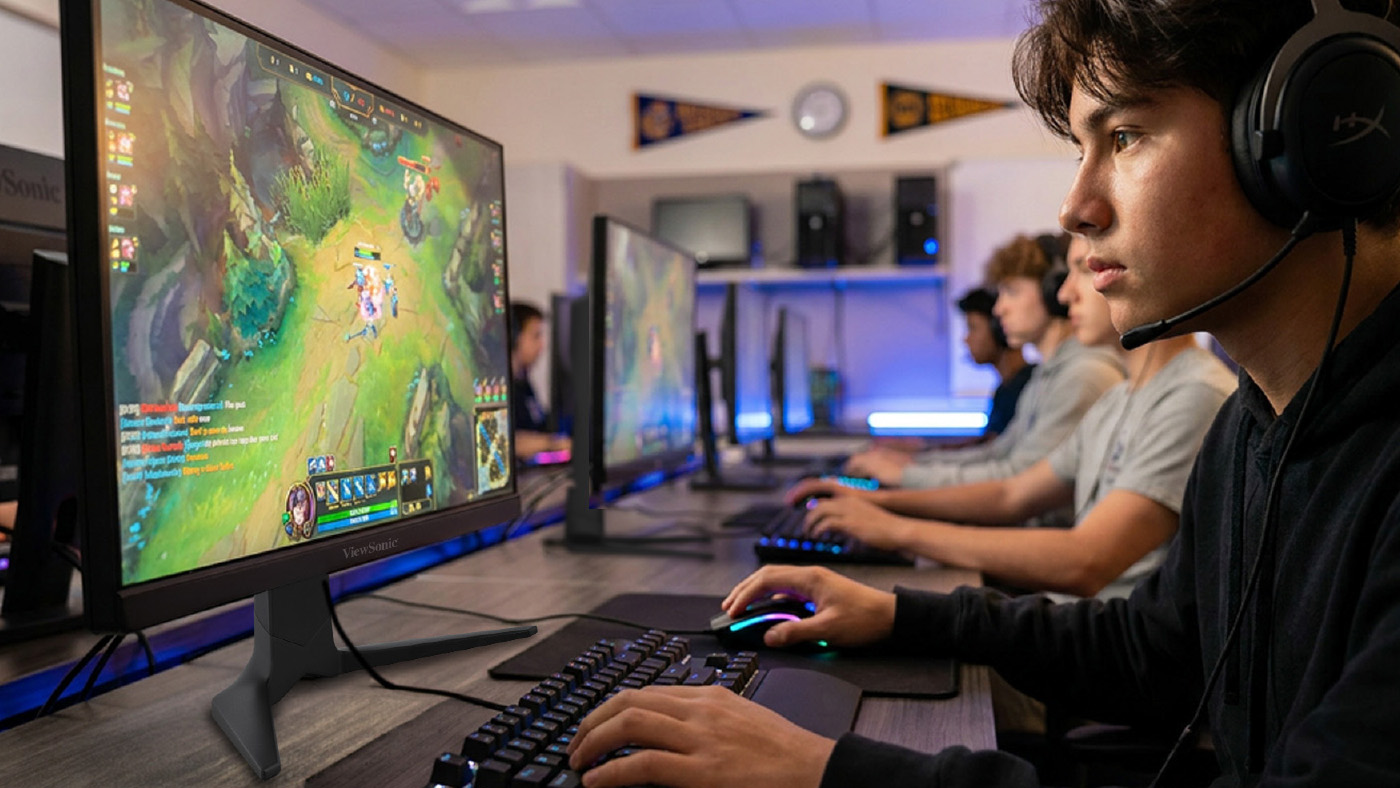
Have a Dedicated Lab? Choose by Need
If you do have a dedicated space, the decision comes down to three things: your budget, the competitive level you’re aiming for, and how the lab will actually be used. Here are three tiers to consider.
Entry-Level Competitive: VX2418C and VX2428A
- Refresh rate: 180Hz
- Best for: schools that want solid gaming specs at a lower cost
Both 24-inch monitors hit a fast 180Hz refresh rate at a budget-friendly price. The VX2418C is a 1500R curved panel with a 1ms response time for an immersive feel, while the VX2428A uses a fast IPS panel with a 0.5ms response time and HDR10 support. Either one is a practical choice for labs that serve a wide range of students, from casual players to your competitive club.
Versatile Multi-Purpose: VX2730D-4K
- Refresh rate: switchable between 144Hz at 4K and 288Hz at Full HD
- Best for: labs that balance free play, classwork, video content, and competitive gaming
The VX2730D-4K is the chameleon of the lineup. Run it at 4K and 144Hz for immersive casual gaming, video, or general coursework. Then switch to Full HD at a blazing 288Hz when competitive play takes priority. It also has a 24.5-inch esports mode that shrinks the viewable area to the ideal competitive size, keeping the action in the player’s peripheral vision and reducing head movement. With AMD FreeSync Premium and NVIDIA G-Sync compatibility, it’s a true multi-purpose display that adapts to whatever the lab needs on any given day.
Ultra-Competitive: XG2536
- Screen size: 25-inch display (24.5-inch viewable)
- Refresh rate: 280Hz (overclocked)
- Best for: dedicated esports programs focused on competitive play
When the goal is serious competition, the XG253 6 is built for it. The 24.5-inch viewable area sits at the ideal esports size, and the overclockable 280Hz refresh rate with a 0.5ms response time keeps fast action razor-smooth. It adds FreeSync Premium, G-Sync compatibility, RGB lighting, a narrow-footprint stand, and 65W USB-C charging, plus it connects to PCs and consoles alike, from PlayStation and Xbox to the Switch and Steam Deck.
From Amateur to Pro at a Glance
Not sure where to land? This simple framework is an easy starting point.
|
TIER |
MODEL |
WHAT YOU GET |
BEST FOR |
|
AMATEUR |
24-inch, 1080p, 180Hz curved display at the best value |
New clubs and casual play on a per-seat budget |
|
|
COMPETITIVE |
27-inch, 1440p, 180Hz with advanced ergonomics |
Growing programs that want sharper visuals and all-day comfort |
|
|
PRO |
27-inch, 1440p, 240Hz with USB-C and RGB |
Established teams chasing every competitive edge |
Each step up adds resolution, screen space, or speed, so match the tier to how seriously your program plays.
Compare ViewSonic Gaming Monitors for Education
Here’s the full lineup side by side.
|
MODEL |
SIZE |
WHAT YOU GET |
MAX REFRESH RATE |
BEST FOR |
|
15.6" |
1080p |
144Hz |
Portable carts, no dedicated space |
|
|
1080p |
144Hz |
A bigger screen for portable carts |
||
|
24" |
1080p (curved) |
180Hz |
Budget entry-level competitive |
|
|
24" |
1080p |
180Hz |
Budget entry-level competitive |
|
|
27" |
1440p |
180Hz |
Step-up sharpness and screen space |
|
|
27" |
4K or 1080p |
288Hz (at 1080p) |
Multi-purpose: free play and competitive |
|
|
25" |
1080p |
280Hz (OC) |
Dedicated esports and pure speed |
|
|
27" |
1440p |
240Hz |
Top all-rounder: speed plus resolution |
|
|
32" |
1080p |
180Hz |
Large, immersive curved screen |
How to Choose the Right Monitor Size
Screen size shapes the experience as much as refresh rate does. Here’s a quick guide to what works best where.
|
SIZE |
BEST FOR |
|
24 INCHES |
The budget pick. Not perfect for any one thing, but a solid, affordable choice that still handles competitive play |
|
25 INCHES |
The competitive edge. The ideal esports size that keeps content in peripheral vision and minimizes head movement |
|
27 INCHES |
The versatile sweet spot. Not ideal for fast competitive genres like FPS and MOBA, but big enough for immersive RPGs and racing games |
|
32 INCHES AND ABOVE |
Built for immersion, plus fighting games where a bigger screen lets players gather around and play together |
The VX2730D-4K deserves a special mention here. As a 27-inch monitor with a 24.5-inch esports mode, it bridges the gap between versatile sizing and competitive performance, which makes it a strong multi-purpose pick for labs that wear a lot of hats.
Common Questions About Gaming Monitors for Schools
What gaming monitor is best for a school with no dedicated space?
A portable monitor like the VX1654 or VX1754. Paired with a cart and consoles like the Nintendo Switch, it creates a mobile esports lab you can move between rooms.
What refresh rate do school esports programs need?
Entry-level competitive play works well at 180Hz. Dedicated esports teams benefit from higher rates, up to 280Hz on the XG2536, for the smoothest fast-paced gameplay.
What size monitor is best for esports?
About 25 inches is the sweet spot for competitive play. It keeps the action in the player’s peripheral vision and reduces head movement, which can make a real difference in fast games. We also offer a 27-inch model that features a 24.5-inch esports mode. This is a great dual-purpose option for computer labs.
Gaming Monitors Built With Education in Mind
ViewSonic designs gaming monitors with education in mind, balancing competitive performance, classroom versatility, and budget-conscious features across every product tier. Whether you’re rolling out a portable cart for a brand-new club or building a full esports arena, there’s a fit for your program.
Talk to a ViewSonic rep to find the right gaming monitors for your school.


Login and Registration Form