 Teacher's Community
  Support
How a National Retailer Replaced Third-Party Docking Stations with ViewSonic Docking Monitors
- Jul 27, 2026
SOLUTION BRIEF
How a National Retailer Replaced Third-Party Docking Stations with ViewSonic Docking Monitors
What Challenge Was This Organization Trying to Solve?
This organization had standardized on the same monitor setup for years, and as it prepared to move into a new corporate office, it saw an opportunity to rethink that standard rather than simply replicate it in the new space.
The existing setup relied on third-party docking stations to connect each desk's monitor, keyboard, mouse and peripherals to a laptop, one more component to source, manage and eventually replace. Moving into a new location gave IT a clean opportunity to consolidate that setup rather than carry the same multi-piece configuration into the new office.
Why Did ViewSonic's Docking Monitors Fit This Project?
The organization wanted a monitor that could replace the third-party dock outright, not just sit next to it. ViewSonic's VG2758-2K docking monitors build the dock into the monitor itself, so a single USB-C cable handles video, data and up to 100W of power delivery between the laptop and the monitor.
That consolidation also simplified the rollout. Because the whole setup connects in a clean daisy chain instead of a separate dock, IT could standardize the same configuration across every desk in the new office without a more complex, multi-vendor install.
What ViewSonic Solution Did They Deploy?
The retailer deployed ViewSonic® VG2758-2K docking monitors as the standard primary solution for every desk in its new corporate office (roughly 1,600 units). These were paired with a secondary VG2752-2K monitor at each desk, a matching partner to the VG2758-2K for a two-monitor setup.
- VG2758-2K: 27" QHD (2560x1440) docking monitor with built-in 100W USB-C, RJ45 Ethernet and a 5-port USB hub, replacing the third-party dock at each desk.
- A secondary VG2752-2K monitor, daisy-chained off the primary VG2758-2K over a single USB-C cable, giving every employee a standard two-monitor setup.
- Daisy chain connectivity between the two monitors reduces cabling to one connection per desk rather than separate docks and cables for each monitor.
- Between the two monitors, that's nine USB ports per desk for keyboard, mouse, phone charging and other peripherals, more than most docking stations offer.
What Does the Deployment Look Like?
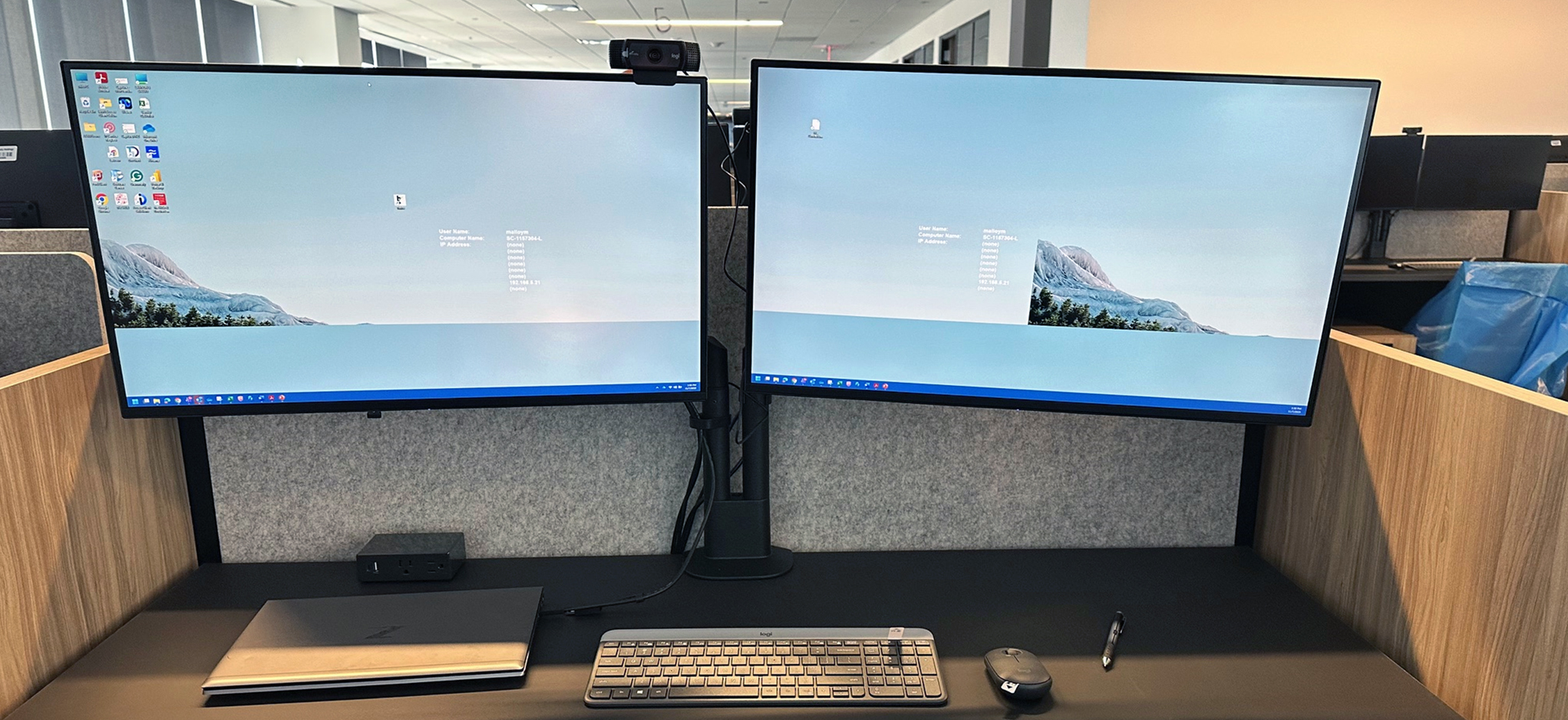
Each desk in the new office is built around the same standard configuration. This includes a VG2758-2K connected to the user's laptop over a single USB-C cable that also delivers power and data, and a secondary VG2752-2K monitor daisy-chained off the primary over USB-C. There's no separate dock to source, connect to or eventually replace.
Because the configuration is identical at every desk, IT can deploy and support the setup the same way companywide, rather than troubleshooting a different dock and cable combination in every room.
The VG2758-2K's ergonomic stand empowered employees to adjust the setup to their ideal position so they could work for longer in greater comfort. Because of its intuitive design, the ergonomic stand also enabled monitors to be deployed faster.
What Results Has the Organization Seen?
The move was an opportunity to simplify rather than just relocate the old setup. Replacing the third-party dock with the monitor's built-in docking station has streamlined the workflow for both IT, which now manages one fewer component per desk, and employees, who connect with a single cable.
The standard two-monitor, single-cable setup is now deployed at every desk across the new corporate office, giving the organization a consistent, easy-to-support configuration instead of a patchwork of docks and cables accumulated over time.
Frequently Asked Questions
What Is a USB-C Docking Monitor, and Why Do Companies Use Them Instead of a Separate Dock?
A USB-C docking monitor has a docking station built into the monitor itself, so a single USB-C cable carries video, data and power between a laptop and the monitor. Companies use them to remove a separate docking station from the desk setup, which means one fewer component to buy, cable and eventually replace.
How Does Daisy Chain Connectivity Work for a Two-Monitor Desk Setup?
With daisy chain over USB-C, a secondary monitor connects through the primary monitor rather than running its own separate cable back to the laptop. This means that a two-monitor setup only needs one cable running to the user's laptop. USB ports on the second monitor work without needing an additional cable, something a DisplayPort daisy chain configuration can't do on its own.
Why Would a Company Moving to a New Office Change Its Standard Monitor Setup?
An office move is a natural point to reassess a standing hardware setup, especially when the existing configuration relies on components, like third-party docks, that add cost and complexity to every desk. Standardizing on a docking monitor at that point avoids simply recreating the same setup in a new location.
What Are the Benefits of Consolidating a Dock and Monitor Into One Device?
Consolidating a dock into the monitor reduces the number of components IT has to source, manage and replace at each desk, and it simplifies the connection for employees to a single cable. That tends to lower total cost of ownership compared with maintaining separate docks across an office.
How Many Monitors Can Be Part of a Single USB-C Daisy Chain Setup?
It depends on the specific monitors, cable configuration and laptop graphics card, but ViewSonic's docking monitors, including the VG2758-2K, support single-cable daisy chaining to a second monitor, making a standard two-monitor desk setup possible without any additional docking hardware.
Ready to Explore a Similar Solution?
Talk to a ViewSonic Field Solutions Engineer about how a USB-C docking monitor could simplify your own office's desktop setup, especially during a move or refresh.


Login and Registration Form