Education
Business
Consumer

Solution

ViewSonic Direct View LED Display Accentuates Entryway in Technology-Focused Medical Center

CASE STUDY

ViewSonic Direct View LED Display Accentuates Entryway in Technology-Focused Medical Center

CUSTOMER

Formed by the 2018 merger of Bon Secours Health System and Mercy Health, Bon Secours Mercy Health is the fifth largest Catholic health care company in United States and one of the nation’s 20 largest health care systems. With 48 hospitals, thousands of providers, more than 1,000 points of care and over 60,000 employees, Bon Secours Mercy Health is dedicated to continually improving health care quality, safety and cost effectiveness. The company’s hospitals, care sites and clinicians are recognized for clinical and operational excellence, and it uses robust measurement and reporting processes to continually enhance care and improve outcomes.

LogoLogo

“I was very impressed with both the level of service we received from ViewSonic and the quality of the product. All the components of the system went together nicely – everything was milled correctly, and the panels self-aligned and snapped on easily.”


— Richard Banus, Account Manager at Onyx Audio Visual

PARTNER

A design-build firm dedicated to working closely with clients to identify their requirements and vision, Onyx is an industry leader in audio visual technology with over 30 years of experience in the U.S. and internationally. The company leverages its extensive experience in engineering to install and integrate highly complex systems. With a track record of successful, timely project execution, Onyx continues to cultivate relationships with government agencies, corporate enterprises, houses of worship, and educational institutions.

LogoLogo

CHALLENGE

line drawing of a circular mazeline drawing of a circular maze
  • The hospital required a high-tech entryway display to honor donors for its new smart facility expansion.

  • IT needed a state-of-the- art video wall that visually matched the hospital’s advanced medical technology.

  • The team faced the challenge of sourcing a large, seamless display that was easy to install.

  • The chosen solution also needed to overcome typical technical hurdles to ensure easy long-term maintenance.

Part of the Bon Secours medical group, The Harbour View Campus in Suffolk, Virginia was being expanded with a three-story, 100,000 square foot addition. Slated to become the system’s first smart hospital, the facility required a dedicated entryway space to give thanks to the donors who made the expansion possible. The primary challenge for the IT team was sourcing a state-of-the-art digital video wall that visually corresponded with the hospital’s advanced medical technology.

Furthermore, they needed a solution that could overcome the typical hurdles of large-scale video walls: it needed to be a large, seamless display that was both easy to install and easy for the customer to maintain. To find a system that met all these strict requirements, the team turned to their longtime partner, Onyx Audio Visual, for help. Their account manager, Richard Banus, recognized these specific challenges and recommended dvLED technology as the ideal solution.

“The benefits offered by dvLED technology are outstanding,” said Banus. “Not only does it deliver a large, seamless display, it is easier to install and easier for customers to maintain.”

SOLUTION

line drawing of a jigsaw puzzle pieceline drawing of a jigsaw puzzle piece
  • Onyx recommended the ViewSonic 136-inch dvLED (LDM136-151) because it offered the exact features the hospital needed.

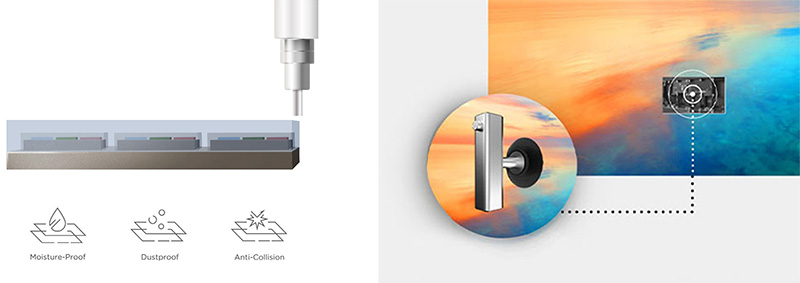
  • The display featured high brightness, integrated speakers, and a surface treatment resisting dust, moisture and impact.

  • This All-in-One solution included wireless casting for easy management over the hospital’s LAN.

  • The display also featured an ultra-thin aesthetic with a detachable control box that enabled an even sleeker look.

Banus acquired quotes from display brands he had worked with in the past and was pleased to discover that ViewSonic also offered a 136-inch dvLED.

“While I’ve used ViewSonic monitors and IFP displays, we were just becoming an official ViewSonic dealer,” said Banus. “They had exactly what I was looking for in a dvLED – high brightness, integrated speakers and GOB surface treatment, which makes it impervious to dust, moisture and bumps. It’s truly an All-in-One solution with everything included that’s needed for installation. It even provided wireless casting that would allow my customers to manage easily over their LAN.”

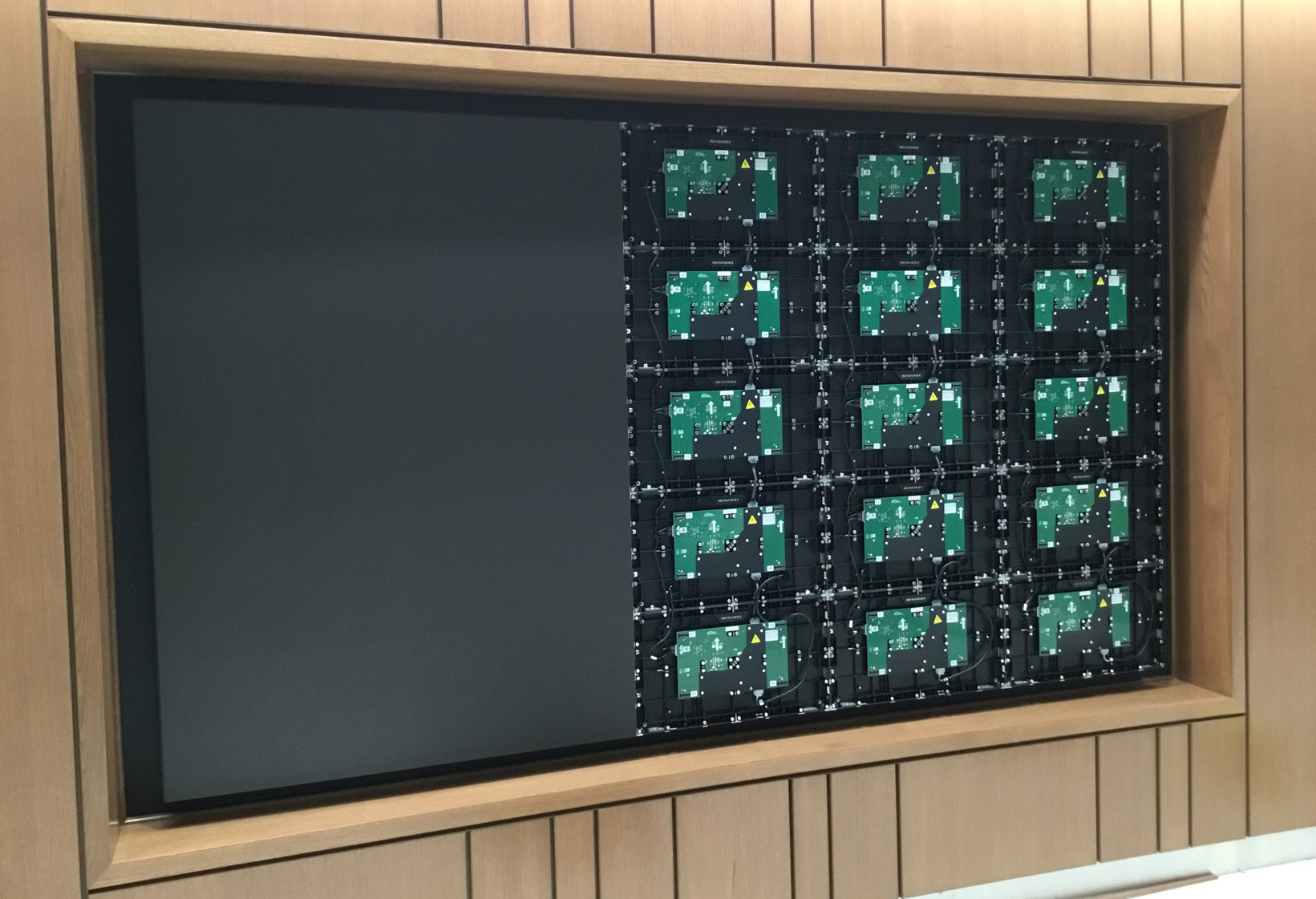
It was also a winner aesthetically, Banus added, with an ultra-thin appearance and detachable control box that enabled an even sleeker look.

Banus shared the results of his comparison with the Bon Secours IT team and together they chose the ViewSonic (LDM136-151) 136-inch dvLED. The product shipped quickly and the team was ready to complete the installation in time for the grand opening, just a week away.
RESULTS

Line drawing of a rocketLine drawing of a rocket
  • The sleek, vibrant digital display now greets patients and visitors, rotating content to thank donors and provide important announcements.

  • The installation perfectly echoes the high-tech design of the medical center and has been very well received by staff and visitors.

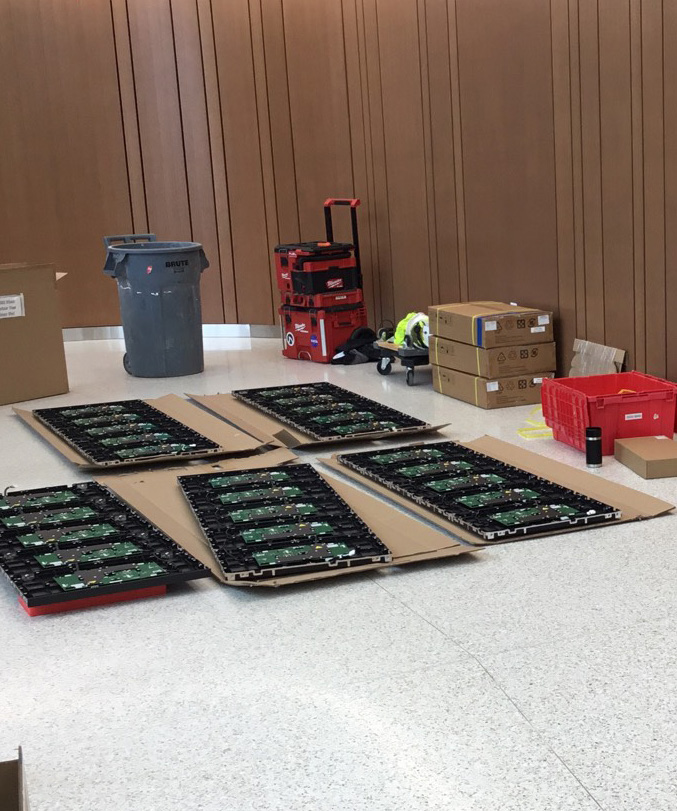
  • The All-in-One design made installation easy, as components were milled correctly and panels self-aligned.

  • The hospital was highly pleased with both the price point and the final visual outcome.
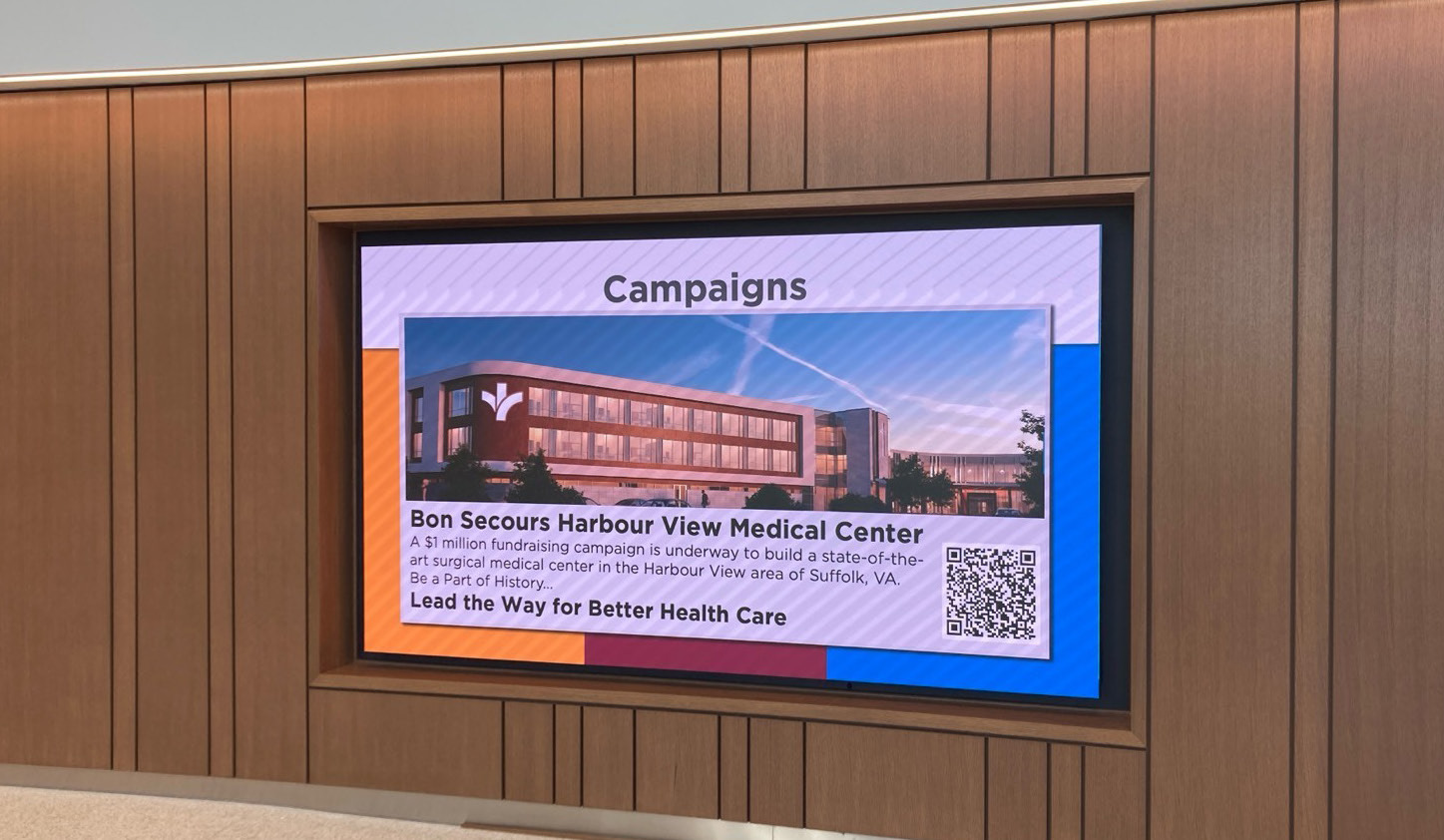
Patients and visitors who enter the Bon Secours Harbour View Medical Center’s main entrance are greeted with a sleek and vibrant digital display that echoes the Center’s high-tech design and service. Rotating content thanks donors and provides important announcements.

“The project lead sent an email letting me know how well-liked the display is by Center staff and visitors,” said Banus. “They were pleased with the price-point, and I haven’t had a single negative comment since it’s been up and running.” Banus noted that while he had installed many ViewSonic ViewBoard® interactive IFP displays in the health system’s offices and conference rooms, this was his first time working with a ViewSonic All-in-One dvLED video wall.

“I was very impressed with both the level of service we received from ViewSonic and the quality of the product,” he said. “All the components of the system went together nicely – everything was milled correctly, and the panels self-aligned and snapped on easily.”

The All-in-One design is ideal for an easy, streamlined process, he added, since the installers have everything they need right at hand, including cabinets, tiles, power supplies, and cables.

“When they were done, we turned on the display and it lit up and looked great,” he concluded. “The client loves how it looks and is happy with the outcome.”
Community Center Enhances Civic and Community Events with ViewSonic 136-Inch Direct View LED

CASE STUDY

Community Center Enhances Civic and Community Events with ViewSonic 136-Inch Direct View LED

CUSTOMER

The City of Highland Heights Community Center serves 9,000 residents, providing a convenient space for weddings, birthdays, graduation parties, events and community meetings year-round. City residents and businesses can reserve the Buckeye room (64 guest capacity) or the Highland room (175 guest capacity) for a rental fee. Both party rooms have access to the Center’s kitchen. Many Highland Heights civic and community groups use the Center to host monthly or weekly meetings.

LogoLogo

“The large [dvLED] display is a focal point in the room and makes a statement with the clear and bold picture. Professionally, presentations are now easy to see from any seat in the room, and I have had only positive feedback from residents who use the screen in social gatherings.”


— Audrey Gerbasi, Community Program Coordinator at the Center

PARTNER

iVideo Technologies is an audio-visual technology integration partner dedicated to empowering organizations through integrated AV, broadcast, and technology systems since 1968. With several locations across Ohio and in Pittsburgh, PA, iVideo delivers communication solutions that support clarity, collaboration, and audience engagement across all sectors nationwide.

CHALLENGE

line drawing of a circular mazeline drawing of a circular maze
  • The city wanted to upgrade video equipment in its 175-capacity Highland room to enhance presentations and engagement.

  • They needed a vibrant, modern display that was easily visible to anyone in the room.

  • The center sought to eliminate lighting and size struggles caused by using a portable projector.

  • Staff required a system that would be readily available and easy to use for various events.

The City of Highland Heights was looking to upgrade the video equipment in the Community Center’s largest room. With a capacity of 175, the Highland room was a high-demand space for hosting scheduled civic and community group meetings, as well as for rental by residents for parties and events. The ability to display content would enhance presentations and offer a way to boost engagement at events.

“Our goal was to provide a vibrant, modern display that could be easily seen by anyone in the room,” said Audrey Gerbasi, Community Program Coordinator at the Center. “We were also looking forward to eliminating the struggles with lighting and size presented by the portable projector that we would occasionally bring into the room. We needed a system that would be readily available and easy to use.”

SOLUTION

line drawing of a jigsaw puzzle pieceline drawing of a jigsaw puzzle piece
  • Reseller iVideo Technologies recommended the ViewSonic 136-inch dvLED display, model LDM136-151.

  • The expansive screen provided clear viewing with high brightness, a strong contrast ratio, and fast refresh rates.

  • A modular design with hotswappable front LED panels greatly simplified maintenance compared to traditional video walls.

  • The Glue-on-Board surface provided essential durability against bumps, dust, and moisture during energetic room rentals.

The Center’s reseller partner, iVideo Technologies, had worked with the city previously, including the installation of AV equipment in the council chambers. When Senior Account Manager Dale Kiser was briefed on the goals for the Center’s Highland room, he immediately thought of the ViewSonic® 136-inch Direct View LED (dvLED) display (model LDM136-151).

“We have corporate accounts that are standardized on ViewSonic CDE displays for their conference and training rooms, so I’m very familiar with their products and I know I can count on ViewSonic to provide outstanding service,” said Kiser. “I had recently worked with ViewSonic to develop a dvLED solution for another customer and recognized that it would be an ideal solution for the Center.”

The expansive 136-inch screen would ensure clear, vibrant viewing throughout the space, with 600-nit high brightness, 6,500:1 contrast ratio and 3,840Hz refresh rate, while the modular design with hot-swappable front LED panels would greatly simplify maintenance compared to traditional video walls.

Importantly, for a room that would be used for events ranging from professional meetings to energetic parties, the Glue-on-Board (GOB) surface treatment provided the durability needed to withstand potential bumps along with resisting dust and moisture.

“I like recommending this product because it delivers such nice color and brightness, and the form factor is very aesthetically pleasing,” said Kiser. “I like working with ViewSonic because the service, support and quick reaction times from their team really gives me a warm fuzzy feeling,” he concluded with a smile in his voice.

Kiser developed a complete solution that included a QSC system with touch panel control and with the Center’s approval of his plan installation was completed without issue by iVideo’s installation field team.

RESULTS

Line drawing of a rocketLine drawing of a rocket
  • The AV makeover added professionalism and energy to civic events, meetings, and private parties.

  • Presentations are easily seen from any seat, generating positive feedback from residents attending social gatherings.

  • Allowing community members to showcase personal media on the big screen boosted the space’s rental appeal.

  • Time-consuming projector challenges were eliminated, paving the way for future resident movie nights.

According to Gerbasi, the Highland room AV makeover has made a huge impact on professional meetings, civic events, and private parties, adding both professionalism and energy to the space.

“The large display is a focal point in the room and makes a statement with the clear and bold picture,” she said. “Professionally, presentations are now easy to see from any seat in the room, and I have had only positive feedback from residents who use the screen in social gatherings.”

Additionally, the ability for community members to showcase personal images or watch a chosen broadcast or video has added to the space’s rental appeal.

“People are excited when they see the eye-catching power of the big screen,” said Gerbasi. “They appreciate the grandness of the picture and like to come up with ways to incorporate the new technology into their events.”

Even when the display is not being used to support presentations, civic meetings have been enhanced by the ability to showcase the city’s logo on the screen during events, Gerbasi added.

“Everyone seems very satisfied with the outcome, and we’re thrilled to have eliminated the time-consuming challenges we had with the projector,” Gerbasi concluded. “We look forward to offering movie nights to our residents and expect many more years of positive feedback.”

University Faculty and IT Team Gain Efficiency and Efficacy with ViewSonic® Digital Podiums

CASE STUDY

University Faculty and IT Team Gain Efficiency and Efficacy with ViewSonic® Digital Podiums

SCHOOL

Coker University is a student-focused, private liberal arts college located in Hartsville, South Carolina. Founded in 1908, Coker is a bachelor’s and master’s degree-granting institution and competes in 24 NCAA Division II sports. Redefining undergraduate research, Coker students participate in local and regional conferences and competitions. Coker combines round table, discussion-based learning with hands-on experiences to promote active participation in and out of the classroom.

LogoLogo

“I’m just starting to touch on what it can do, and so far, I can’t imagine a better outcome than [the myPodium ID2456-4K]. I’d rate the upgrade a 10/10 and I’m not always that generous.”


— Joseph Flaherty, PhD, Research Director and Professor of Biology at Coker

CHALLENGE

line drawing of a circular mazeline drawing of a circular maze
  • Coker University classrooms contained disparate technology from various manufacturers.

  • Maintaining a broad mix of technology caused inefficiencies for the small IT team.

  • The aging technology frustrated faculty members and generated a high volume of help desk tickets.

  • The IT Director needed to navigate a complex edtech landscape to standardize a common solution across the campus.

When Information Technology Director Charlie Poag joined the Coker University team, edtech across the campus was ripe for an upgrade. Classrooms contained an array of disparate technology from a range of manufacturers, which led to inefficiencies and challenges for both IT and faculty.

“We can’t be experts in every technology out there and maintaining such a broad mix efficiently was more than our small team could do,” said Poag. “Faculty was frustrated and we were receiving a lot of help desk tickets.”

The edtech landscape had changed dramatically since the aging Coker classroom technology had been installed. Poag’s objective was to standardize around a common solution. But first his team would need to identify which solution would best meet their faculty’s needs.

“We began our due diligence and discovered that each manufacturer had many models of each product category – from projectors to interactive displays.” said Poag. “Edtech has become a complex landscape, with a huge array of options.”

As his team began the process of researching the latest edtech, Poag was introduced to Tyler Davis, a regional rep from Howard Technology Solutions. During their initial conversation, Poag recognized the value of partnering with an AV pro like Howard.

“The folks at Howard know the edtech landscape through and through, and it was clear that they could be a big help with our upgrades,” said Poag. “As a starting point, Tyler offered to give us his favorite new edtech product to evaluate – the ViewSonic 4K Digital Podium.”

SOLUTION

line drawing of a jigsaw puzzle pieceline drawing of a jigsaw puzzle piece
  • IT deployed a ViewSonic 4K Digital Podium (model ID2456-4K) in a well-used classroom for faculty evaluation.

  • Following overwhelmingly positive faculty feedback, the university unified more than two-thirds of its classrooms around ViewSonic products.

  • The upgrades included ViewSonic Commercial Displays, Laser Projectors, and the digital podium ID2456-4K solutions.

The Coker IT Team put the Digital Podium (ViewSonic myPodium™ ID2456-4K) in a well-used classroom and invited feedback from faculty.

“The response was very positive,” said Poag. “The faculty loved it. Based on this, we purchased five more, putting one in each academic building.”

After allowing time to get to know the product, the IT team conducted a survey to gain insight into the upcoming upgrades.

“We gave them options based on technology they had been using for some time, such as Promethean and SMART boards, and we asked what technology they would like to use going forward,” said Poag. “Overwhelmingly the faculty wanted to use the ViewSonic podiums.”

At that point, Poag had the direction he needed to begin unifying the technology across all Coker classrooms.

Top of the list were the athletic building classrooms, where users had been increasingly frustrated with the aging technology. While Poag and his team worked with Howard to create an upgrade plan, a grant came in to refurbish the entire science building. In the end, more than two thirds of the Coker classrooms were unified around ViewSonic products, including ViewSonic Commercial Displays (CDE8630 and CDE9830), ViewSonic Laser Projectors 
(LS92OWU) and the ViewSonic myPodium ID2456-4K.

“Wherever possible, we upgraded to the ViewSonic Commercial Displays for front-of the-room viewing,” said Poag. “Where we had pre-existing cabling to the ceiling we upgraded to ViewSonic’s 6000-lumens Laser Projector.”

RESULTS

Line drawing of a rocketLine drawing of a rocket
  • The IT team experienced greater operational efficiency and received far fewer technical support calls.

  • The digital podiums offered an affordable alternative to placing large touchscreens in every classroom.

  • New displays and laser projectors provided highly visible, detailed content while requiring less maintenance.

  • Faculty gained the flexibility to seamlessly connect their own devices via USB-C, eliminating device connection confusion.

From an IT perspective, the results could hardly have been better: faculty were happier and so was the IT team. What’s more, the upgrade made smart use of the university’s limited resources and would continue to reduce costs over time. “These podiums are a terrific solution for so many reasons,” said Poag. “For one thing, they are so much more affordable than putting a large touchscreen in every classroom. And, in my opinion, they’re a better fit for the job because instructors don’t have to turn their back on the students to annotate content.” Unifying around ViewSonic products, said Poag, has enabled his team to operate with greater efficiency and expertise.

“We can really get to know this product, how to best train instructors, and how to effectively maintain and troubleshoot,” said Poag. “Now faculty can move seamlessly from classroom to classroom, and the IT team is fielding far fewer tech support calls.” 

And, with modern laser projectors, the IT team purchases fewer bulbs and spends less time on maintenance.

“Another benefit of the digital podiums,” added Poag, “is the ability for faculty to connect their devices with USB-C, while maintaining the connection to the PC we provide in the room. They have the choice of which to use, and this eliminates any confusion around which device is connected. We used to get a lot of calls about disconnections and faculty having to reboot the PC.” From an instructional perspective, the new technology is enabling more streamlined and interactive instruction, along with more visible content.

“The large screens in the front of the classroom are magnificent,” said Joseph Flaherty, PhD, Research Director and Professor of Biology at Coker.

“The panels are highly visible from everywhere in the room and they’re perfect screens for visualizing detailed content. It’s a big improvement 
over the old projectors.”

Because of past encounters with digital whiteboards that were clunky, slow and challenging to use, Flaherty prefers the smooth, responsive touch panel on the ViewSonic myPodium ID2456-4K.

“The screen is such high quality, it’s like using your phone, and I love not having to turn my back on students.” said Flaherty. “The fast, responsive screen makes it a breeze to interact with content. I particularly appreciate being able to pinch and zoom in to highlight material – that alone makes teaching easier. I look forward to learning more about the functionality and how it can further help me add impact to instruction.”

Although he knows he’s just scratched the surface of what he’ll be able  to accomplish with the digital podium, Flaherty is already thankful that the IT team partnered with ViewSonic.

“I’m just starting to touch on what it can do, and so far, I can’t imagine a better outcome than this product,” he concluded. “I’d rate the upgrade a 10/10 and I’m not always that generous.”

The IT team is likewise thankful for the growing relationship with both Howard and ViewSonic.

“We love having Howard as our AV partner; they’re very responsive and listen well and make sure understand the need before they start recommending products,” said Poag. “They’ve connected us with our ViewSonic rep Randy, who has also been very helpful.”

Higher Education Hybrid Classroom Gets Transformative Upgrade with ViewSonic Direct View LED Displays and More

SOLUTION BRIEF

Higher Education Hybrid Classroom Gets Transformative Upgrade with ViewSonic Direct View LED Displays and More

BACKGROUND

For one school district located in western Canada representing a large and diverse network of K-12 public schools, raising the bar of excellence for digital learning was achieved with ViewSonic’s ViewBoard solution.

LogoLogo

Not only is the upgraded classroom now a cutting-edge digital learning environment, it is also a model for future classroom refreshes. The integrated technology seamlessly blends in-person and remote experiences, delivering a host of benefits to faculty, students, and the IT team.


— Miles Brandon, Owner, Capistrano VW

CHALLENGE

line drawing of a circular mazeline drawing of a circular maze
  • Upgrade outdated classroom displays to seamlessly support hybrid learning.

A recognized leader in STEM higher education, this large state university is dedicated to being on the forefront of classroom technology. To facilitate efficient use of technology resources, the university offers instructors a variety of classroom configurations to meet their edtech needs. At the pinnacle of these options are classrooms equipped to simultaneously deliver instruction to in-person and remote students. Live-monitored by university IT staff to prevent tech-related disruption, these rooms serve an important role in extending the reach of instruction.

One such classroom was due for a major technology update. The existing setup relied on two ceiling-mounted projectors, which cast content onto dual wall screens. It was time to upgrade to technology that would support the range of modern learning options and instructional modalities: a state-of-the-art video wall that would deliver bright, consistently sharp visuals for every student. More importantly, the solution needed to seamlessly deliver content to in-person and distance learners, while creating an environment that connected those audiences and provided intuitive control for the instructor.

Several types of displays would be needed to support these goals, including large, vibrant front-of-room displays for on-site learners; displays to bring Zoom participants into the room; confidence displays for the instructor at the back of the room; and an interactive display at the instructor podium. All of which would be maintained and monitored in real time by university IT staff.

SOLUTION

line drawing of a jigsaw puzzle pieceline drawing of a jigsaw puzzle piece
  • ViewBoard IFP8650 86-inch Interactive Display

  • myViewBoard® Digital Whiteboarding Software

To accomplish these goals, the IT group worked with longtime reseller partner ClarkPowell, which recommended ViewSonic for the display component of the installation. The IT team reviewed the recommendations and agreed that this would be an ideal solution for their needs, commenting in particular on the durability of the ViewSonic® Direct View LED (dvLED) display with Glue-on- Board (GOB) technology and the ability to swap individual panels with included spares, which would streamline maintenance.

The final front-of-room solution included two 136-inch ViewSonic All-in-One dvLED video walls (Model LDM136-151) to present class content. These would be mounted on either side of a ViewSonic 98-inch 4K commercial display (model CDE9830). Two ViewSonic 65-inch commercial displays (model CDE6530) would be mounted to the back wall for instructor visibility: one to mirror the instructional content; one to display Zoom participants.

Finally, the instructor podium would be equipped with a ViewSonic 24-inch digital podium touch display (model ID2456-4K) that would enable faculty to intuitively deliver content and connect with students using integrated ViewSonic® ViewDirector™ software. To ensure seamless operation, the ClarkPowell team would integrate the ViewSonic displays into the classroom’s existing Crestron matrix switcher.

RESULTS

Line drawing of a rocketLine drawing of a rocket
  • Stunning 231-inch seamless video wall transformed showroom aesthetics and energy

  • Reliable all-in-one system resolved previous performance and management issues

  • Easy setup with complete kit enabled quick, frustrationfree installation

  • Day-and-night visibility extended promotional impact to freeway traffic

  • Enhanced content flexibility for events, promotions, and employee recognition

  • Long LED lifespan reduces maintenance and supports 24/7 use

  • Dealership excited to expand usage for movie nights, community engagement, and brand storytelling

The integrated technology seamlessly blends in-person and remote experiences, delivering a host of benefits to faculty, students, and the IT team.

Instructors appreciate no longer having to contend with projector lights shining in their eyes, as well as being able to maintain focus on students. The confidence monitors in the back of the room allow presenters to easily confirm that their content is looking as it should on the front screens, while also providing an interface with students joining on Zoom.

The brightness and clarity of the ViewSonic dvLED displays provides classroom and remote students with a clearer view of content in all lighting conditions, while also delivering outstanding recorded images – a critical component of serving the needs of asynchronous distance learners. Along with this consistency in lighting, the IT team benefits from the lower, and easier, maintenance offered by the dvLED displays. All of which provides more streamlined instruction with greater efficiency and reduced costs. /span>

What’s more, a visiting IT specialist mentioned that one of their university’s classrooms had an outdated dvLED display that lacked GOB surface treatment, which resulted in damage, and added repair costs, when students bumped into it.

The university’s stated objective for its top-tier tech classrooms is to empower faculty to deliver modern, high-impact instruction to a range of students, without the burden of technical barriers. In these spaces, the edtech allows faculty to focus on teaching, not troubleshooting. This classroom upgrade has achieved just that, with bright and durable ViewSonic dvLED video walls, commercial displays, and a digital podium touch display shining as the foundational visual technology.

Business School Enhances Event Experience with ViewSonic® Direct View LED Display

SOLUTION BRIEF

Business School Enhances Event Experience with ViewSonic® Direct View LED Display

BACKGROUND

With a growing population of undergraduate and graduate students, the business school at a top-ranked university on the U.S. East Coast was running out of space. As a result, it was compelled to repeatedly repurpose study space to accommodate events, which was both inconvenient for students and inefficient. The opportunity to address this need arose when space in their main building became available to transform into an exclusive event space.

Central to delivering an effective space would be a focal-point display that could easily be seen by all participants. The large space, which would accommodate up to 200 attendees at round tables, was graced with significant natural lighting from numerous windows. While a benefit to the ambiance overall, this ambient light would constrain their choice of AV system, which would need to be bright enough to deliver clear images in these conditions.

The school’s IT team quickly ruled out projection.

“They had already been moving away from traditional projectors, because of the higher maintenance and tendency to dim over time,” said Eric Waldron, ViewSonic Regional Business Manager for the area. “They wanted instructors and presenters to be able to keep the lights on, which helps facilitate engagement, and they liked that a video wall solution would provide excellent support for hybrid meetings.”

Along with needing outstanding brightness and clarity, the space required a precise fit and the IT team was under pressure to complete the installation quickly for a planned event. Additional objectives included a platform that would enable intuitive transition for professors from the familiar white- and blackboards to digital annotation. 

LogoLogo

Not only did the business school gain useful event space, which meant no longer displacing students from study areas, the IT team is enjoying the benefits of the front-swappable panels, which enable faster and easier maintenance and easier alignment, which ensures a more seamless, accurate image.


— Miles Brandon, Owner, Capistrano VW

CHALLENGE

line drawing of a circular mazeline drawing of a circular maze
  • Equipment currently in use is beginning to reach the end of their service life

As part of its education delivery, the district had previously relied on Promethean projectors in classrooms, but these products were reaching the end of their life cycle. Not only were the images hard to see in ambient light conditions, the systems often needed replacement parts and were expensive to maintain. Additionally, the projectors had to be manually recalibrated every time they were moved, presenting new logistical challenges. The school district decided it was time to make a transition to newer technology, and undertook a comprehensive search and trial of leading visual technologies, from projection systems to interactive flat panel displays (IFPs) – including ViewSonic® ViewBoard® interactive displays.

The team leading the search already knew that interactive flat panel systems would be more flexible to use, much easier to install, and require less maintenance than projectors. They decided to invite teachers from across their network to a central location to evaluate four different interactive flat panel (IFP) display systems in person.

SOLUTION

line drawing of a jigsaw puzzle pieceline drawing of a jigsaw puzzle piece
  • ViewBoard IFP8650 86-inch Interactive Display

  • myViewBoard® Digital Whiteboarding Software

The business school IT team evaluated video walls and dVLED screens from several brands, ultimately choosing a ViewSonic 136-inch All-in-One Direct View LED Display (model LDM136-151). This provided the ideal combination of features, along with outstanding brightness, refresh rate and clarity, said Waldron. Fortunately, the size was an exact fit for the space, and the display was in stock and ready to ship. The modular, all-in-one design enabled fast, streamlined installation. “The easy and seamless mounting structure and automatic configuration capabilities were big selling points for this customer,” said Waldron. “They were very happy when the installation was as quick and straightforward as we said it would be.”

RESULTS

Line drawing of a rocketLine drawing of a rocket
  • Stunning 231-inch seamless video wall transformed showroom aesthetics and energy

  • Reliable all-in-one system resolved previous performance and management issues

  • Easy setup with complete kit enabled quick, frustrationfree installation

  • Day-and-night visibility extended promotional impact to freeway traffic

  • Enhanced content flexibility for events, promotions, and employee recognition

  • Long LED lifespan reduces maintenance and supports 24/7 use

  • Dealership excited to expand usage for movie nights, community engagement, and brand storytelling

“Importantly, the hiccup-free delivery and installation enabled the IT team to meet the deadline for the premier event in the new space, despite some internal concerns.

“Just a week prior, they were having serious internal discussions about moving the event elsewhere,” said Waldron. “The IT team assured their stakeholders that the video wall would be the least of their worries, and in the end, it was.”

In the end, everyone involved was impressed by how quickly and cleanly the installation came together, reported Waldron, and the IT team has appreciated the solution’s ongoing reliability and low maintenance.

“It is always fulfilling to hear from a customer that they’re experiencing greater efficiencies because of our product,” said Waldron. “Not only did the business school gain useful event space, which meant no longer displacing students from study areas, the IT team is enjoying the benefits of the front-swappable panels, which enable faster and easier maintenance and easier alignment, which ensures a more seamless, accurate image.”

Ultimately, the vibrant display met every objective on the business school IT team’s list and has made a strong impression on everyone who’s used the space, Waldron reported.

“They told me that it’s been a game-changer for their events,” he concluded. “Which is exactly why many of our customers are turning to our dVLED in place of traditional video walls.” 

School District Offers Esports to All Ages by Leveraging ViewSonic Display Infrastructure

CASE STUDY

School District Offers Esports to All Ages by Leveraging ViewSonic Display Infrastructure

PROFILE

Fayette County Public Schools is a large district encompassing the city of Lexington, Kentucky and serving approximately 42,000 students across 57 schools. The second-largest school district in Kentucky, it includes 38 elementary schools, 13 middle schools and 6 high schools, along with preschools and several additional programs/technical centers, with a 60% minority enrollment and over a third of students whose families are economically disadvantaged.

LogoLogo

“Just one plug is all it takes for the ViewSonic ViewBoard to launch an instant esports lounge. That single connection makes the display the unquestioned focal point—where any room is a ready-to-compete arena.”


— Shad Lacefield, FCPS STEM Learning Coach

CHALLENGE

line drawing of a circular mazeline drawing of a circular maze
  • Establish the state’s first elementary school esports program to positively impact student success and engagement.

  • Overcome the lack of dedicated space and budget to accommodate significant student interest.

  • Find funding for career connection projects, such as producing student-designed team jerseys.

Boasting several state championships, the Fayette County Public Schools (FCPS) high schools had enjoyed the benefits of a thriving esports program since 2019. In 2023, the principal of the G. W. Carver STEM Academy, Lamar Allen, set his sights on bringing these benefits to his students.

“He was determined to become the first elementary esports program in the state,” said Shad Lacefield, FCPS STEM Learning Coach, who provides tech support throughout the district and helps esport coordinators with program startup. “As the leader of a STEM school, he knew how much this program could positively impact student success.”

The most immediate challenge to establishing the program was finding the space and equipment to accommodate significant student interest. After that, program staff were challenged with how to fund projects designed to engage students in esports career connections.

SOLUTION

line drawing of a jigsaw puzzle pieceline drawing of a jigsaw puzzle piece
  • Leveraged existing infrastructure of 75-inch ViewSonic® ViewBoard® interactive flat panel displays to create equitable access.

  • Utilized mobile carts to create flexible “pop-up” esports lounges in shared spaces like libraries and media centers.

  • Deployed the ViewSonic All- in-One Direct View LED mobile and foldable display for large- scale competitions and events.

  • Partnered with ViewSonic to cover production costs for team jerseys.

In the five years preceding the dream of an all-ages esports program, FCPS had installed 75-inch ViewSonic ViewBoard interactive flat panel displays in every classroom in order to create a universal classroom experience and equitable environment for student learning across the district. These existing displays, Lacefield realized, could be leveraged to support the elementary esports expansion.

“The ViewSonic IFP displays bring outstanding interactivity and engagement to classroom learning,” said Lacefield. “It was a tremendous investment in our students that we were able to extend as a shared resource to create popup esports lounges. This solved the universal problems of one, how to afford the equipment, and two, where are we going to put it.”

The inaugural club was launched in the G. W. Carver STEM Academy library, which housed a media space ripe for conversion into a part-time esports environment.

“There were several ViewSonic IFP displays already in the room, which serves as a flexible learning space for students, and the school had other ViewSonic ViewBoard displays on mobile carts,” said Lacefield. “It was easy to simply roll them in for the after-school club meetings.”

And with that, mission accomplished: FCPS had the first-ever elementary esports lounge in the state. Next, the team found exciting ways to leverage another ViewSonic display resource: an all-in-one mobile Direct View LED Display folding travel kit.

“The district purchased it for use in large spaces like the auditoriums where we hold conferences and professional development programs,” said Lacefield. “Of course, it also shines as a focal point at in-person esports competitions, where we’re able to display four screens at a time on the one massive display.”

Ultimately, the district was able to provide the after-school club at no cost to participants, thanks to existing infrastructure and support from grants and partnerships. However, when students designed team logos and jerseys, the club had no funds to produce them.

“The project would have had to remain a creative exercise,” said Lacefield, “But ViewSonic stepped in and covered the cost of every jersey for every player.”

RESULTS

Line drawing of a rocketLine drawing of a rocket
  • Rapid program expansion from a single pilot school to 41 schools (30 elementary and 11 middle) in just two years.

  • Created a cost-free, inclusive extracurricular activity that improves social-emotional and academic outcomes.

  • Maximized hardware investment by using displays for instruction during the day and gaming after school.

  • Fast setup allowed staff to launch an esports arena instantly with just one plug.

  • Developed a strong pipeline of enthusiastic students and supportive parents feeding into high school esports programs.

What started with one school quickly exploded to thirty in the span of just two years. By the 2025-2026 school year, spaces in 30 elementary and 11 middle schools were being used for the after-school esports program – with more to come. At one school, the club used a conference room already outfitted with 75-inch ViewSonic ViewBoard IFP displays. At another, the maker space was a perfect fit. Each school was unique, but all made use of existing wall- or mobile cart-mounted ViewSonic ViewBoard displays.

“The ViewSonic cart-mounted displays offer incredible flexibility of use,” said Lacefield. “They can be moved during the day to meet instructional needs, and used after school to support extracurriculars.”

To easily facilitate the transformations, Lacefield created gamer backpacks that house everything needed for the students to connect to and use the displays.

“Once the IFP displays are wheeled in, the students can set up the gaming space quickly and easily,” said Lacefield. “Just one plug is all it takes for the ViewSonic ViewBoard IFP to launch an instant esports lounge. That single connection makes the display the unquestioned focal point—where any room is a ready-to-compete arena.”

In all cases, the results were exciting and impactful.

“The kids absolutely love playing on what to them looks like massive TV screens,” said Lacefield. “And the video quality and speed are incredible – even when running a LAN tournament. The huge screens make it feel so exciting and real to the kids.”

Within a year, the program Lacefield managed merged with the Girls Who Game club, led by Ashley Faulkner. Together they became EPIC Esports and began creating curriculum around the esports industry and other important gaming topics.

“We realized that we were teaching students how to be digital citizens online with their Chromebooks, but not necessarily through gaming. To gain insight, we surveyed a sample of students from across the district,” said Lacefield. “We discovered that 90% were gaming weekly, with 79% engaging with people they didn’t know. To address this, we created content for students and parents on how to safely navigate this ecosystem.”

Along with gathering to game, members of the EPIC Esports program learn about the inner workings of the esports industry and its career opportunities.

“We’re showing our students that, while they may not end up pro gamers, their love of video games could lead them down related career paths,” said Lacefield. “They could become game designers, shout casters, graphic designers, and more.”

To bring these opportunities to life, Lacefield and Faulkner engage students in career connection activities like designing team logos and jerseys.

“Thanks to ViewSonic we were able to produce and provide jerseys with student-designed logos for all of our teams,” said Lacefield. “We are so grateful to them for their support.”

The club’s name, which stands for Engaging Players in Inclusive Competitions, epitomizes its impact on students. At its heart, the FCPS EPIC Esports Club is about engagement. Research has consistently demonstrated that students who participate in extracurricular activities thrive. In every way, involved students do better: academically, socially-emotionally, and in their lives beyond school.

“Most of our esports students weren’t involved in any other extracurricular activities; this club was their first,” said Lacefield. “Now they’re making new friends and expanding their experiences, and the impact on student growth is amazing.”

A district middle school exemplifies this impact.

“These kids have been extremely successful in our region, which includes teams from Florida up through New York,” said Lacefield. “They were in the top five out of 170 teams in a recent competition. Later their coach told us that she saw a big change in students’ behavior and demeanor in school. It gave them a boost of confidence to be one of the best Super Smash teams in the region.”

Coaches at other schools have shared similar feedback, from students and parents.

“A parent of one of my students got emotional during a meeting, while sharing how EPIC Esports helped her son find a place and make friends,” said Jennifer Reams, an Elementary EPIC Esports Coach, “This is a student who has a learning disability and struggles academically, but in esports he excelled, becoming one of our top Mario Kart racers.”

Parental appreciation for the EPIC Esports program has impacted the pipeline to high school esports participation as well.

“In the past, parents were often skeptical about their kids participating,” said Chris Griffith, Esports Coach at Esports State Champion Lafayette High School. “However this year, when I hosted the booth for our esports team at orientation, the middle school parents were thrilled to sign their kids up for our team. There were many students and families excited to continue what they started with EPIC Esports. That was really cool to me.”
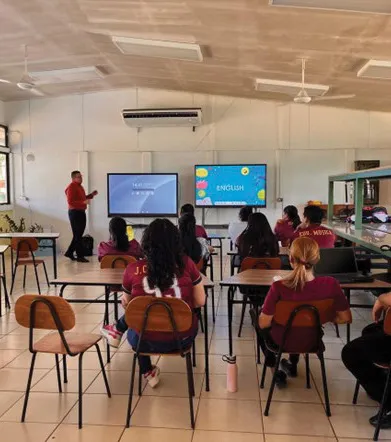
The EPIC Esports program has been an unequivocal success, said Lacefield, thanks to the help of partners like ViewSonic.

“It’s been everything we’ve hoped for,” he said. “We have been able to provide a free, safe community where kids can make friends and do what they love, and we’ve seen the positive impact in improved academic and social-emotional outcomes.”

By Integrating ViewSonic Technology, Preuniversitario Gauss Redefines Pre-University Education in Chile

CASE STUDY

By Integrating ViewSonic Technology, Preuniversitario Gauss Redefines Pre-University Education in Chile

PROFILE

In Chile, a preuniversitario is a private educational institution that prepares high school students—typically in their final four years—for the Higher Education Admission Test (PAES), a critical exam for university admission.

Founded in 2011, Preuniversitario Gauss was established with a clear mission: to prepare students for higher education through a model rooted in academic excellence. With more than 15 years of experience, Gauss now operates seven physical campuses—Los Trapenses, Chamisero, La Reina, Huechuraba, Peñalolén, Montemar, and La Serena—alongside a robust online campus. This expansion has positioned the institution as one of Chile’s most innovative and forward-thinking pre-university programs.

In 2019, Cathia Morais joined Gauss as Business Development Manager with a bold vision to elevate the institution. “My mission was to lead a digital transformation and turn Preu Gauss into a five-star pre-university institution, where academic excellence and technology go hand in hand,” she recalls.

Since the arrival of Morais, Gauss has focused on delivering an academic experience defined by excellence, innovation, and outstanding service—setting a new benchmark for pre-university education in Chile.

LogoLogo

“Thanks to the swift execution by our distributor and the dedicated support of the after-sales training team, we implemented the technology in record time. Since then, we’ve become the first pre-university institution in Chile—and likely the first educational institution overall—to equip every classroom on every campus with interactive screens.”


— Cathia Morais, Business Development Manager

CHALLENGE

line drawing of a circular mazeline drawing of a circular maze
  • Redesign the conventional education framework, replacing outdated tools like blackboards, projectors, and notebooks with a comprehensive digital approach.

  • Position Gauss Pre-University as a leading premium institution, recognized for its superior level of service.

  • Maintain the delivery of online classes throughout the pandemic, while preserving the quality and personal connection of the learning experience.

Since its establishment, Preuniversitario Gauss has aimed to distinguish itself from traditional pre-university institutions in Chile. From the outset, the institution recognized the growing need for a digital learning model—one that would enable students to attend classes from anywhere. “We already saw the need for a digital transformation that would allow us to reach students throughout Chile,” recalls Morais.

The leadership team understood that the future of education lay in hybrid and connected learning, a trend already evident in more advanced educational systems, such as those in the United States and Europe. Before embarking on its transformation, Gauss’s instructional approach mirrored that of most Chilean institutions: a traditional setup dependent on blackboards, projectors, and limited digital interaction.

“Everything was done manually—attendance, notes, exercises. Students had to be physically present to learn,” Morais explains. While this model had served its purpose, it offered little flexibility and left minimal room for innovation.

The onset of the COVID-19 pandemic dramatically accelerated the institution’s digital strategy. Almost overnight, Gauss was faced with a dual challenge: to establish itself as a premium pre-university institution while also ensuring continuity of learning during lockdowns. “We had two challenges,” says Morais. “We wanted to differentiate ourselves as a premium pre-university institution with a higher standard of service, and at the same time, ensure that all students could continue learning—even if they couldn’t attend in person.”

The greatest hurdle was delivering the same level of quality and personal connection students experienced in physical classrooms through a fully online or hybrid format. What had once been a long-term digital vision became an urgent operational priority. With the pandemic, we told ourselves: this is the moment— we have to invest in putting screens in every classroom,” Morais concludes.

SOLUTION

line drawing of a jigsaw puzzle pieceline drawing of a jigsaw puzzle piece
  • Implemented 42 ViewBoard® IFP6550 interactive displays across all classrooms.

  • Adopted the myViewBoard® ecosystem for managing classroom content, digital materials, and attendance tracking.

  • Transitioned to a hybrid and online learning model, making classes accessible to students across Chile.

Preuniversitario Gauss’s technological journey began in 2018 with the acquisition of its first ViewSonic® ViewBoard® interactive display. Though initially dependent on an external computer, this first device offered an early glimpse into the tool’s potential. Shortly after launching its digital transformation strategy, Gauss outlined a more ambitious plan to modernize its academic model. The arrival of the COVID-19 pandemic served as a powerful catalyst, accelerating that plan and prompting the rapid, simultaneous rollout of interactive displays across all campuses.

The project advanced with remarkable speed. Backed by distributor LACE Educación and supported by ViewSonic’s after-sales and training teams, Gauss successfully equipped every classroom in just two weeks.

“Thanks to our distributor’s rapid execution and the after-sales training team, we were able to implement the technology in record time. Since then, we’ve been the first pre-university—and likely the first educational institution—in Chile to have interactive screens in every classroom and on every campus,” explains Morais.

Today, 42 ViewBoard IFP6550 interactive displays form part of Gauss’s core educational infrastructure. Each 65-inch screen is integrated with cameras, microphones, and myViewBoard software, enabling seamless, real-time hybrid classes enriched with dynamic digital resources. “Teachers can annotate documents, grade essays directly on screen, or play YouTube videos to illustrate concepts. It makes teaching far more interactive and visual,” Morais adds.

Beyond enhancing classroom learning, the technology has also been adopted to improve internal operations—for example, during enrollment sessions, when staff use the interactive displays to present services and deliver live demonstrations of the Gauss experience to prospective families.

RESULTS

Line drawing of a rocketLine drawing of a rocket
  • Ensured uninterrupted learning and rapid adaptation during the COVID-19 pandemic.

  • Achieved greater classroom interaction, engagement, and student motivation.

  • Strengthened Preuniversitario Gauss’s position as a leading, technology-driven institution in Chile’s education sector.

The implementation of ViewSonic interactive displays marked a defining milestone in the evolution of Preuniversitario Gauss. For students, it ensured uninterrupted academic preparation—regardless of external circumstances. “Students can log in from home if they’re sick or traveling and still participate in class as if they were physically there,” explains Morais, highlighting the immersive nature of the hybrid experience.

For teachers, the impact was equally transformative. “It was revolutionary. Teachers now have tools that make their classes more dynamic,” she adds. The new technology introduced interactive learning capabilities through videos, 3D graphics, and digital presentations—significantly improving both teaching quality and student engagement.

The benefits extended beyond the classroom. The use of cutting-edge technology quickly became a key differentiator for Gauss in the education market. “When we show our classes live on screen, parents instantly recognize the innovation and professionalism. It’s a decisive factor in their choice,” Morais notes. As a result, technological innovation has become central to Gauss’s identity as a premium institution.

Even after five years of active use, Gauss continues to push forward. The institution regularly explores new features within myViewBoard, keeps its equipment up to date, and ensures ongoing teacher training. At the start of each academic year, educators participate in refresher sessions to maximize the effective use of technology in their classrooms.

Looking ahead, Preuniversitario Gauss plans to integrate artificial intelligence and more advanced interactive tools to further enhance the student learning experience. “We are incredibly proud. This transformation didn’t just change how we teach—it solidified Gauss’s reputation as a premium institution,” concludes Morais.

Excelling in Connectivity with ViewSonic ViewBoard Interactive Displays

SOLUTION BRIEF

Excelling in Connectivity with ViewSonic® ViewBoard® Interactive Displays

BACKGROUND

For one school district located in western Canada representing a large and diverse network of K-12 public schools, raising the bar of excellence for digital learning was achieved with ViewSonic’s ViewBoard solution.

LogoLogo

“ViewSonic’s myViewBoard platform enables real-time collaboration from any location, with cloud-based portability, screen mirroring/sharing and digital whiteboarding supporting a variety of pedagogies over an open, agnostic, and secure platform.


— Miles Brandon, Owner, Capistrano VW

CHALLENGE

line drawing of a circular mazeline drawing of a circular maze
  • Equipment currently in use is beginning to reach the end of their service life

As part of its education delivery, the district had previously relied on Promethean projectors in classrooms, but these products were reaching the end of their life cycle. Not only were the images hard to see in ambient light conditions, the systems often needed replacement parts and were expensive to maintain. Additionally, the projectors had to be manually recalibrated every time they were moved, presenting new logistical challenges. The school district decided it was time to make a transition to newer technology, and undertook a comprehensive search and trial of leading visual technologies, from projection systems to interactive flat panel displays (IFPs) – including ViewSonic® ViewBoard® interactive displays.

The team leading the search already knew that interactive flat panel systems would be more flexible to use, much easier to install, and require less maintenance than projectors. They decided to invite teachers from across their network to a central location to evaluate four different interactive flat panel (IFP) display systems in person.

SOLUTION

line drawing of a jigsaw puzzle pieceline drawing of a jigsaw puzzle piece
  • ViewBoard IFP8650 86-inch Interactive Display

  • myViewBoard® Digital Whiteboarding Software

ViewSonic’s ViewBoard interactive displays with integrated myViewBoard® whiteboarding software was the clear winner from the start. The decision was made to go with the 86-inch ViewSonic ViewBoard IFP8650 with integrated myViewBoard software as a standardized solution across their school system.

During the evaluation period, the teams that were leading the search noted that teachers tended to gather around the ViewBoard at the end of the day to get a first-hand trial of the myViewBoard system. It definitely caused the most excitement which made for a very easy decision.

One area of concern expressed by the teachers was ensuring seamless transition of the content they had accumulated over the years to the new system. Because myViewBoard software natively opens Promethean Flipchart files, teachers were able to easily import and manage all of their content created on older software. All of their content was accessible so they didn’t have to reinvent the wheel.

Teachers were also able to transition to the new technology with minimal interruption. The school district decided to install the new ViewBoard displays in schools during the school year, and were able to remove the old technology in the evening and install the ViewSonic system by the end of the next day.

RESULTS

Line drawing of a rocketLine drawing of a rocket
  • Stunning 231-inch seamless video wall transformed showroom aesthetics and energy

  • Reliable all-in-one system resolved previous performance and management issues

  • Easy setup with complete kit enabled quick, frustrationfree installation

  • Day-and-night visibility extended promotional impact to freeway traffic

  • Enhanced content flexibility for events, promotions, and employee recognition

  • Long LED lifespan reduces maintenance and supports 24/7 use

  • Dealership excited to expand usage for movie nights, community engagement, and brand storytelling

“With such a mix of different schools and teaching styles, this school district had numerous different use cases for the technology,” said Deidre Deacon, General Manager, ViewSonic Canada. In choosing ViewSonic’s myViewBoard platform, flexibility was a key consideration. “The beauty of the ViewBoard solution is the ability to easily adapt to the curriculum of a particular school, while enabling centralized maintenance and control through the myViewBoard software. Another key advantage over the older projection systems is the improved contrast, which provides clearer images and better viewing angles.”

The ViewBoard displays are also capable of wireless connectivity which enables screen sharing from any laptop, allowing teachers and students to easily share content via their in-class devices.

Wireless connectivity and easy set up were critical considerations as the units could easily be moved between schools and maintained from a central location. Installation was quickly completed – in fact the rollout of the first 230 ViewSonic ViewBoard displays took only 12 weeks to complete.

Today, teachers are excited with what they can do with the new technology. They are also trying out different digital learning tools, like putting cameras on top of the ViewBoard displays, streaming school tournaments, and allowing multiple students to engage on the screen at the same time.

Having advanced interactive display technology has also been a valuable drawing card with parents who are always looking for what’s best for their kids. If they see more cutting-edge technology that actually works, and they know they can watch and be connected with their kids, the decision to send them to one of the district’s schools is easy.

ViewSonic Revolutionizes Education in Costa Rica with ViewBoard® Interactive Displays

CASE STUDY

ViewSonic Revolutionizes Education in Costa Rica with ViewBoard® Interactive Displays

PROFILE

The Diocesan Catholic Education Project (PRODIECA) is a Catholic organization composed of three educational centers in the province of Guanacaste, Costa Rica:

Centro Educativo Católico San Ambrosio (1994) 
Centro Educativo Católico Eulogio López Obando (2007) 
Centro Educativo Católico Vittorino Girardi Stellin (2014)

PRODIECA created its educational communities as a response to the educational crisis arising from challenges in forming meaningful educational relationships. For these relationships to be authentic, they must convey essential values and life principles that support each individual’s growth and maturity, while also contributing to the common good.

PRODIECA works to overcome the disconnect in traditional education by fostering authentic, value-based relationships that support personal growth and collective well-being. It also contributes to faith communities by promoting values aligned with peace, justice and humanity.

LogoLogo

“The use and implementation of technological tools has had a positive impact, generating strong interest and motivation”.


— Rodolfo Araya Rojas, PRODIECA Principal

CHALLENGE

line drawing of a circular mazeline drawing of a circular maze
  • Replace outdated projectors and whiteboards with low-maintenance, high-resolution interactive displays, eliminating visual quality and calibration issues

  • Provide comprehensive training to facilitate seamless adoption of new interactive technologies

  • Transform spaces into collaborative hubs for video conferencing and interactive learning experiences

  • Acquire high-resolution displays with advanced features and minimal maintenance requirements

  • Provide students with access to interactive content, enabling seamless integration with their tablets

  • Implement operating systems compatible with all educational tools

  • Enhance student learning and attention through interactive, immersive experiences

Classroom instruction was outdated and limited to physical tools like chalkboards and printed worksheets. There was a critical need to modernize the teaching process through digital tools and more engaging methods.

One key challenge was the need to diversify classroom practices by incorporating technology into the teaching process.

This included integrating principles of Universal Design for Learning and gamification to enhance educational mediation. This need was one of the main factors that led PRODIECA to initiate the project.

Additionally, in subjects such as Mathematics and Physics, there was a specific need to create learning situations that promoted both graphical and algebraic analysis.

The project launched at the beginning of the 2024 school year focused on raising awareness about the use of new technological tools. This was followed by hands-on exploration and implementation in subject-specific areas, enabling teachers to integrate these tools into their mediation strategies based on their particular disciplines. 

SOLUTION

line drawing of a jigsaw puzzle pieceline drawing of a jigsaw puzzle piece
  • Deployed 23 ViewBoard IFP8650 interactive displays across key classrooms

  • Seamlessly connected the displays with existing school systems for efficient operation

  • Activated myViewBoard PRO licenses for all entity accounts, maximizing interactive capabilities

  • Provided comprehensive teacher training to ensure effective utilization of the new technology

To support the project’s goal of diversifying classroom activities through the integration of innovative technological tools, the distributor SOINED not only provided the necessary equipment but also delivered comprehensive training to ensure its effective adoption and pedagogical integration. This training played a key role in strengthening both the use and educational application of the technology.

Previously reliant on standard whiteboards, PRODIECA recognized the need for transformation. In response, SOINED, committed to delivering forward-thinking educational solutions, arranged a demonstration.

A thorough evaluation followed, leading to the selection of ViewSonic’s IFP52-2ED ViewBoard interactive displays —a solution that not only addresses current classroom needs but also significantly enhanced the overall educational experience.

The presentation —led by SOINED’s pedagogical and commercial teams—reinforced a shared commitment to innovation. It was followed by well-coordinated logistics for delivery, installation, and personalized teacher training, ensuring the technology was seamlessly implemented and fully utilized driven by a vision to transform education, a demonstration was promptly arranged, followed by a thorough evaluation that led to the selection of ViewSonic IFP52-EDLA ViewBoard interactive displays.

This solution not only meets the current needs of the schools but also significantly enhances the overall educational experience.

Significantly, this initiative marks the first time PRODIECA has incorporated ViewSonic equipment into its educational model. ViewSonic offers a comprehensive solution that combines cutting-edge technology with pedagogical innovation. Partnering with SOINED has further enhanced the value and effectiveness of the implementation.

The installation process was swift and precise, allowing both students and teachers to benefit from the new tools almost immediately. ViewSonic’s technology fostered collaborative learning and enabled interaction with 3D models, human anatomy, geographic data, and even traditional subjects such as mathematics.

RESULTS

Line drawing of a rocketLine drawing of a rocket
  • Students actively participate without fear of equipment damage
  • Streamlined IT resource management
  • Significant savings through energy-efficient technology
  • Alignment with ISO standards
  • Elevated satisfaction with the overall learning environment and a commitment to continuous improvement improvement

The installation of this equipment has allowed for greater diversification of classroom activities, enriching the teaching process through the integration of innovative and engaging resources.

Encouraged by the positive results, the organization plans to expand the use of this and other ViewSonic solutions in the future.

These tools have led to more efficient use of instructional time and have significantly boosted motivation among both students and teachers. This renewed enthusiasm is reflected in improved analytical thinking and other qualitatively assessed skills. 

Featured Products

ViewBoard Interactive Displays
IFP52-2ED

Car Dealership’s Creativity Shines Bright with Huge ViewSonic Direct View LED Display

CASE STUDY

Car Dealership’s Creativity Shines Bright with Huge ViewSonic Direct View LED Display

COMPANY

In a city brimming with history, the Capistrano VW dealership is itself historic. Opened in 1963, seven years before San Juan Capistrano in Orange County, California became an official city, the dealership was the region’s first purveyor of new cars. In 1997 it was purchased by its current owner, Miles Brandon, who opened Capistrano Mazda next door in 2015. Today, both dealerships operate according to Brandon’s “undealer” philosophy, which strives to deliver a unique and positive experience that surpasses what customers and employees expect from a car dealer. Both dealerships have been recognized with award-winning customer service.

LogoLogo

““This incredible [Direct View LED display] addressed every issue we had with the other systems. It’s a complete package from one manufacturer, and it includes easy device management software. It’s absolutely beautiful, with no annoying bezels. And the price was good too, which really amazed me.”

— Miles Brandon, Owner, Capistrano VW

CHALLENGE

line drawing of a circular mazeline drawing of a circular maze
  • Create a visually unique showroom experience within strict manufacturer branding constraints

  • Replace failing multi-screen video wall with a more reliable, easier-to-manage solution

  • Eliminate frequent maintenance costs and performance issues caused by complex multi-vendor setup

Car dealerships are notoriously homogenous within each brand, with manufacturers dictating virtually every aspect of the design, inside and out. This leaves owners with limited opportunity to visually distinguish themselves. Nonetheless, Brandon – who is as enthusiastic about his showroom’s appeal as he is about the history of Volkswagen vehicles – has managed to implement unique and successful strategies over his many years in the business.

“In 2012, we followed the lead of Casey Gunther, then the top VW dealer in the U.S., who broke all the rules and created amazing energy in his Florida showroom,” said Brandon. “He took it pretty far, with things like vibrant hood artwork on the vehicles in his showroom. Our approach was to put in a large video wall that would enable us to dynamically change up the content.”

Initially, Brandon installed a 220-inch screen, comprised of an array of sixteen 55-inch monitors with bezels between each monitor. While he was thrilled with the energy it brought to the showroom, within a few years the system began to experience performance problems. Running with a complex system of components from different manufacturers, the dealership struggled to efficiently manage the technology, which reduced usage. Ultimately, screens began to dim or go fully dark. Frequent screen replacement was required, creating an expensive cost burden. Brandon reached out to their reseller partner Avidex, for help.

SOLUTION

line drawing of a jigsaw puzzle pieceline drawing of a jigsaw puzzle piece
  • ViewSonic® LDM231-251 All-in-One Direct View LED display

  • Integrated ViewSonic Manager™ device management software

  • Installation and support by Avidex and ViewSonic Field Solutions Architect

A long-time ViewSonic partner, the first solution Avidex recommended was the 231-inch ViewSonic® LDM231-251 All-in-One Direct View LED display.

“This incredible product addressed every issue we had with the other systems,” said Brandon. “It’s a complete package from one manufacturer, and it includes easy device management software. It’s absolutely beautiful, with no annoying bezels. And the price was good too, which really amazed me.”
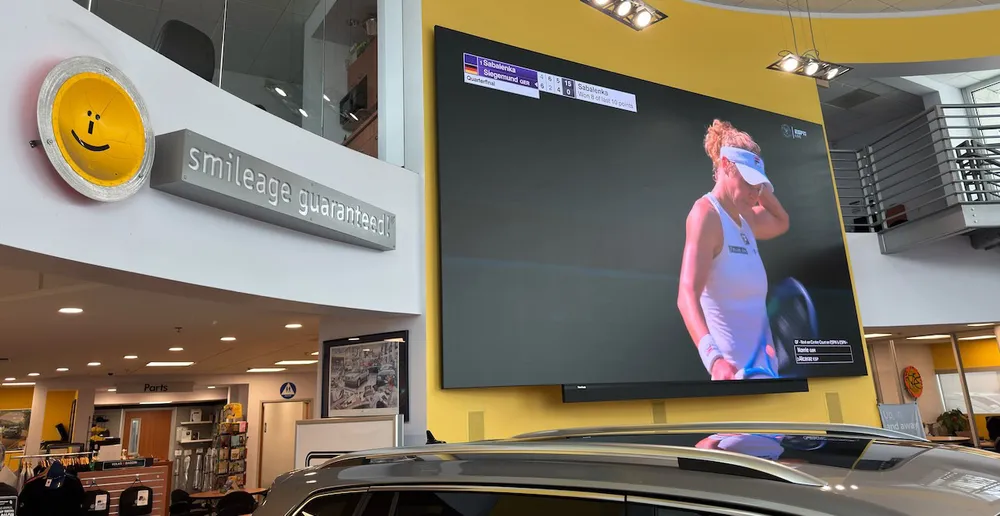
Avidex and ViewSonic worked quickly to present a proposal, which came in right on budget, said Brandon, and the first recommendation became the only one he needed to consider.

RESULTS

Line drawing of a rocketLine drawing of a rocket
  • Stunning 231-inch seamless video wall transformed showroom aesthetics and energy

  • Reliable all-in-one system resolved previous performance and management issues

  • Easy setup with complete kit enabled quick, frustrationfree installation

  • Day-and-night visibility extended promotional impact to freeway traffic

  • Enhanced content flexibility for events, promotions, and employee recognition

  • Long LED lifespan reduces maintenance and supports 24/7 use

  • Dealership excited to expand usage for movie nights, community engagement, and brand storytelling

As expected, installation of the ViewSonic LDM231-251 Direct View LED display went smoothly. Everything needed, from the LED tiles and AV hardware to the software, power supplies, and cables, came in one package, making for a fast, frustration-free process.

“From pre-sales support to the installation we were very pleased with everything,” said Brandon. “The ViewSonic field solutions architect was there the entire time, overseeing the process. Everything went incredibly smoothly.”

Brandon was amazed at the transformation.

“What had become an eyesore was now a stunning, dynamic video screen,” he said. “Not only is the sheer size impressive, the image clarity is amazing and the content looks much better without the bezels. The entire solution is clean and modern looking, with no stray components or clutter.”

What’s more, said Brandon, Avidex had assured him that the LEDs used in the ViewSonic Direct View LED display are likely to remain functional well beyond the system’s expected operational life, with a rating of up to 100,000 hours of use. This eliminated the worry that screens could burn out with 24/7 use.

“We love leaving the wall running because people can see it from the I-5 freeway,” he said. “But with the other screens we were concerned that they would burn out. We didn’t want that added expense. That’s not an issue with the ViewSonic display. We’re looking forward to running content at 2:00 am with messages like ‘We may be closed but you can still pull over and look at your next new car.’”

For now, the Capistrano VW showroom team is happy to see their usual dynamic sports content, live cams from local beaches and the San Juan Capistrano train station, and brand content looking so much better on the bright, vibrant screen. The display played a star role in the dealership’s July 2025 showing of the critically-acclaimed Volkswagen-centric movie Circle the Wagen, a feature film that follows the idealistic owner of a 1972 VW bus on an iconic trip down Route 66.

“It looked so much better than the first time we did this, when the movie was released in 2013,” said Brandon. “It added excitement and energy to the event. We’re looking forward to holding more events like this on a regular basis.”

The successful installation, outstanding support, and stunning display have motivated Brandon and his team to look for new ways to make use of their video wall.

“When the other displays were new and looking ok, we used to play loops of fun car content, so we’ll definitely start doing that again,” said Brandon. “With this easier-to-use system we’ll also be adding slideshows of things like employee birthdays or anniversaries, new model release hype, features on new customers, and after-hours promotional messages.”

Ultimately, the ViewSonic Direct View LED solution enables the Capistrano VW team to deliver dynamic, multipurpose content quickly and easily, thanks to the integrated management software. And with the brighter display, added Brandon, drivers on the freeway can now see their messages during the day, not just at night.

“After Avidex and ViewSonic got me the initial proposal so quickly, I knew I’d be happy working with them, and the product looked amazing,” said Brandon. “In fact, everything exceeded my expectations. Between ViewSonic and Avidex we feel more comfortable than ever that we’re working with good people that will be there for us if any issues arise.”

ViewSonic ViewBoard Interactive Displays Enhance Learning at Claretiano de Huancayo

CASE STUDY

ViewSonic® ViewBoard® Interactive Displays Enhance Learning at Claretiano de Huancayo

SCHOOL

Claretiano de Huancayo School, a leading educational institution in Peru, is the first in the region to achieve ISO 21001:2018 international certification, a testament to its exceptional educational quality. Guided by the Christian values of St. Anthony Mary Claret, the school cultivates well-rounded students, nurturing their academic, personal, and spiritual growth. Its curriculum empowers students to become competent, socially responsible citizens dedicated to national progress.

Embracing its motto, ‘Being Claretian means striving to be better every day,’ the school fosters a culture of continuous improvement.

LogoLogo

“The ViewBoard interactive displays have transformed our learning environment, enabling more dynamic and engaging teaching methods.”


— Brenda Bastidas, School Director

CHALLENGE

line drawing of a circular mazeline drawing of a circular maze
  • Replace outdated projectors and whiteboards with low-maintenance, high-resolution interactive displays, eliminating visual quality and calibration issues

  • Provide comprehensive training to facilitate seamless adoption of new interactive technologies

  • Transform spaces into collaborative hubs for video conferencing and interactive learning experiences

  • Acquire high-resolution displays with advanced features and minimal maintenance requirements

  • Provide students with access to interactive content, enabling seamless integration with their tablets

  • Implement operating systems compatible with all educational tools

  • Enhance student learning and attention through interactive, immersive experiences

Previously, Claretiano de Huancayo School relied on interactive projectors and whiteboards. However, this technology proved costly due to frequent lamp replacements and diminishing brightness. Teachers also faced constant pointer calibration issues, even during lessons, and the projected image quality was subpar.

Following the pandemic, the school sought more effective solutions and chose ViewSonic® ViewBoard® interactive displays. While the initial investment was higher, these displays eliminated maintenance costs. This decision aligned with the school’s commitment to continuous improvement, as evidenced by their recent ISO 21001:2018 certification, which requires modernizing educational resources. The school aimed to foster interactive learning and engage students in a digital environment.

SOLUTION

line drawing of a jigsaw puzzle pieceline drawing of a jigsaw puzzle piece
  • Deployed 23 ViewBoard IFP8650 interactive displays across key classrooms

  • Seamlessly connected the displays with existing school systems for efficient operation

  • Activated myViewBoard PRO licenses for all entity accounts, maximizing interactive capabilities

  • Provided comprehensive teacher training to ensure effective utilization of the new technology

The school thoroughly researched educational technology options to find the ideal solution, comparing features, costs, and benefits. ViewSonic was selected for its strong reputation in the education sector, high-quality products, and positive recommendations from other schools.

Through reseller Tecdata Peru, the school acquired 23 ViewSonic IFP8650 interactive displays, installing them in 5th and 6th grade classrooms.

“ViewSonic’s myViewBoard platform allows us to create dynamic and engaging lessons. We can easily import content and share lessons with students,” explains Brenda Bastidas, the school’s director.

ViewSonic provided top-quality equipment, expert technical support, and training, ensuring a seamless implementation. Their team was readily available to address any technical issues during installation.

The implementation involved several phases: physical installation, configuration and integration with existing school systems, and comprehensive training for teachers and technical staff.

“Managing the displays is straightforward. The school’s existing software was compatible, and teachers and students adapted quickly, finding the displays as intuitive as smartphones. Students interact with the screen effortlessly, and teachers can save lessons to the cloud or download them as PDFs for easy sharing,” says Manuel Fernández, the school’s subdirector.

RESULTS

Line drawing of a rocketLine drawing of a rocket
  • Students actively participate without fear of equipment damage
  • Streamlined IT resource management
  • Significant savings through energy-efficient technology
  • Alignment with ISO standards
  • Elevated satisfaction with the overall learning environment and a commitment to continuous improvement improvement

“This marks Claretiano de Huancayo School’s first experience with ViewSonic products, and it’s been a resounding success for both students and teachers,” said Fernández. “The ViewBoard interactive displays have transformed our learning environment, enabling more dynamic and engaging teaching methods.”

Students now actively use tablets in class, receiving educational materials in real time as teachers share content directly with them.

“There’s a noticeable difference in how students interact with the screen,” said Bastidas. “They’re no longer afraid to touch it. They confidently use their hands to complete exercises, which has made learning more engaging and enjoyable.”

The implementation successfully met the school’s objectives: enhancing the educational experience, boosting student engagement, and aligning with stringent quality standards. Furthermore, the school realized significant energy savings, improved IT resource management, and increased teacher productivity. ViewSonic’s technology has cultivated a more enriching and satisfying learning environment for everyone involved.

The ViewBoard interactive displays have proven to be an invaluable classroom addition. They resolve the issues of previous technologies and solidify the school’s investment in the future education of Claretiano de Huancayo’s students.

Uruguay Adventist Institute Equips 30 Classrooms with ViewSonic ViewBoard Interactive Displays

CASE STUDY

Uruguay Adventist Institute Equips 30 Classrooms with ViewSonic® ViewBoard® Interactive Displays

PROFILE

The Instituto Adventista del Uruguay (IAU), located in Progreso, Canelones, is a Christian educational institution with over seven decades of history. Offering education from elementary school to high school, IAU also provides a boarding school system that welcomes students from across South America, including Argentina, Brazil, Chile, Paraguay, and Peru. Its dedication to quality education rooted in Biblical-Christian values has solidified its reputation in the region.

LogoLogo

“Since the incorporation of the ViewBoard interactive displays, classroom dynamics have changed not by 100%, but by 1,000%.”


— Carlos Caballero, IT Manager at the Instituto Adventista de Uruguay

CHALLENGE

line drawing of a circular mazeline drawing of a circular maze
  • Modernize its 30 K-12 classrooms

IAU faced the need to upgrade its 30 classrooms, where teachers were still relying on projectors, traditional whiteboards, and markers for their lessons. While functional, this setup required instructors to bring their own laptops and equipment, complicating logistics and restricting pedagogical possibilities. Recognizing the urgency of modernization, the institute sought to implement a technological solution that would streamline teaching and provide students with a more modern, engaging learning experience.

SOLUTION

line drawing of a jigsaw puzzle pieceline drawing of a jigsaw puzzle piece
  • 30 ViewBoard IFP6552 interactive displays

The IAU decided to replace traditional projectors and whiteboards with 30 ViewSonic ViewBoard IFP6552 65-inch interactive displays, complemented by the myViewBoard software solution. This change marked the start of a new era for the institution, where technology became a fundamental tool for teaching.

RESULTS

Line drawing of a rocketLine drawing of a rocket
  • Modernized classrooms allow each student to experience their lessons with more realistic and interactive situations

  • Teachers transformed their teaching methods by uploading their lesson plans to the cloud the day before. When they arrive in the classroom, they simply turn on the interactive display and start the lesson

  • It has become easier for teachers to present real-life examples of each topic covered

Since the implementation of the interactive displays, the impact on classroom dynamics has been remarkable. Classes that once relied on analog tools have become fully interactive and dynamic. Teachers can now upload their lesson plans to the cloud, easily access them from the displays, and present multimedia content that enhances student learning.

“Since the incorporation of the ViewBoard interactive displays, classroom work has changed not 100% but 1,000%,” said Carlos Caballero, IT Manager at IAU. He added: “We have been working with ViewSonic since 2007 when we purchased 30 projectors to equip each classroom. In August of last year, we didn’t hesitate to replace the projectors with interactive displays. We are so pleased with the quality of the brand that we chose to purchase ViewSonic products directly.

”Caballero further stated: “Not only did we incorporate the ViewBoard interactive displays and myViewBoard software, but all the monitors used in the institution, including those in our computer room, as well as the projectors for the auditoriums, are also from ViewSonic. This makes us a 100% ViewSonic institution.”

Strategic Marketing Firm Equips New Command Center with ViewSonic Displays to Enhance Creativity and Client Relationships

CASE STUDY

Strategic Marketing Firm Equips New Command Center with ViewSonic Displays to Enhance Creativity and Client Relationships

CUSTOMER

A leading Orange County, California Marketing and PR Firm, KCOMM delivers strategic marketing solutions including executive relationships, social media content, digital advertising, earned media and more, that engage their clients’ target audience, inspire action, and deliver ROI. Powered by some of the smartest and most impactful professionals in the business, KCOMM leverages engaging and insightful stories with high-level relationships across a dynamic spectrum of media.

LogoLogo

“The capital investment was minimal and the return has been extraordinary. Not just to our bottom line and income, but to our creativity and to feeling good in this space. The ViewSonic displays have been a big part of this; truly, ViewSonic has made my life better.”


— Sinan Kanatsiz, KCOMM CEO

CHALLENGE

line drawing of a circular mazeline drawing of a circular maze
  • Create a state-of-the art workspace venue that uniquely drives creativity, inspiration, and relationships

For most businesses, change is the single constant, though its rate and volume vary. For professional service providers like KCOMM, the drumbeat of change is relentless, and never more rapid since AI became part of the equation.

“Professional services firms need to constantly innovate and reinvent themselves,” said KCOMM CEO, Sinan Kanatsiz. “Which is why I stay carefully attuned to changing environments. My goal is for our business to be constantly ahead of change instead of being a product of change.”

This mindset has served the company well across its 29 years in business, resulting in continuous growth in clients and revenue. Long before the pandemic drove many professionals to home offices, Kanatsiz supported the work-from-home lifestyle, in moderation.

“I’m all about workplace environment and the ways in which it can support efficiency and employee morale,” he said. “But as my friend Palmer Luckey says, how many billion-dollar companies are there with everyone working at home all the time?”

In their business, he added, getting together in person for creative work and comradery-building is critical. For these weekly activities, KCOMM used a beautiful, shared office space at the 400 Spectrum Center space in Irvine, CA.

Amid the pandemic-induced turmoil that had everyone thinking differently about workspace, Kanatsiz wondered: how can we get ahead of this sea-change?

SOLUTION

line drawing of a jigsaw puzzle pieceline drawing of a jigsaw puzzle piece
  • ViewSonic ViewBoard IFP7550

  • ViewSonic ViewBoard IFP6562

  • ViewSonic Mobile Cart VB-STND-009

Parallelling the success of his business, Kanatsiz’ family was expanding, and it was time to move on from their ocean-bluff dwelling in San Clemente, California. With his characteristic future-focused mindset, Kanatsiz envisioned a unique new use for his former home: the KCOMM Command Center.

“Not only would the Command Center be a state-of-the-art venue to drive creativity and inspiration during our weekly all-hands meetings,” he said. “It would be a unique space where technology and relationships come together in exciting new ways.”

The main floor would provide a formal, conference-style environment; a softseating area for more relaxed brainstorming, reflection, and connection; and a technology-rich office space for management and the CEO . The five downstairs bedrooms would accommodate clients with efficiency and style. The entire space would be filled with state-of-the-art technology, and was surrounded by the splendor of ocean and mountain views.

Familiar with ViewSonic through his longstanding business relationship with ViewSonic Americas President Jeff Volpe, Kanatsiz naturally turned to the company to assist with building out the facility’s display technology. Together, the companies’ AV teams created a seamless display workflow that included a 75-inch IFP7550 ViewSonic® ViewBoard® interactive display mounted on a VB-STND-009 mobile cart, with 65-inch IFP6562 ViewBoard displays in the executive office.

RESULTS

Line drawing of a rocketLine drawing of a rocket
  • Stunning environment and leading technology elevate efficiency and creativity

  • Combined high-end accommodations and tech-driven workspaces add value for clients, enhancing monetary and emotional ROI

  • Cart-mounted 75-inch ViewSonic ViewBoard provides crisp, clear digital workspace/ signage throughout the facility

  • myViewBoard® software delivers easy and diverse annotation capabilities

  • Quick connectivity enables fluid, efficient meetings with sharing by multiple participants

  • ViewSonic XX-inch displays provide seamless viewing in executive office

The KCOMM Command Center has become integral to the way the firm does business, serving as a unique resort-like work environment for both the KCOMM team and their clients. Part luxury VRBO, part business center, the space is delightfully illusive.

“People’s jaws drop when they walk in, that’s how stunning the environment is and how frictionless the technology works,” said Kanatsiz. “The technology is minimalistic and transparent, but when it’s needed, it’s ideal for supporting every need we’ve encountered.”

Surrounded by stunning natural views, the conference (formerly dining) room doubles as a food and beverage area. It is ideally suited for both informal conversations over meals and focused meetings, with easy-access to refreshments.

“It’s like a standard conference room, but with concierge like benefits,” said Kanatsiz. “We bring in food and beverage and roll in the ViewSonic ViewBoard. Everyone gets down to work, but they also feel a bit like they’re on vacation.”

The cart-mounted interactive display provides locational versatility and everything the firm needs to support meetings with crisp images, easy connectivity, and intuitive annotation capabilities. It has found its way into every area on the main floor, including the conference area, living room space and Kanatsiz’ office. In the entryway it greets clients with customized welcome messages.

“From financial statements to presentation slides and commercials, everything looks beautiful on it,” said Kanatsiz. “And the myViewBoard software has become a terrific addition to meetings. The value of the ViewSonic technology sneaks up on you. When we first got the ViewBoard, we loved it as a huge monitor for displaying content. Then we began discovering the benefits of the annotation tools and other features. It has a lot of hidden gems.”

KCOMM President of Operations Hall Roosevelt notes that, from an account coordinator perspective, the ViewBoard interactive display allows users to give presentations, annotate on them, and still have the ability to use other windows – all while sharing a screen.

“Our team meets in person every week to review accounts, discuss creative work and make plans for the week,” said Roosevelt. “Everyone presents and we are constantly jumping on and off the ViewBoard, which provides a fluid, collaborative environment.”

The easy and intuitive connectivity provided by the ViewBoard display had become one of the KCOMM team’s favorite features.

“Often, when we arrive at someone else’s office for a meeting it takes anywhere from five to fifteen minutes just to get a computer connected to a screen,” said Roosevelt. “With the ViewBoard it takes no more than 60 seconds.”

This efficiency has likewise impressed the firm’s clients. Roosevelt recalls one who asked whether they needed to install an application to share content to the display. The client, he said, was quite impressed with how simple and fast it was to connect to the screen.

“At a recent client meeting we had multiple presenters using their own laptops to present with, and two of them had never used a ViewBoard before,” Roosevelt further recalled. “The meeting and presentations were very natural and fluid, with seamless transition from one presenter to the other. This type of efficiency has an incredibly positive impact on client meetings.”

The value of the Command Center for KCOMM and its clients continues well beyond the effectiveness of the dining room space. After meeting around the conference table, clients and KCOMM teams alike gravitate toward the inviting living room for more casual conversation – or creative brainstorming – surrounded by breathtaking views.

The five luxurious bedrooms on the bottom floor of the property provide “boutique-like” accommodations, said Kanatsiz, with the high-end TVs and AV system sustaining the high-tech vibe of the upstairs spaces. Select clients are invited to use the property for a night or two before scheduled meetings, providing them with a hotel-alternative that seamlessly combines work and pleasure – and a much-needed sense of getting away from it all for clients with offices located far from the splendor of the Pacific Ocean and Santa Ana mountains.

“We run everything from our phones – from the security system to the bedroom TVs – and clients check in using a QR code,” said Kanatsiz. “We created a single system using Google Home and ADT to provide a seamless experience. It’s as efficient and integrated as home tech gets.”

Along with providing an outstanding setting for board meetings, creative sessions, retreats, fundraisers, and more, Kanatsiz said he is literally thrilled to go to work in his Command Center office, formerly the home’s family room.

“I get behind my workstation and everything is breathtaking – from the natural views to the ergonomically perfect positioning of my three ViewSonic displays,” he said. “We’re in the news business, so I have one tuned to news 24/7. I use another for email, and the third display supports video calls and other communications. I wouldn’t change a thing.”

Not the least of the Command Center’s charms is its return on investment.

“The capital investment was minimal and the return has been extraordinary,” said Kanatsiz. “Not just to our bottom line and income, but to our creativity and to feeling good in this space. The ViewSonic displays have been a big part of this; truly, ViewSonic has made my life better.”

The firm’s clients invariably have similar reactions to this unique hybrid home-like workspace.

“Our clients truly enjoy the Command Center as well. They come here and don’t want to leave,” said Kanatsiz. “By being in this place, they’re getting something more out of their lives. It makes them want to work with us more. We have clients asking to come here – that tells me it’s working.”

Santa Filomena School Improves Classroom Engagement and Learning with ViewSonic ViewBoard Interactive Displays

CASE STUDY

Santa Filomena School Improves Classroom Engagement and Learning with ViewSonic ViewBoard Interactive Displays

SCHOOL

Santa Filomena School in Viña del Mar was established in 1925 as the “Santa Filomena Girls’ Workshop School.” In 1960, the founders entrusted the school’s administration to the Adoratrices Sisters, who continue to manage it today under the guidance of Saint Maria Micaela’s teachings.

The school’s curriculum incorporates Christian values, especially those of the Micaelian spirit. Currently, it offers classes from pre-kindergarten to eighth grade, serving approximately 620 students with a staff of over 40 teachers and 30 teaching assistants.

LogoLogo

“Because of our new ViewBoard displays, we’ve not only upgraded our equipment but also enhanced safety, expanded learning opportunities for students, and eliminated access barriers.”


— Andrea Ramírez, Head of the Technical Pedagogical Unit (UTP)

CHALLENGE

line drawing of a circular mazeline drawing of a circular maze
  • Pandemic lead to challenges in maintaining student engagement and connectivity

  • New technology and training was needed for shift to online learning

  • Learning curve for integration of technology into teaching

Like many schools worldwide, Santa Filomena School encountered significant challenges in maintaining student connectivity during the COVID-19 pandemic.

In Chile, all schools closed in 2020, forcing educational institutions to adopt new technological approaches to engage with students during lockdowns and school closures. Even after students returned to in-person learning, these digital tools remained essential.

This shift necessitated substantial investments in educational technology and teacher training to bridge the digital divide. The primary challenge was incorporating technology seamlessly into teaching practices while maximizing teachers’ efficiency.

“We wanted to optimize teachers’ time by eliminating distractions like searching for extension cords or dealing with projectors,” explained school director Juan Morales. This challenge sparked the idea of digitizing classrooms with interactive displays.

SOLUTION

line drawing of a jigsaw puzzle pieceline drawing of a jigsaw puzzle piece
  • 19 ViewSonic® ViewBoard® IFP7552 interactive displays

  • ViewSonic® Education Software

To enhance teacher productivity, the school initiated a project to address recurring technology-related challenges. These issues included frequent internet disruptions, sluggish device performance, poor screen visibility, tangled cables, and complicated setup procedures.

To address these challenges, the school partnered with Innovaxis, a long-time provider of educational materials. Innovaxis presented several interactive display options, including the KDOCE Classtouch and ViewSonic® ViewBoard® interactive display. Based on Innovaxis’ expertise, the school selected the ViewBoard display due to its superior performance and warranty.

In addition to offering a competitive price, Innovaxis also proposed protective enclosures for the screens and existing whiteboards. This comprehensive solution solidified the decision to implement ViewSonic technology. As a result, the school purchased 19 ViewBoard IFP7552 interactive displays, equipping every classroom with this advanced technology.

“Because of our new ViewBoard displays, we’ve not only upgraded our equipment but also enhanced safety, expanded learning opportunities for students, and eliminated access barriers,” said Andrea Ramírez, Head of the Technical Pedagogical Unit (UTP).

The ViewBoard IFP7552 is a 75-inch interactive display with stunning 4K Ultra HD resolution. Its single-cable USB-C setup offers instant connectivity, precisely what Santa Filomena School required.

In partnership with Innovaxis, the school meticulously prepared for the displays’ arrival by undertaking extensive classroom and hallway renovations. New curtains and paint transformed these spaces, creating a welcoming environment for students. Custom-designed protective enclosures with white acrylic panels were installed to safeguard the displays while maintaining a traditional classroom aesthetic.

Following the ViewBoard installation in April, 40 teachers received comprehensive training on the ViewBoard and its accompanying ViewSonic® Education Software. These devices are now integrated into kindergarten through eighth grade classrooms, enriching subjects like Music, Mathematics, and Language.

Teacher training has been essential, especially for those less tech-savvy. However, the touchscreens’ user-friendly interface has facilitated a smooth learning curve. Morales emphasized the importance of teacher support and ongoing training to maximize the technology’s potential. While the full capabilities of the ViewBoard displays are yet to be fully explored, there is a clear sense of optimism among the teaching staff.

RESULTS

Line drawing of a rocketLine drawing of a rocket
  • ViewBoard displays have been fully integrated into classrooms, replacing laptops and projectors, streamlining teacher workflow.

  • Improved image quality, interactive features, and accessibility have made learning more engaging and inclusive for all students, including those with learning differences

  • ViewBoard displays have transformed classrooms into dynamic learning spaces, catering to the needs of students of all ages through interactive and engaging content

According to Santa Filomena School’s director, while ViewBoard adoption was gradual initially, “now everyone uses the screens, which is incredibly gratifying.”

Morales explained, “We’ve eliminated all laptops and projectors from classrooms, ensuring universal ViewBoard usage. Teachers no longer need to carry laptops as all tasks can be performed directly on the ViewBoard.”

Ramirez emphasized that ViewBoard technology has enhanced teaching methods, making learning more inclusive and effective for students with challenges. She noted, “We’ve significantly reduced cable clutter and dramatically improved image quality. The displays offer exceptional clarity, vibrant colors, and clear audio.”

These enhancements contribute to more engaging, diverse, and accessible classrooms. To ensure inclusivity, the school installed ViewBoard displays in kindergarten classrooms at a child-friendly height, encouraging interaction and exploration.

Ramirez observed, “The children are more engaged as they can independently play songs, games, or review assignments.”

Morales emphasized, “ViewSonic technology is now the centerpiece of our classrooms.”

School District Supports Small Group and Hybrid Learning with ViewSonic 24-inch VG2456 Docking Monitor

SOLUTION BRIEF

School District Supports Small Group and Hybrid Learning with ViewSonic 24-inch VG2456 Docking Monitor

Serving one of the largest student populations in the US, this school district was looking for an efficient, cost-effective way to add instructional flexibility to its 13,000 classrooms. The endeavor began on the heels of the Covid pandemic, with the goal of providing an easier way to manage hybrid teaching.

The district provided teachers with new convertible laptops on which to run the learning management system (LMS) and other instructional content. The original plan called for adding a separate 24-inch monitor that would allow teachers to easily view and interact with remote students. To streamline the process, the IT team intended to pair docking stations with the new monitors. Unfortunately, the combination of these two products exceeded the district’s cost parameters.

“They ended up not having the budget to accomplish their goal as originally conceived,” said Ben Pearson, ViewSonic Southeast RBM for Education. “I suggested that they look at the ViewSonic 24-inch VG2456 docking monitor, which features built-in connectivity. It had a higher price tag than the other monitor I quoted them, but it was less costly than the monitor-plus-dock combination.”

The streamlined VG2456 docking monitor had all the key features the IT team was seeking, including USB-C with power delivery for the laptops, RJ45 Ethernet, and two USB downstream ports for accessories like web cams and document cameras. It seemed like a perfect solution.


“Teachers across the district additionally enjoyed the ability to bring remote and in-person students together for small group instruction, by turning their ViewSonic VG2456 docking monitor and camera to face several in-classroom students.”

— Ben Pearson, ViewSonic Southeast RBM for Education


To verify its viability the district IT team ran the ViewSonic VG2456 docking monitor through their test bed to ensure that it performed to their standards, said Pearson. It passed with flying colors, and the district committed to purchasing a ViewSonic® VG2456 docking monitor for each of their 13,000 classrooms. Compared to the original monitor/docking station plan, the project saved the district around $250,000.

As anticipated, the solution provided outstanding instructional flexibility for concurrent learning among in person and remote students. Facing the in-classroom students, teachers wirelessly cast content to the classroom projector from their laptops, and could now use their folded laptops in tablet mode to input and interact with the content. The ViewSonic VG2456 docking monitor sat to the side, displaying the gallery of remote students, who received the live content on their school-issued laptops. Teachers used their document camera connected to the integrated ports on the ViewSonic VG2456 docking monitor to directly address remote learners.

Teachers across the district additionally enjoyed the ability to bring remote and in-person students together for small group instruction, by turning their ViewSonic VG2456 docking monitor and camera to face several in-classroom students. Depending on the learning requirements, teachers could use the monitor as the primary content screen, with remote learners displayed on the laptop, or toggle the gallery of remote learners onto the ViewSonic monitor to encourage conversation between digital and in-person learners.

With classrooms once again filled with students, the new technology continues to facilitate small group and active learning, which are key components of the district’s updated curriculum plan.

“The advanced ergonomics of the ViewSonic VG2456 docking monitor make it easily adaptable for small group work,” said Pearson. “With its smooth pivot, swivel, tilt, and height adjustment capabilities, this monitor easily provides a wide range of customizable adjustments for maximum flexibility and comfort.”

Furthermore, he added, the SuperClear® IPS panel technology ensures that viewers seated to the side of the display will experience the same image quality as those directly facing it.

“This setup has been ideal for the district, which is working towards more modular classrooms to support active and small group learning,” said Pearson. “In fact, ViewSonic has been working with them on developing a model classroom for just this purpose, with varied seating and technology to support small group work.”

In the meantime, the ViewSonic VG2456 docking monitor continues to perform an important role across the district, serving as a small group solution in the traditionally-configured classrooms. To provide an additional small-group station, the district is working with ViewSonic to develop a three-tier rolling cart topped with a ViewSonic 32-inch TD3207 touch display.

“Space is very limited in their classrooms, and anything they add needs to be multipurpose, just like the docking monitor,” said Pearson. “The cart-mounted interactive display will allow teachers to store supplies while providing an interactive learning station for students.”

ViewSonic ClassSwift Enhances Language Learning with Engaging Activities and Data-Driven Insights

CASE STUDY

ViewSonic ClassSwift™ Enhances Language Learning with Engaging Activities and Data-Driven Insights

SCHOOL

Located in Los Angeles County, California, the Bellflower Unified School District (BUSD) serves the city of Bellflower as well as portions of Cerritos and Lakewood. The district provides education to over 9,000 students at 11 elementary schools, 3 high schools, and 1 independent study academy.

LogoLogo

“ClassSwift provides a fun way to engage students and gain quick feedback on their results. This data informs our instruction and enables us to better identify areas for more practice or reteaching. When we know how students are doing, we can quickly adapt our instruction decisions and change up what we teach to address the immediate needs of the students.”


— Dorah Fauben, French Teacher at Mayfair Middle/High School

CHALLENGE

line drawing of a circular mazeline drawing of a circular maze
  • Increase engagement and accountability in language learning classrooms

Longtime language teachers and close collaborators at Mayfair Middle/High School, French teacher Dorah Fauben and Mandarin teacher Cheri Luo are dedicated to continually upping their game. This includes staying current with the latest and most useful edtech.

“In our department meetings we share the new tools and methods that each of us is trying,” said Fauben. “We’re continually exploring ways to keep things from being boring in the classroom. We’re constantly learning as teachers.”

Among these new tools were ViewSonic ViewBoard interactive displays, which became the district’s newest teaching and learning technology in August, 2023.

“Dorah and I have attended a lot of webinars on how to maximize our use of the new ViewSonic interactive displays,” said Luo. “I love teaching with the ViewBoard and it stays fresh because ViewSonic is always updating the ways we can do new things with it.”

In December, 2022, Luo was invited to join a group of teachers visiting Taiwan. The highlight of her visit, said Luo, was the ViewSonic headquarters. During a demo of the ViewBoard display, Luo noticed the Google Classroom icon on the screen, and asked what the company could do to help boost classroom engagement.

“They told us, we’re working on it, be patient; a new interactive tool will be coming soon,” said Luo.

The ClassSwift toolbar appears over Luo’s instructional content, ready for her to push questions to her class and receive real-time responses.

SOLUTION

line drawing of a jigsaw puzzle pieceline drawing of a jigsaw puzzle piece
  • ViewSonic ClassSwift™ Software

Midway through the 2023-24 school year, Luo heard about new ViewSonic software called ClassSwift, and realized that it was the new tool the team at the Taiwan headquarters had hinted at.

Created to boost participation as well as to provide instructors with data insights that would allow them to adapt lessons to students’ knowledge levels, ClassSwift was described as “a quick and engaging way to interact with your class.”

It sounded like the tool Fauben and Luo didn’t know they had always wanted.

“When Cheri told us about ClassSwift in our staff meeting, she knew I would be eager to jump right into it,” said Fauben. “We were excited to try out the many ways ClassSwift could enhance learning and bring added engagement and insightful data into our classrooms.”

Over the summer break, the duo learned everything they could about ClassSwift. The features they looked forward to using included:

  • Engagement tools like annotation and content gamification with quizzes, timers, and buzzers
  • Quick comprehension checks, with instant feedback on student responses
  • AI assist to help build interactive content from their existing lessons
  • The ability to group students by need and deliver customize content

RESULTS

Line drawing of a rocketLine drawing of a rocket
  • Increased student engagement using gamification, annotation and AI-smashing tools

  • Increased accountability, with real-time visibility to student participation

  • Efficient review and reteaching, with immediate data insights

  • Time savings, with students simultaneously creating audio clips

The team began using ClassSwift at the start of the 2024-25 school year. After a few months of use, they find the app a valuable addition to their teaching toolkit and are pleased to advise ViewSonic on software enhancements.

Students access ClassSwift via QR code or a Google Classroom link, engaging with activities on their Chromebooks or smartphones. Fauben and Luo share synced content on their ViewBoard interactive displays. They then utilize their own materials or employ an “AI-Smash”—using two or more AI tools like ChatGPT and Claude to create, edit, refine, and finalize content—within ClassSwift to develop diverse quizzes and annotatable content. Fauben specifically uses this “AI-Smashed” content or textbook material with ClassSwift’s Quiz Gen to build relevant assessment questions directly within the platform.

“We’ve really liked it so far,” said Fauben. “ClassSwift provides a fun way to engage students and gain quick feedback on their results. This data informs our instruction, allowing us to better identify areas needing more practice or reteaching. Knowing how students are doing helps us quickly adapt our teaching decisions and adjust what we teach to meet their immediate needs.”

Luo noted that for her, the accountability provided by ClassSwift is the most helpful component.

“We want students to participate within a lesson, but it can be hard to tell if they are actually participating,” said Luo. “With ClassSwift, we can see right away who is participating and who isn’t.”

Another feature Luo likes is the annotation tools provided in ClassSwift, which provide a quick way to show whether students understand the material. She also likes giving quick quizzes through ClassSwift.

“I use the quizzes as practice, not to score for a grade,” Luo said. “I like that I can create multiple question formats, and the real-time results enable me to quickly find out how well students know vocabulary words, for example.”

Seconding the use of ClassSwift to hold students accountable, Fauben said that her students have responded enthusiastically to the gamification the platform provides.

ClassSwift on the ViewSonic ViewBoard, capturing student participation and responses in real time.

“With ClassSwift, my lessons still have the academic aspect, but they’re also fun,” said Fauben. “Using the timer, buzzer and gamification capabilities creates an engaging level of competition; students want to be first to choose the right answer, which definitely makes them more attentive. It’s still learning, but in a more relaxed way.”

Time savings is another key feature provided by ClassSwift, said Luo.

“I can have the whole class participating in an activity like recording an audio clip – which is really important for language learning – rather than having them meet with me individually.” said Luo. “When I can have the students do this all at once, I have more class time to devote to other things and we’re able to move through lessons much more quickly.”

Using the recording feature of ClassSwift is a regular part of her lesson plan now, said Luo, adding that the sound quality is very good, and students like it much better than speaking in front of one another, or showing their faces in a video. Students likewise appreciate the anonymity provided by the other ClassSwift features, which give teachers visibility to their results, but not their classmates.

As with most new teaching tools, some students immediately took to ClassSwift, while others are fans of paper-and-pencil assignments.

“This is how it is whenever I introduce something new,” said Fauben. “I tell them, the world is moving and we have to keep up.”

Ultimately, both teachers experienced a positive impact on student engagement when using ClassSwift. They look forward to growing along with this impactful new teaching tool as ViewSonic continues to update the software.

Related Items

DORAH FAUBEN
FRENCH TEACHER

CHERI LUO
MANDARIN TEACHER

Holistic Approach to Education with ViewSonic ViewBoard Digital Learning Ecosystem

SOLUTION BRIEF

Holistic Approach to Education with ViewSonic® ViewBoard® Digital Learning Ecosystem

Committed to providing a holistic and future-ready learning experience,a leading private school board in Ontario, Canada, encompassing all elementary and high schools within its community, has strategically standardized on the ViewSonic® ViewBoard® digital learning ecosystem. This comprehensive solution seamlessly integrates ViewSonic ViewBoard interactive flat panel displays, the dynamic myViewBoard® collaborative whiteboarding software, and ViewSonic Manager™, a cloud-based platformfor efficient remote device and application management.

To date, the board has deployed ViewSonic IFP8650 and IFP5550 ViewBoard displays across every classroom in its schools, creating a consistent and engaging learning environment. Most classrooms are equipped with the expansive 86-inch ViewBoard displays, while smaller 55-inch models are strategically placed in Kindergarten, Grade 1, and Grade 2 classrooms – an ideal size for younger learners who often participate in floor-based circle time activities. Recognizing the importance of adaptable learning spaces, the schools also utilize several mobile ViewBoard units on carts, allowing for easy relocation and collaborative opportunities within and between classrooms.

Before adopting ViewSonic’s integrated education solution, the school board faced significant limitations with their existing technology infrastructure. The reliance on traditional TVs connected to individual PCs presented several key challenges: the cumbersome process of managing individual passwords for new teachers, the absence of native annotation capabilities, and consequently, limited opportunities for interactive student engagement during lessons.

ViewSonic’s ViewBoard digital learning ecosystem delivered a comprehensive and future-ready solution, providing the schools with a platform-agnostic,


“Flexibility was another key factor in choosing ViewSonic. The digital learning ecosystem seamlessly supports both in-class and remote learning, while cart-mounted interactive displays add mobility and convenience. Together, these solutions provide end-to-end adaptability as the school advances its integrated approach to holistic learning.”

— Deidre Deacon, General Manager and Channel Chief of ViewSonic Canada


scalable, and interoperable foundation for modern education. This integrated system offers a suite of tools and software meticulously designed to foster student engagement across traditional classrooms, as well as distance and remote learning environments. The intuitive platform empowers both teachers and students to interact seamlessly, share ideas effectively, and communicate clearly, consistently leading to high-quality learning outcomes. Teachers can effortlessly integrate their existing resources by importing SMART Notebook files, while ViewSonic’s vCast feature enables dynamic presentations through screen extension and simultaneous content broadcasting.

In selecting ViewSonic’s digital learning ecosystem, the school board demonstrated a forward-thinking approach, carefully evaluating best practices in educational technology from leading districts. Their decision underscored a commitment to placing technology at the forefront of their educational vision. Furthermore, the board prioritized seamless integration with their existing student information software and learning management systems, recognizing the importance of a connected educational experience. This strategic alignment allows schools to actively involve parents who wish to take a more engaged role in their children’s learning journey, fostering a collaborative and supportive educational environment.

Deidre Deacon, General Manager and Channel Chief of ViewSonic Canada, commented on the school board’s decision: “Selecting best-in-class technology and a future-ready solution was a top priority for this private school board when choosing ViewSonic’s ViewBoard digital learning platform for all its schools. With the new system in place, teachers are seeing a transformational impact—greater student engagement, improved lesson planning, and better content comprehension—all contributing to a more interactive and effective learning environment.”

Recognizing the need for long-term value and adaptability, the school board also prioritized price and future-proofing. They sought a robust and scalable solution capable of supporting evolving educational needs, particularly the integration of more wireless casting applications to facilitate interactive and engaging learning experiences. With all students and teachers equipped with touchscreen laptops, they can now annotate directly on the ViewBoard screen in any learning environment, further enhancing collaboration and interactivity.

“Flexibility was another key factor in choosing ViewSonic,” said Deacon. “The digital learning ecosystem seamlessly supports both in-class and remote learning, while cart-mounted interactive displays add mobility and convenience. Together, these solutions provide end-to-end adaptability as the school advances its integrated approach to holistic learning.”

As the school board continues evolving its digital learning landscape, teachers enthusiastically embrace the ViewBoard ecosystem, increasingly integrating its diverse features into their daily instruction. From interactive pop quizzes and efficient split-screen functionality to the seamless Throw feature for sharing files and images, these tools are instrumental in significantly boosting student engagement.

This proactive adoption is translating into tangible results. Teachers observe increased student participation and demonstrably better learning outcomes across all grade levels. This underscores the transformative impact of ViewBoard’s digital tools in revolutionizing lesson planning, fostering dynamic student interaction, and enhancing content comprehension.

“ViewSonic’s myViewBoard software is fully integrated with the ViewBoard interactive displays, empowering the school board to create immersive, next-generation learning environments,” said Deacon. “This powerful foundation supports the schools’ long-term vision—ensuring that every student, regardless of background, can learn and thrive in smart, connected classrooms.”

Related Items

myViewBoard Digital Whiteboarding Software

ViewSonic Manager Device Management Software

Seneca Polytechnic Advances Digital Strategies and Student Experience with ViewSonic Direct View LED 135” Mobile Display

CASE STUDY

Seneca Polytechnic Advances Digital Strategies and Student Experience with ViewSonic Direct View LED 135” Mobile Display

SCHOOL

Seneca Polytechnic is a multi-campus postsecondary institution located in the Greater Toronto Area and Peterborough, Ontario. It offers full-time and part-time programs at the baccalaureate, diploma, certificate, and graduate levels. Combining academic rigor with practical, professional and career-focused learning, Seneca Polytechnic provides students with a seamless transition from education to employment.

LogoLogo

“Installation of the ViewSonic Direct View LED by Dot2Dot Communications, an AV digital signage integrator, was completed in January 2024, and feedback to date has been phenomenal. Both the President and Vice President have affirmed that ViewSonic was the right solution for Seneca.”


— Alvin Shum, Head of Enterprise IT Client Services

CHALLENGE

line drawing of a circular mazeline drawing of a circular maze
  • Upgrade an 86-inch display that was too small for a large meeting room, and also produced high screen glare

  • The school did not want permanent equipment installed, so a flexible installation method was needed

  • The chosen display technology had to enable employees to interact with content through a centralized system, with the ability to send out communications and alerts 24/7

Seneca Polytechnic’s CITE Employee Lounge was repurposed as a meeting space, but it lacked the technology to support presentations and sound. A temporary 86-inch display on wheels was deployed in the space, however, sun streamed through the large, south-facing windows throughout the day and created a blinding glare on the screen.

The challenge was to find a solution that offered functionality without compromising the lounge’s ability to host meetings. Permanent installations weren’t ideal, so a flexible approach was needed.

Seneca sought an immersive display technology that would allow employees to seamlessly interact with content. This solution also needed to integrate with a centralized system, enabling the broadcast of communications and alerts 24/7, regardless of the employee’s location.

SOLUTION

line drawing of a jigsaw puzzle pieceline drawing of a jigsaw puzzle piece
  • ViewSonic® LDS135-151 Direct View LED Mobile Display

In its search for more immersive display technologies, Seneca Polytechnic found ViewSonic’s innovative LDS135-151 Direct View LED display as the perfect answer through the recommendation of Dot2Dot, one of Seneca Polytechnic’s digital innovation partners.

“Dot2Dot considered several different traditional wall, ceiling and floor mounted LED options for the space, each of which presented their own set of installation challenges and extra costs,” said John Bostock, VP Business Development, Dot2Dot. “We fell in love with the ViewSonic LDS135-151 Direct View LED at first sight. An ideal solution for Seneca which eliminated all of the obstacles and costs with the traditional methods. The ViewSonic Engineering team has done a masterful job in designing the LED: quick setup, easy to use, great picture quality with integrated sound, and its portability providing Seneca with the versatility of being able to move the LED anywhere on Campus to support their student and open house events”.

This industry-first display ticked all the boxes for Seneca. The massive 135-inch display created an engaging viewing experience, while the LED technology, high contrast ratio and incredible brightness eliminated glare. This ensured clear viewing from nearly any angle within the room, important for a space that transforms from lounge to meeting area.

Beyond its physical attributes, the ViewSonic display integrated seamlessly with Seneca’s centralized IT infrastructure. This allows for effortless content interaction and the ability to broadcast communications and alerts 24/7, further enhancing employee engagement.

“Seneca Polytechnic chose the ViewSonic 135” Direct View LED based on the added functionalities it brings,” said Alvin Shum, Head of Enterprise IT Client Services. “It addresses challenges we had with viewing angles from the existing 86-inch TV display we previously had set up in the space. The older display was also not the right size for the room, and there were challenges with glare due to sunlight. The ViewSonic Direct View LED display has improved the viewing angles and eliminated the glare, greatly improving the viewing experience for those attending meetings in the space.”

RESULTS

Line drawing of a rocketLine drawing of a rocket
  • The large 135-inch screen size and minimal bezels of the Direct View LED created an immersive viewing experience

  • Direct View LED also had reduced glare for clear viewing from any angle

  • Seamless integration with central IT system for content delivery and communication

  • Enhanced employee engagement through improved content interaction and communication

Portability was also an important consideration in Seneca’s choice of the ViewSonic® Direct View LED display. Its pre-assembled design and foldable screen on a movable stand enables effortless transportation across multiple venues and all-in-one flexibility. Seneca Polytechnic can easily move the ViewSonic 135” display around campus or transport it to venues for industry tradeshows and conferences.

In addition, Seneca Polytechnic is using a Content Management System across its campuses with 219 BrightSign media players deployed – small devices that attach to the back of display panels and serve digital content. With media players connected behind every monitor, including the ViewSonic Direct View LED foldable display, Seneca Polytechnic’s marketing and communications teams now have centralized control and the ability to push content whenever and wherever it is needed.

“Seneca Polytechnic is making it easier for students and faculty to interact with content through our centralized and digital IT infrastructure,” said Shum. “Every student that attends our campuses brings at least one or two devices, and our facilities are equipped with the leading digital capabilities for students to easily connect and interact, enhancing the overall student experience.”

Shum continued on to add that the LDS135-151 was hailed as a successful installation choice by key administrators.

“Installation of the ViewSonic Direct View LED was completed in January 2024, and feedback to date has been phenomenal. Both the President and Vice President have affirmed that ViewSonic was the right solution for Seneca.”