 Teacher's Community
  Support
Excelling in Connectivity with ViewSonic ViewBoard Interactive Displays
- Aug 26, 2025
SOLUTION BRIEF
Excelling in Connectivity with ViewSonic® ViewBoard® Interactive Displays
BACKGROUND
For one school district located in western Canada representing a large and diverse network of K-12 public schools, raising the bar of excellence for digital learning was achieved with ViewSonic’s ViewBoard solution.

“ViewSonic’s myViewBoard platform enables real-time collaboration from any location, with cloud-based portability, screen mirroring/sharing and digital whiteboarding supporting a variety of pedagogies over an open, agnostic, and secure platform.
— Miles Brandon, Owner, Capistrano VW
CHALLENGE

-
Equipment currently in use is beginning to reach the end of their service life
As part of its education delivery, the district had previously relied on Promethean projectors in classrooms, but these products were reaching the end of their life cycle. Not only were the images hard to see in ambient light conditions, the systems often needed replacement parts and were expensive to maintain. Additionally, the projectors had to be manually recalibrated every time they were moved, presenting new logistical challenges. The school district decided it was time to make a transition to newer technology, and undertook a comprehensive search and trial of leading visual technologies, from projection systems to interactive flat panel displays (IFPs) – including ViewSonic® ViewBoard® interactive displays.
The team leading the search already knew that interactive flat panel systems would be more flexible to use, much easier to install, and require less maintenance than projectors. They decided to invite teachers from across their network to a central location to evaluate four different interactive flat panel (IFP) display systems in person.
SOLUTION

-
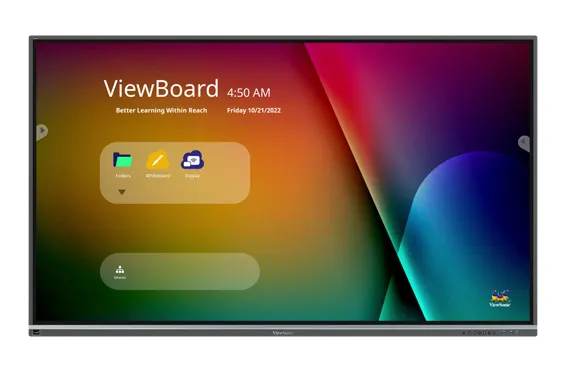
ViewBoard IFP8650 86-inch Interactive Display
-
myViewBoard® Digital Whiteboarding Software
ViewSonic’s ViewBoard interactive displays with integrated myViewBoard® whiteboarding software was the clear winner from the start. The decision was made to go with the 86-inch ViewSonic ViewBoard IFP8650 with integrated myViewBoard software as a standardized solution across their school system.
During the evaluation period, the teams that were leading the search noted that teachers tended to gather around the ViewBoard at the end of the day to get a first-hand trial of the myViewBoard system. It definitely caused the most excitement which made for a very easy decision.
One area of concern expressed by the teachers was ensuring seamless transition of the content they had accumulated over the years to the new system. Because myViewBoard software natively opens Promethean Flipchart files, teachers were able to easily import and manage all of their content created on older software. All of their content was accessible so they didn’t have to reinvent the wheel.
Teachers were also able to transition to the new technology with minimal interruption. The school district decided to install the new ViewBoard displays in schools during the school year, and were able to remove the old technology in the evening and install the ViewSonic system by the end of the next day.
RESULTS

-
Stunning 231-inch seamless video wall transformed showroom aesthetics and energy
-
Reliable all-in-one system resolved previous performance and management issues
-
Easy setup with complete kit enabled quick, frustrationfree installation
-
Day-and-night visibility extended promotional impact to freeway traffic
-
Enhanced content flexibility for events, promotions, and employee recognition
-
Long LED lifespan reduces maintenance and supports 24/7 use
-
Dealership excited to expand usage for movie nights, community engagement, and brand storytelling
“With such a mix of different schools and teaching styles, this school district had numerous different use cases for the technology,” said Deidre Deacon, General Manager, ViewSonic Canada. In choosing ViewSonic’s myViewBoard platform, flexibility was a key consideration. “The beauty of the ViewBoard solution is the ability to easily adapt to the curriculum of a particular school, while enabling centralized maintenance and control through the myViewBoard software. Another key advantage over the older projection systems is the improved contrast, which provides clearer images and better viewing angles.”
The ViewBoard displays are also capable of wireless connectivity which enables screen sharing from any laptop, allowing teachers and students to easily share content via their in-class devices.
Wireless connectivity and easy set up were critical considerations as the units could easily be moved between schools and maintained from a central location. Installation was quickly completed – in fact the rollout of the first 230 ViewSonic ViewBoard displays took only 12 weeks to complete.
Today, teachers are excited with what they can do with the new technology. They are also trying out different digital learning tools, like putting cameras on top of the ViewBoard displays, streaming school tournaments, and allowing multiple students to engage on the screen at the same time.
Having advanced interactive display technology has also been a valuable drawing card with parents who are always looking for what’s best for their kids. If they see more cutting-edge technology that actually works, and they know they can watch and be connected with their kids, the decision to send them to one of the district’s schools is easy.



Login and Registration Form