 Teacher's Community
  Support


Easy CMS Support for Digital Signage
ViewSonic Manager
ViewSonic Manager™ software is a free, robust web-based application included with select ViewSonic® displays. Designed to optimize your digital signage network, it seamlessly integrates with your existing CMS while streamlining overall device management. From one central dashboard, IT administrators can easily streamline the deployment of compatible third-party CMS apps across all enterprise displays.
ViewSonic Manager
FREE Software Features

Urgent Alert Broadcast
With ViewSonic and third-party CAP messaging integrations, you can strengthen safety standards, increase visibility and keep your staff informed during critical events.

Cloud-Based Access
Remotely access and manage devices from anywhere, with no software installation needed. All you need is a web browser and a myViewBoard® account.

Easy Device Enrollment
Enroll devices remotely with unique device PINs or serial numbers. Enroll devices on-site using QR code scanning. myViewBoard Manager also supports batch enrollment to expedite mass device setup.

Device Monitoring and Control
Remotely manage and monitor connected devices and displays 24/7 from the admin portal. Monitor the status of devices such as on/off, last connected, local IP address and more. Control devices such as switching inputs, locking and unlocking firmware, and more.

App Management
Remotely install or remove apps on enrolled devices. Admins can silently manage apps without the need for user intervention on the device. An app library provides a curated list of compatible apps (both ViewSonic and third-party apps).

Use Your Own CMS
Use the “Install Apps” feature to easily
upload your existing CMS applications
via APK. You can then remotely push
them to all displays at once. This
completely eliminates the need for
manual USB installations.
ViewSonic Manager Advanced™
UPGRADED Software Features
Multimedia Broadcast
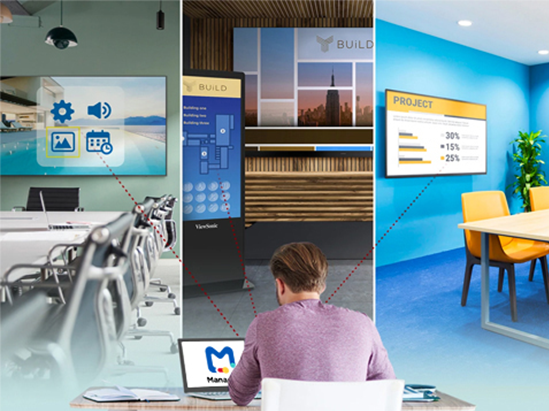
Remotely broadcast pictures, websites or videos to enrolled devices in full screen or use zones to display multiple pieces of media at once. This feature can be used for dedicated digital signage displays around a business campus (lobbies, cafeterias and showrooms), or sending messages to commercial displays and ViewBoard® displays in meeting rooms.

Proactive CMS Monitoring
Proactively manage your devices to ensure your digital signage stays running without interruption. Manager Advanced ensures your third-party CMS software operates smoothly across all displays. IT teams can seamlessly and remotely troubleshoot devices, check real-time statuses, analyze display health, and edit basic settings. When an issue does occur, admins can quickly implement a fix from anywhere to minimize downtime and keep your messaging visible.
Task Scheduling
Streamline workflow by automating tasks ahead of time for increased efficiency in managing devices. Tasks can be planned for a specific time as a one-off event, or as a recurring event. Remotely schedule tasks such as screen on/off, power off, broadcast media and more on select devices.

User Management
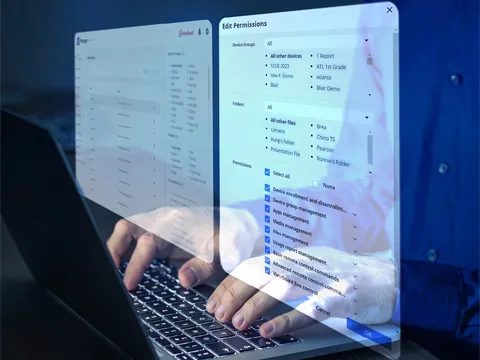
Streamline your workflow with custom permissions. Easily assign roles to your team to control access to devices, media, and job settings. Our Permissions function ensures the right people always have the right level of access.
Job Scheduling
A Jobs function streamlines your workflow by creating scheduled tasks ahead of time such as powering down or restarting displays, setting passwords for specific devices, updating firmware, broadcasting playlists and more. Scheduling power off not only saves on electricity bills, but it also helps to extend the life span of your displays and devices.

Remote Desktop
Enables IT to provide support from a single location. With a central dashboard for remote troubleshooting, IT admins have easy access to their organization’s devices that not only saves time for themselves, but reduces downtime for staff.

High School Principal Broadcasts Positivity with ViewSonic Manager Advanced and ViewBoard Interactive Displays

Features and Options
| Features | Manager | Manager Advanced |
|---|---|---|
|
Cloud Storage
|
1GB | 15GB |
|
QR Code Enrollment
|
 |
|
|
WiFi SSID Push
|
|
|
|
Full Device Control & Monitoring
|
|
|
|
App Management
|
|
|
|
Remote Firmware Update
|
|
|
|
Message Broadcast
|
|
|
|
API Integration
|
|
|
|
System Backup & Restore
|
1 Slot | 10 Slots |
|
Multimedia Broadcast with Zones
|
 |
|
|
Device Profiles
|
|
|
|
File Transfer
|
|
|
|
Job Scheduling
|
|
|
|
Remote Desktop
|
|
|
|
User Permissions Management
|
|
|
|
Activity Log and Usage Report
|
|
|
|
|
|
|
| Options |
Free
|
1-Year Single Panel Package (MVBM_ADV_1Y01) 3-Year Single Panel Package (MVBM_ADV_3Y01) 5-Year Single Panel Package (MVBM_ADV_5Y01) 7-Year Single Panel Package (MVBM_ADV_7Y01) |


Unlock
15% OFF
when you subscribe.
By Clicking "CONTINUE" you agree to receive our newsletter. You can unsubscribe at any time. Discount applies to one (1) item only, not the entire order. Offer is not stackable or combinable with any other promotions or promo codes.
Login and Registration Form