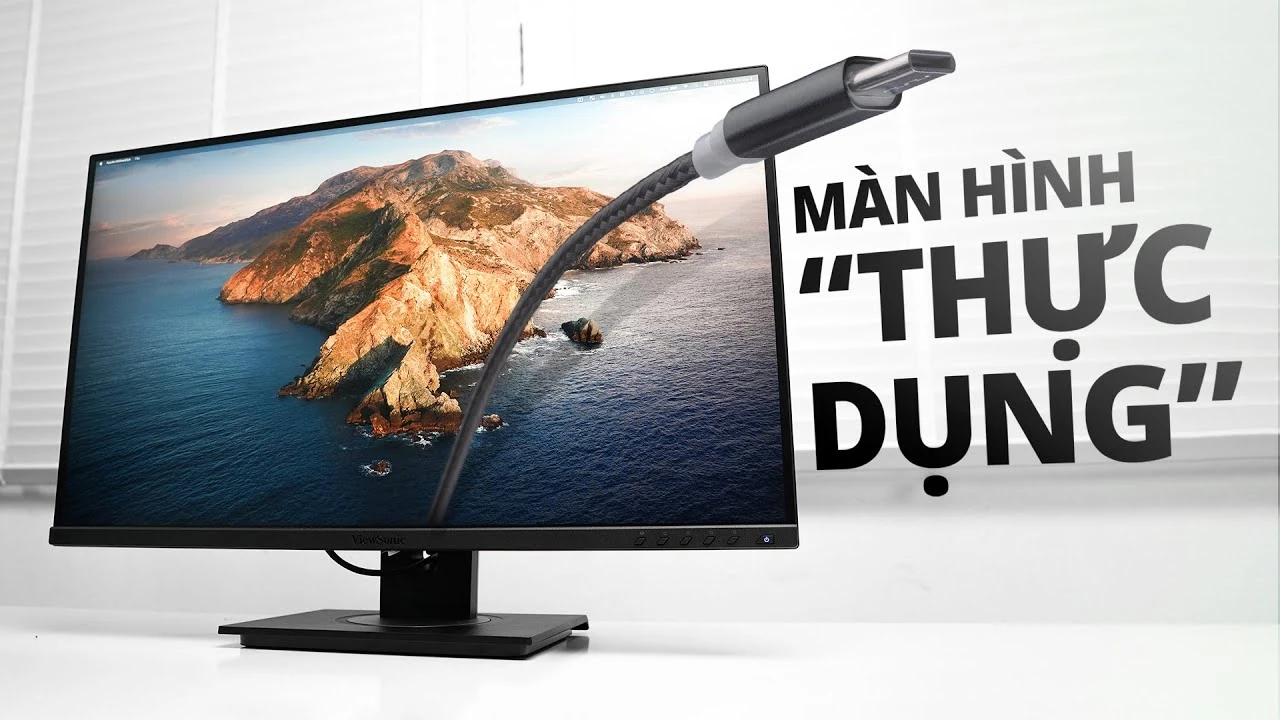
“Đây là chiếc màn hình ViewSonic VG2755-2K, một sản phẩm mới ra của ViewSonic đã điền vào chỗ đang hơi trống hiện nay. Đó là chiếc màn hình 2K IPS nhưng có cổng USB Type-C. Theo mình đây là một chiếc màn hình khá đáng tiền.”
Archived

VG2755-2K
27” Advanced Ergonomics Business Monitor
- USB Type-C
- WQHD 1440p resolution
- Frameless bezel
- 100% sRGB SuperClear® IPS technology
- HDMI and DisplayPort inputs
REVIEWS
SPECIFICATIONS
- DisplayDisplay Size (in.): 27
Viewable Area (in.): 27
Panel Type: IPS Technology
Resolution: 2560 x 1440
Resolution Type: QHD (Quad HD)
Static Contrast Ratio: 1,000:1 (typ)
Dynamic Contrast Ratio: 80M:1
Light Source: LED
Brightness: 350 cd/m² (typ)
Colors: 16.7M
Color Space Support: 8 bit true
Aspect Ratio: 16:9
Response Time (Typical GTG): 5ms
Response Time (GTG w/OD): 5ms
Viewing Angles: 178º horizontal, 178º vertical
Backlight Life (Hours): 40000 Hrs (Min)
Curvature: Flat
Refresh Rate (Hz): 60
Low Blue Light: Software solution
Flicker-Free: Yes
Color Gamut: NTSC: 80% size (Typ)
sRGB: 112% size / 100% coverage (Typ)
Pixel Size: 0.233 mm (H) x 0.233 mm (V)
Surface Treatment: Anti-Glare, Hard Coating (3H) - CompatibilityPC Resolution (max): 2560x1440
Mac® Resolution (max): 2560x1440
PC Operating System: Windows 7/8/8.1/10/11 certified; macOS tested
Mac® Resolution (min): 2560x1440 - Connector
- AudioInternal Speakers: 2Watts x2
- PowerEco Mode (Conserve): 17.73W
Eco Mode (optimized): 21.63W
Consumption (typical): 26.54W
Consumption (max): 31.32W
Voltage: AC 100-240V
Stand-by: 0.3W
Power Supply: Internal Power Supply - Additional HardwareKensington Lock Slot: 1
Cable Organization: Yes - ControlsPhysical Controls: Key 1 (eye), Key 2, Key 3, Key 4, Key 5, Key 6 (power)
On Screen Display: Input Select, Audio Adjust, ViewMode, Color Adjust, Manual Image Adjust, Setup Menu - Operating ConditionsTemperature: 32°F to 104°F (0°C to 40°C)
Humidity (non-condensing): 20% to 90% - Wall MountVESA Compatible: 100 x 100 mm
- Input SignalFrequency Horizontal: 15 ~ 90KHz
Frequency Vertical: 49 ~ 75Hz - Video InputDigital Sync: TMDS - HDMI (v1.4), PCI-E - DisplayPort (v1.2), Micro-Packet - Type C
- ErgonomicsHeight Adjust (mm): 130
Swivel: 120º
Tilt (Forward/Back): -5º / 40º
Pivot (Right/Left): 90º / 90º - Weight (imperial)Net (lbs): 15.2
Net Without Stand (lbs): 9.9
Gross (lbs): 22.5 - Weight (metric)Net (kg): 6.9
Net Without Stand (kg): 4.5
Gross (kg): 10.2 - Dimensions (imperial) (wxhxd)Packaging (in.): 27.2 x 16.9 x 8.6
Physical (in.): 24.1 x 15.99~21.01 x 8
Physical Without Stand (in.): 24.1 x 14.3 x 2 - Dimensions (metric) (wxhxd)Packaging (mm): 692 x 430 x 218
Physical (mm): 613 x 406.19~533.75 x 202
Physical Without Stand (mm): 613 x 363 x 52 - GeneralPACKAGE CONTENTS: VG2755-2K x1, 3-pin Plug (IEC C13 / CEE22) x1, USB A/B Cable (v3.2; Male-Male) x1, USB Type-C Cable (Male-Male) x1, Quick Start Guide x1
Recycle/Disposal: Please dispose of in accordance with local, state or federal laws.
Warranty: *Warranty offered may differ from market to market
Power Management: Energy Star standards, EPEAT
COMPATIBLE WITH VG2755-2K

SUPPORT & DOWNLOADS
Datasheets
User Guides
VG2755-2K User Guide (English)
See all languages
VG2755-2K User Guide (Bahasa Indonesia)VG2755-2K User Guide (Deutsch)VG2755-2K User Guide (Español )VG2755-2K User Guide (Français)VG2755-2K User Guide (Hrvatski)VG2755-2K User Guide (Italiano)VG2755-2K User Guide (Magyar)VG2755-2K User Guide (Nederlands)VG2755-2K User Guide (Polski)VG2755-2K User Guide (Português)VG2755-2K User Guide (Romania)VG2755-2K User Guide (Slovenčina)VG2755-2K User Guide (Slovenščina)VG2755-2K User Guide (Srpski)VG2755-2K User Guide (Suomi)VG2755-2K User Guide (Svenska)VG2755-2K User Guide (Türkçe)VG2755-2K User Guide (Česky)VG2755-2K User Guide (Ελληνικά)VG2755-2K User Guide (Български)VG2755-2K User Guide (Русский)VG2755-2K User Guide (Українська)VG2755-2K User Guide (简体中文)VG2755-2K User Guide (繁體中文)VG2755-2K User Guide (한국어)VG2755-2K User Guide (ﺍﻟﻌﺭﺑﻳﺔ)
Driver & Software
Standard Monitor Driver Signed Windows 10 x64Standard Monitor Driver Signed Windows 10 x64Standard Monitor Driver Signed Windows 10 x86Standard Monitor Driver Signed Windows 10 x86Standard Monitor Driver Signed Windows 11 x64Standard Monitor Driver Signed Windows 11 x64Standard Monitor Driver Signed Windows 7Standard Monitor Driver Signed Windows 7 x64Standard Monitor Driver Signed Windows 8 x64Standard Monitor Driver Signed Windows 8 x86Standard Monitor Driver Unsigned WindowsStandard Monitor Driver Unsigned Windows x64vDisplay Manager 2.0 (Mac) DownloadvDisplay Manager 2.0 (Win) DownloadvDisplay Manager 2.0 User Guide (English)vDisplay Manager 2.0 supported models