Accurate Gamma 2.2 And Pre-set 5 Gamma Settings
What is Gamma?
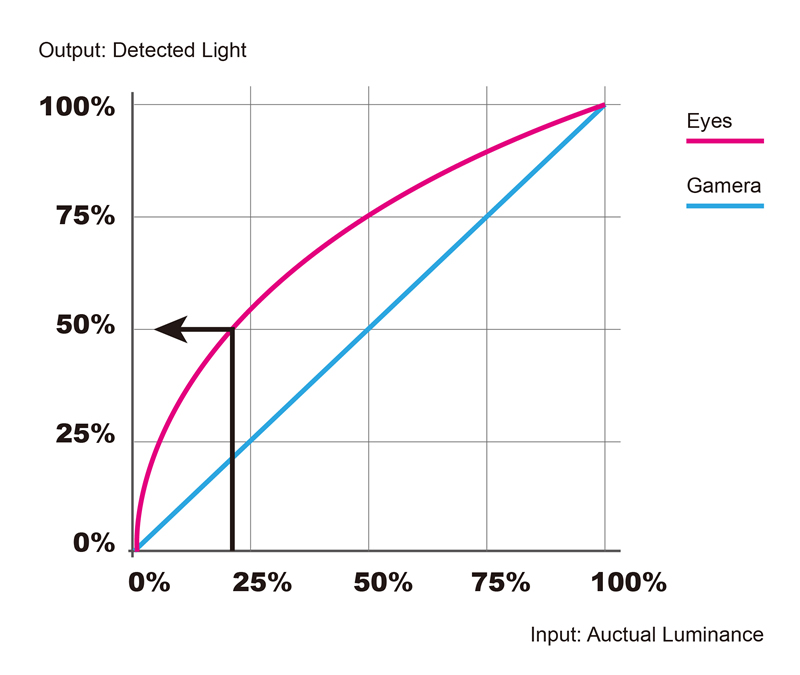
Gamma, previously in CRT and early LCD monitors, was directly linked to voltage and was an important factor in reproducing images accurately on displays. In current LCD monitors, Gamma can be thought of as the moderator of the relationship between the brightness of the data captured (input) and how that affects the total human eye perception of color (output) while viewing the display, in terms of color brightness. In a more technical sense, it is the correction of brightness in an image’s color through color shading balance in a pixel‘s value. Pixels have values that range between 0 (black) to 255 (white) with various degrees of grey in between. Our normal vision (not excessively dark or exceedingly bright conditions) is more sensitive to changes in dark tones and due to the capture process of an image, color can be misrepresented, as a result of the difference in how we perceive brightness and the luminance, from when the original image was captured. Our eyes capture brightness in a disproportional way, for example, if a camera captures an image in an extremely bright setting, our eyes perceive the light as being only a fraction brighter. If the image is processed and displayed on a desktop without gamma correction, it will then be perceived by the user as being washed out or too bright. Due to the imbalance, gamma is used to ensure the input relationship matches the desktop output.




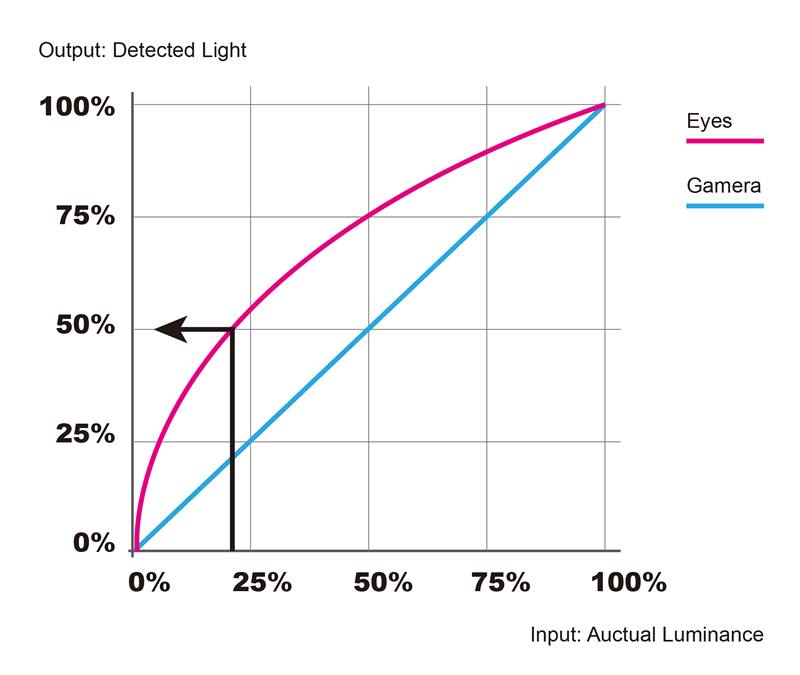
When applying this range to color (RGB) colors can be produced at various brightness levels, while not affecting the color hue. A red pixel with a value of 192 would be three quarters of the possible brightness with a red pixel with a value of 10 would be extremely dark. Gamma correction is needed to adjust images in response to the properties of human vision, in order to produce true color. Our eyes capture brightness in a disproportional way, for example, if a camera captures an image and it is exceedingly bright, we will perceive the light as being only a fraction brighter. If the image is processed and displayed on a desktop without gamma correction, it will then be perceived by the user as being washed out or too bright. Due to the brightness imbalance, gamma is used to balance the input relationship to match the desktop output creating true to life color. There are various levels of gamma that can balance color, with varying degrees of success. Gamma levels of 1.8 and 2.2 (Mac OS and Windows OS respectively) were the de facto standard for many years, with gamma level adjustment becoming the new standard in professional monitor production.
Gamma Curve Importance:
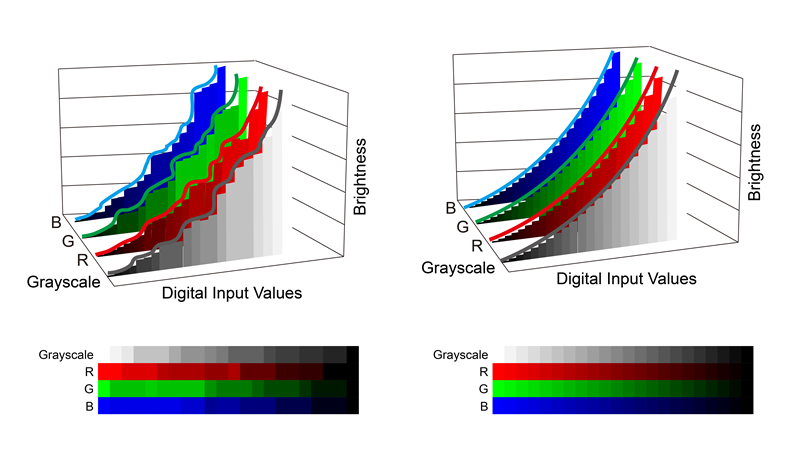
Gamma curve importance stems from the need of smooth gradation between colors and color correction. As technology has improved, internal gamma correction features have been incorporated into LCD monitors, which apply multi-gradation to colors and correct the color information. With 10-bit color processing (approximately 1.07 billion colors) and an enhanced LUT processor, screen gradation and color reproduction can be dramatically improved. To improve gradation further, subjugating an eight-bit count input signal to a 14 or 16 bit calculation can help improve the reproduction of darker tones, improve intermediate color gradation and produce higher quality, more precise color output.
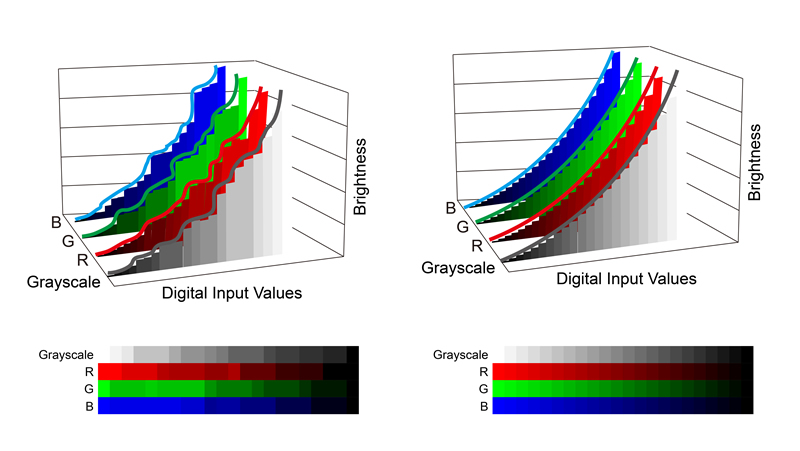
Gamma 2.2 has been the standard for Windows and Apple (since Mac OS X v10.6 Snow Leopard). Using a monitor with a gamma level of 2.2 can produce almost optimal colors. This level provides the optimal balance for true color and is used as the standard for graphic and video professionals.
Optimal Gamma Range:
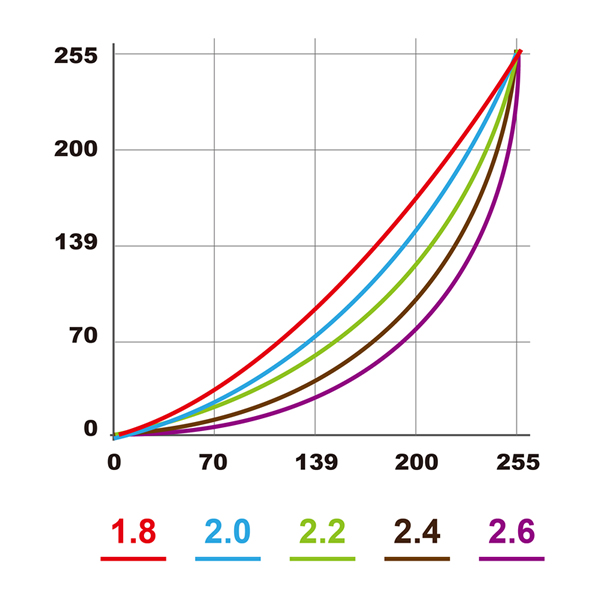
ViewSonic Pre-set Gamma settings: In addition to Gamma 2.2, VP2780-4K also offers Gamma 1.8, Gamma 2.0, Gamma 2.4 and Gamma 2.6 for different kinds of viewing scenarios. This range helps compliment everyday life and viewing situations, whether scenes are too bright and need an enhanced bright color gradient (2.4, 2.6) or too dark (1.8, 2.0). This optimal range allows users the ability to quickly change between modes and find the desired viewing setting for the ideal situation. Whether for casual users, wanting to improve their movie experience or professional movie makers, graphic designers and photographers, ViewSonic Pre-set Gamma settings support a wide range of uses and needs.
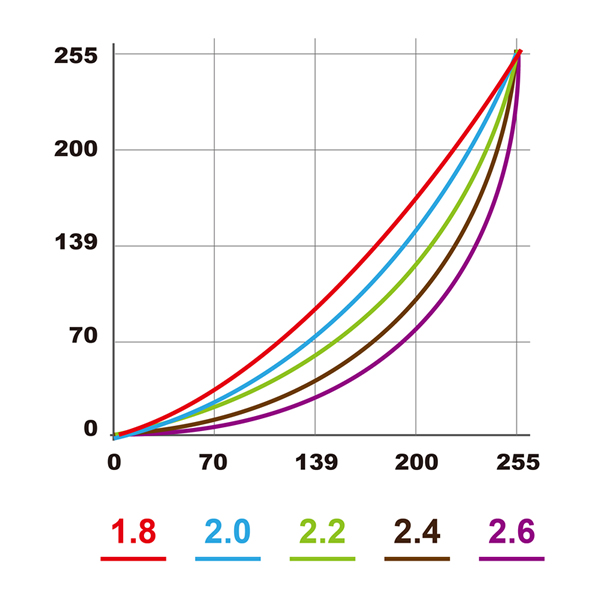
Gamma 1.8: Previously the standard for Mac computers, this setting enhances the color gradient between darker tones, not only making darker scenes clearer but also increases overall color tone brightness. This setting is ideal for watching movies, television or situations where scenes or pictures are too dark.


Gamma 2.0: As another option, this gamma setting can offer balance while still providing increased enhancement of dark tones, not only enhancing the detail in darker scenes but also the soft, gentle scenes as well. Originally designed as a compromise for Mac and PC this setting is a perfect middle ground for users that want to utilize the flexibility of multiple gamma settings.


Gamma 2.2: The standard for gamma settings to balance true color with monitors. This gamma setting is the true standard with Windows and Mac fully supported and the most widely used setting. Adopted because of true color output, gamma 2.2 provides the best curve to produce true to life colors with washout or inaccurate shadows.
Gamma 2.4: As an additional choice, this gamma setting is used to enhance the detail in scenes that are slightly too bright, providing increased contrast, and improved visibility of vivid colors. Perfect for HD television production, and the Rec. 709 color space, this gamma setting supports professional users that want to get the most from their high quality Viewsoninc monitors.


Gamma 2.6: This gamma setting is used to highlight bright tonal contrast in pictures and video where differences in brighter tones are harder to perceive. These various settings allow flexibility to the user, to choose which setting is the ideal, depending on the situation. The gamma standard for DCI (Digital Cinema Initiative) and movie production, this setting provides the truest color for users to produce cinema and film.