What is Color Gamut?
Color Gamut
The color gamut describes a range of color within the spectrum of colors that are identifiable by the human eye (visible color spectrum). The technology for modern day products to reproduce colors varies from device to device, with digital cameras, scanners, monitors, printers, tablets, projectors etc. all reproducing a different range of color. In order to standardize this color difference, various methods of measuring color range have been used to create communicable ranges of color so the capabilities of each device are understood. In 1931 the CIE (International Commission on Illumination) established a standard observer, with the commission recommending the use of chromatic coordinates xyz (CIEXYZ).
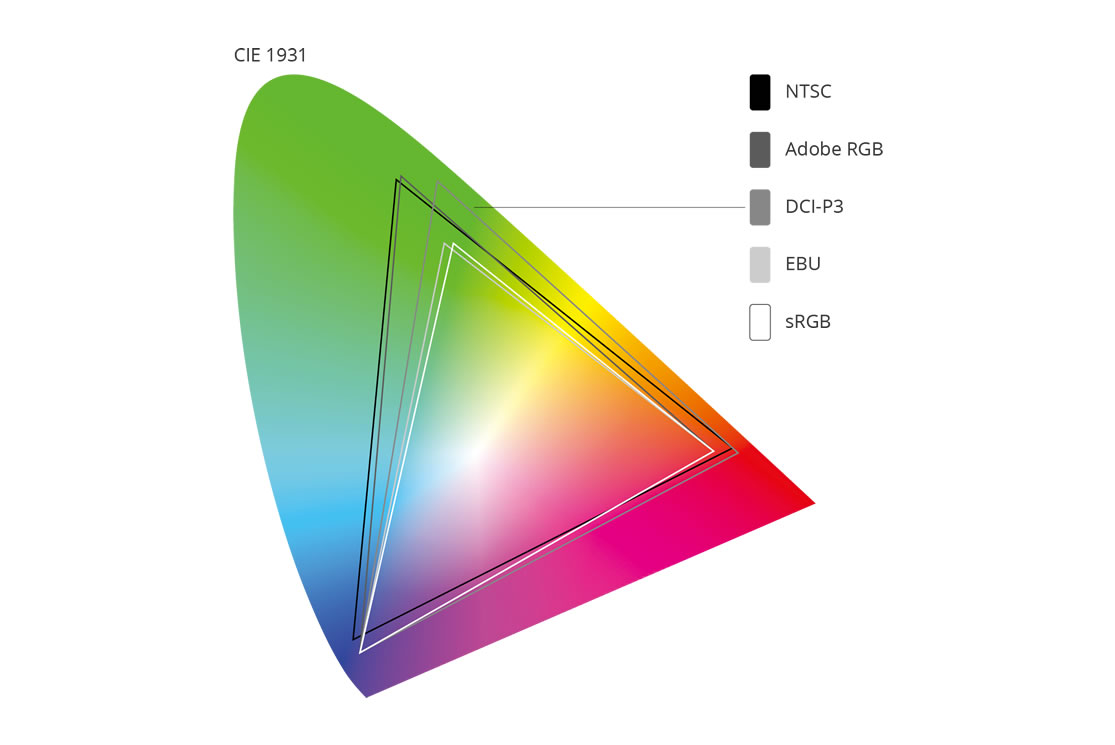
These coordinates are used to form the current standard diagram that sets the range or color of human sight using mathematical theory. This chromaticity diagram is designed so the Y parameter is a measure of brightness of a color, while the chromaticity of a color is identified by the x and y parameter (Yxy).
For instance, white has the same chromaticity of grey, meaning that their (x,y) value is the same on the diagram but their Y value is different because the brightness differs. The color hue is represented by the outer points, with a movement from central white towards 100% saturation, meaning pure color hue, represented by numeric values on the picture above.
What are Color Coverage and Area
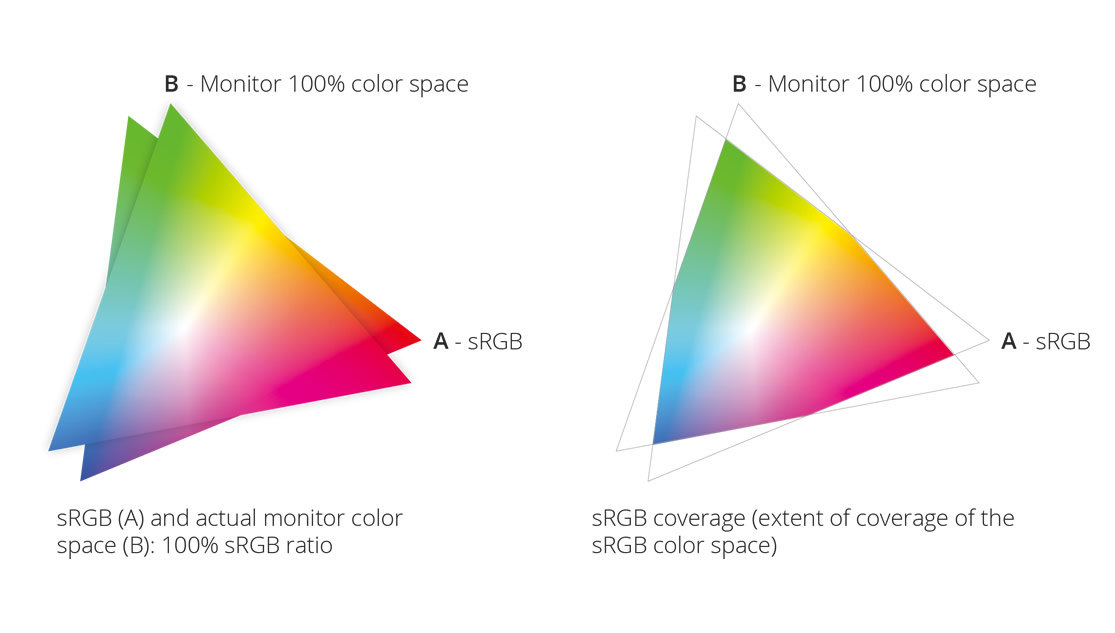
In describing these color standards, various terms are presented when talking about coverage and area. The color area is the actual space on the CIEXYZ color system which is diagramed, using the spectrum of human sight as the parameter and color standard. Coverage, has to do with the actual ability of monitors, printers etc. to reproduce the color areas of the various standards, and to communicate this ability as quantifiable color data (sRGB, AdobeRGB, NTSC). These two terms help define the ability and range at which a product
can reproduce the color gamut in each given standard, which is more communicable than using mathematical statistics and color theory. Using words like area ratio can be dangerous because the ratio can be misleading when talking about area coverage. If a product claims 100% area ratio for sRGB for instance, it’s impossible to calculate the difference in color coverage for sRGB. This is why color coverage was used as a more straightforward descriptor of the monitor’s color capabilities.
Understanding the Color Standards
sRGB
sRGB is the most standard used color gamut in digital products, Windows environments, and monitors. The advantage of this color gamut is that there are reduced discrepancies in color between input and output based on the narrow range. These limitations allowed for fast replication of color and are the reason why it is being used as the standard in digital products, displays, and internet today.
Adobe RGB
Adobe RGB was developed to expand the current offering and standards made by the IEC, to provide a broader color gamut and offer a more realistic representation of visible colors in the display, photo capture and print spaces. This color range offered is a wider color gamut than sRGB, but does not completely overlap with NTSC, with slight differences in reds and blues. With advances in technology and the desire to produce more vivid color detail, has led to the increased use of this standard. It is also the standard for professional color imaging environments and in the print and publishing industries with growing number of LCD monitors having the ability to reproduce most of this color gamut.
NTSC
The color gamut of the National Television Standards Committee (NTSC) covers a wide gamut, similar to Adobe RGB. The red and blue values vary slightly, with this range being developed for standard for television, being covered by 72% of the sRGB color gamut. Monitors at a professional level for video editing must be able to reproduce this color gamut but the average user mostly deals with applications that involve still images.
EBU
The EBU (European Broadcasting Union) has developed its own color gamut that is based on Y’CbCr and is slightly different than NTSC and SECAM (France). The current EBU High Definition (HD) color gamut is very similar to Rec. 709 with values of red and blue being the same and a difference in the green value. These color spaces are all actually very similar with each region of the world having its own preference and way to solve challenges with each color space and technological limitations in effectively replicating a wide color gamut. With the edition of HD, wider color gamuts will be utilized, especially with 4K Ultra High Definition becoming a more supported platform. These offerings will bring never before seen color clarity to viewers, which was traditionally only focused on by photography, graphic designers and video editors.
Stay in touch with ViewSonic ColorPro!
Sign up now for FREE!DCI-P3
The DCI-P3 color space is an RGB color space introduced by SMPTE (The Society of Motion Pictures and Television Engineers). The color space features a color gamut that is 26% wider than sRGB and commonly used for digital cinema. All digital cinema projectors are capable of fully displaying the DCI-P3 color space. Coupling DCI-P3 with a 4K monitor provides the ultimate color precision and accuracy for media professionals. In today’s competitive phone market, DCI-P3 color space is being employed in mobile devices such as the iPhone X and the OnePlus 5T so they can display and provide to viewers, a wider range of colors than devices with the sRGB color gamut.
The Ever-expanding Color Range
From sRGB, Adobe RGB, to NTSC, EBU, and DCI-P3, we learned that each color standard was created to fit specific needs and to push technology forward to cover a wider color range. On one hand, the color standards allow professionals to bring their ideas to life, on the other, the general public gets to enjoy top-notch quality color and visual for entertainment.