Delta E ≦2 Color Accuracy
ViewSonic’s Delta E ≦2 color accuracy means superior, accurate color reproduction, achieving better than the eye can see color difference.
What is Delta E?
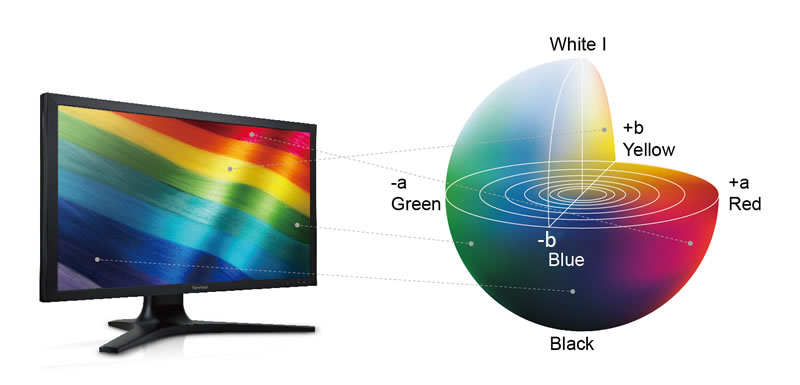
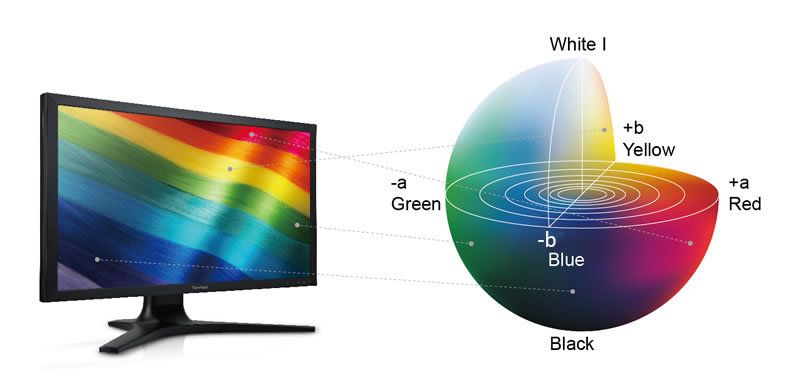
Delta E is the standard calculation metric which correlates the human visual judgment of differences between two perceived colors. This standard quantifies this difference and is used to calculate the deviation from the benchmark standards which allows a tolerance level to be set (based on L*a*b coordinates). Generally speaking, the lower the Delta E number, the closer the display matches the input color to the display’s reproduced color. The Comission Internationale de l’Eclairge (International Commission on Illumination) or CIE, has established Delta E as the standard color distance metric, revising past definitions to incorporate the human eye being more sensitive to certain colors. To address these issues, in addition to finding accepted tolerance levels, CIELAB can be used to scale, with the underlying theory being no two colors can be both red and green nor blue and yellow at the same time. With a lightness scale vertically in the center, colors can then be expressed with single values.
CIELAB:
As stated previously, this model is the standard and is represented by a color plotted-diagram with L* denoting lightness, a* denoting the red/green values and b* denoting the yellow/blue values. The scale is spherical by nature with white (i.e. maximum brightness L*=100), black (i.e. total absorption L*=0), and grey (i.e. neutral grey L*=50) being the vertical center of the sphere. The horizontal plane is depicted with values of either +a/-a (which depicts a shift towards red/green respectively) and +b/-b (depicts a shift towards yellow/blue respectively). Each color is then a measure of their a*, b* and L* values, giving a definitive point of reference on the color scale. This scale gives a precise value with each value having a specific point on the scale, creating that particular hue of color. This is a very important component of Delta E, being the standard measurement tool to measure the difference (Delta E) between the colors represented (displayed) and the deviation from the true color location on the CIELAB scale.
To Measure Monitor Delta E:
There are 32 standard colors that ViewSonic monitors use to create the CIELAB standard colors. These colors are standardized and based on the CIELAB color locations. Imagine taking a color palette of 32 standard colors and with using complex algorithms, a powerful LUT, gamma curve and enhanced monitor reproduction capabilities, matching these colors to their exact hue.
During this process, the input color is taken and matched, producing a Delta E number that displays the distance between the CIELAB matched input color and the color being displayed. Delta E is used to ensure the color being displayed is reproduced with color hue that matches so closely to the color input that the human eye can’t perceive the difference. (Delta E ≦2).
What does Delta E number mean?
The higher the Delta E (ΔE), the further away the color is from the true hue, using CIELAB. Perfect color has a Delta E of zero, although this cannot be detected using the human eye. The minimal detectable difference is between 1-2.5 Delta E. Without a fully-realized color management system, it is very unlikely that monitor calibration can achieve this level of performance for primary and secondary colors. Most virtual displays have a full complement of gray scale settings, so for white, calibration can often meet this standard.
If a Delta E number is less than 1 between two colors that are not touching, it is barely perceivable by the average human observer. A Delta E between 3 and 6 is usually considered an acceptable number in commercial reproduction, but the color difference may be perceived by printing and graphic professionals. (Note: Human vision is more sensitive to color differences if two colors actually touch each other).
Why Delta E is important to professionals?
Color Accuracy: With a lower Delta E, the image color from input signals, like cameras and camcorders, can be more accurate while displayed on the monitor, without color distortion. This is incredibly important for professionals that need to have exact color replication.
No color difference between multiple monitors: Professionals may use multiple monitors for creating graphics. On one monitor, graphics and video can be edited and then can be reviewed on a second, without color degradation or inaccuracies. With lower a Delta E, professionals are able to have accurate and consistent color reproduction.
其他人對這些產品也有興趣
-

VP2786-4K
27" UHD Fogra & G7 Validated Photo Editing & Printout Monitor with integrated calibrator, Adobe rgb, 10 bit Color & ColorPro Sense
了解更多 -
VP3481a
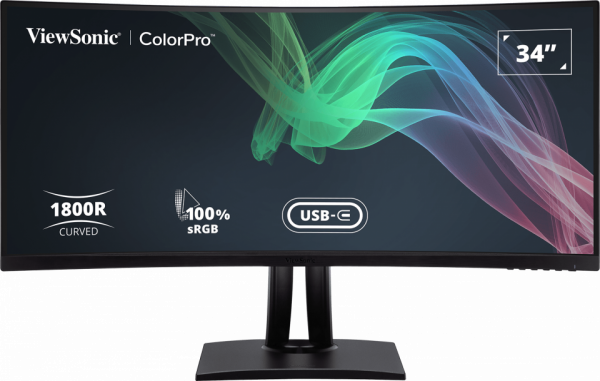
34”( Viewable) UWQHD+ Pantone validated 100% sRGB Curved monitor with docking station
了解更多 -

VP2756-2K
27" 2K QHD Pantone Validated 100% sRGB & Factory Pre-Calibrated Monitor with 60W USB-C
了解更多


